

Introduction
We really like using the model-binding feature of client-side validation. The first thing we do is to apply model binding to automate the process of getting form values and using them to populate the properties of the Person object. The details of the form data are displayed using the p element in the markup.
Create a new project using "File" -> "New" -> "Project..." then select Web then select "ASP.Net Web Forms Application". Name it “ModelBinding". 
For the new ASP.NET Project select Empty template then select the Web Forms checkbox then click OK.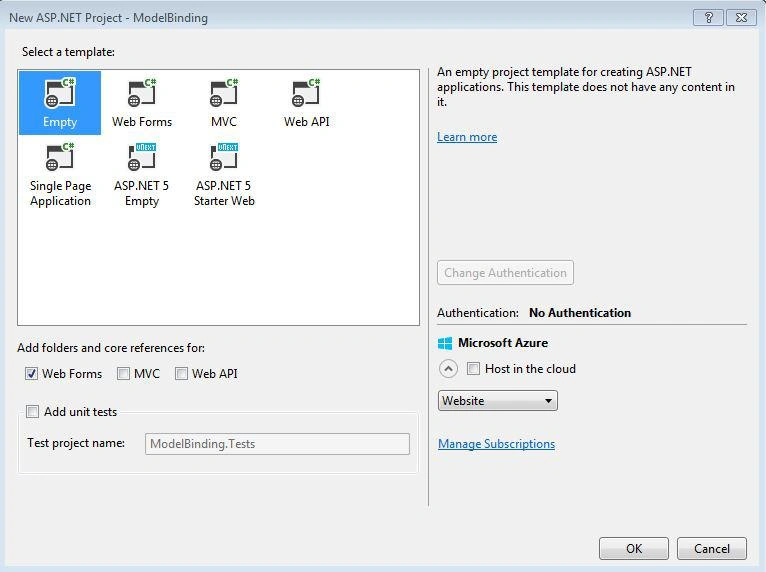
Now, in the project in the Solution Explorerr click on Models then select Add > Class.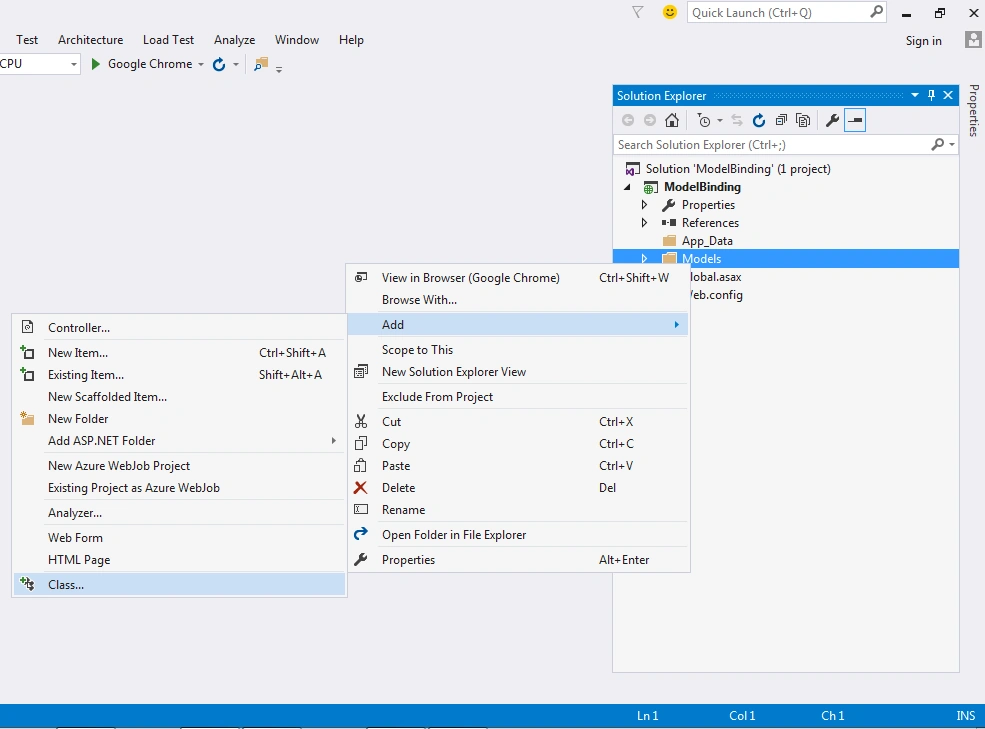
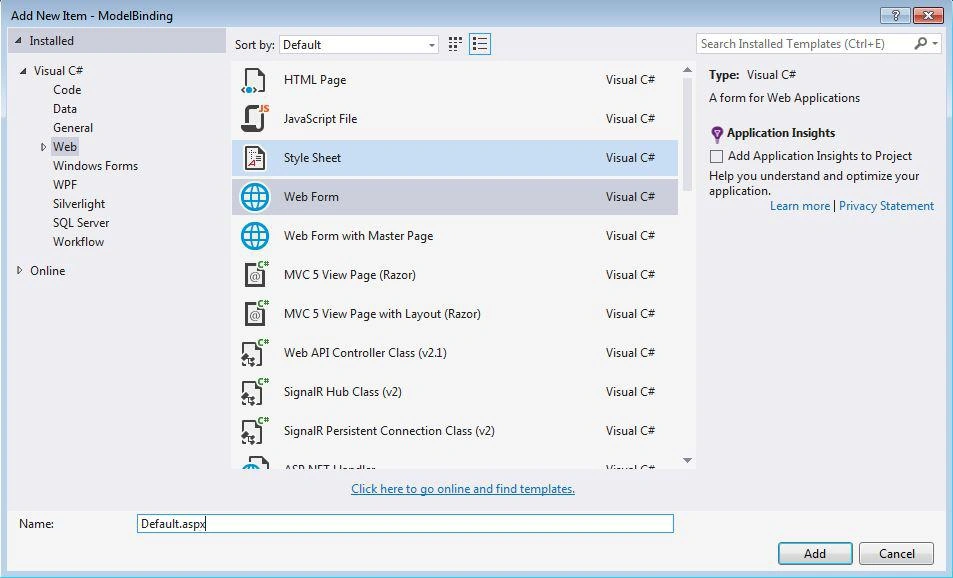
Now add a new item then select class > Contact.cs then click Add.
Now to apply Models attributes to the Contact class.
Contact.cs
- using System;
- using System.Collections.Generic;
- using System.Linq;
- using System.Web;
- namespace ModelBinding.Models
- {
- public class Contact
- {
- public string FirstName { get; set; }
- public string LastName { get; set; }
- public string Email { get; set; }
- public string Phone { get; set; }
- public DateTime DateOfBirth { get; set; }
- public string State { get; set; }
- }
- }
The details of the form data are displayed using the p element in the markup.
The following are the contents of the Default.aspx:
- <%@ Page Language="C#" AutoEventWireup="true" CodeBehind="Default.aspx.cs" Inherits="ModelBinding.Default" %>
- <!DOCTYPE html>
- <html xmlns="http://www.w3.org/1999/xhtml">
- <head runat="server">
- <title>Model-binding</title>
- <link href="Style.css" rel="stylesheet" />
- </head>
- <body>
- <form id="form1" runat="server">
- <h3>Contact Formdata Model Binding in ASP.NET 4.5</h3>
- <div>
- <label>First Name:</label><asp:TextBox ID="FirstName" runat="server"></asp:TextBox>
- </div>
- <div>
- <label>Last Name:</label><asp:TextBox ID="LastName" runat="server"></asp:TextBox>
- </div>
- <div>
- <label>Email:</label><asp:TextBox ID="Email" runat="server"></asp:TextBox>
- </div>
- <div>
- <label>Phone:</label><asp:TextBox ID="Phone" runat="server"></asp:TextBox>
- </div>
- <div>
- <label>Date Of Birth:</label><asp:TextBox ID="DateOfBirth" runat="server" TextMode="Date"></asp:TextBox>
- </div>
- <div>
- <label>State:</label><asp:TextBox ID="State" runat="server"></asp:TextBox></div>
- <div>
- <label></label><asp:Button ID="btnSubmit" runat="server" Text="Submit" OnClick="btnSubmit_Click" />
- </div>
- <p id="DataText" runat="server"></p>
- </form>
- </body>
- </html>
- using System;
- using System.Collections.Generic;
- using System.Linq;
- using System.Web;
- using System.Web.UI;
- using System.Web.UI.WebControls;
- //using Namespace & Models
- using System.Web.ModelBinding;
- using ModelBinding.Models;
- namespace ModelBinding
- {
- public partial class Default : System.Web.UI.Page
- {
- protected void Page_Load(object sender, EventArgs e)
- {
- }
- public void _binddataObject()
- {
- Contact dataObject = new Contact();
- if (TryUpdateModel(dataObject, new FormValueProvider(ModelBindingExecutionContext)))
- {
- DataText.InnerText = String.Format("FirstName: {0}, LastName: {1}, Email: {2}, Phone: {3}, DateOfBirth: {4}, State: {5}",
- dataObject.FirstName, dataObject.LastName, dataObject.Email, dataObject.Phone, dataObject.DateOfBirth, dataObject.State);
- }
- //else
- //{
- // ShowMessage(dataObject.ToString());
- //}
- }
- /// <summary>
- /// This Click Event function is used for _binddataObject
- /// </summary>
- /// <param name="sender"></param>
- /// <param name="e"></param>
- protected void btnSubmit_Click(object sender, EventArgs e)
- {
- _binddataObject();
- }
- /// <summary>
- /// This function is used for show message.
- /// </summary>
- /// <param name="msg"></param>
- void ShowMessage(string msg)
- {
- ClientScript.RegisterStartupScript(Page.GetType(), "validation", "<script language='javascript'>alert('" + msg + "');</script>");
- }
- }
- }

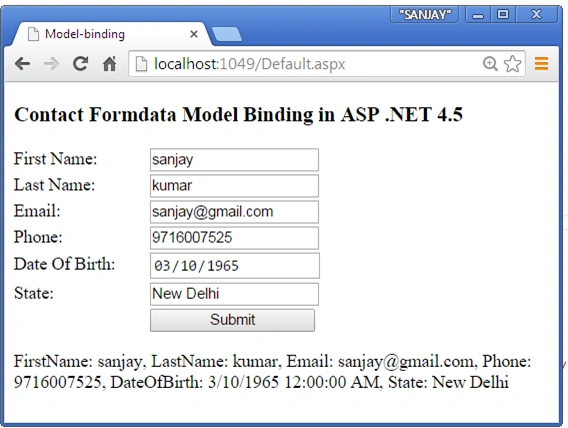
Now Info Fill this from.
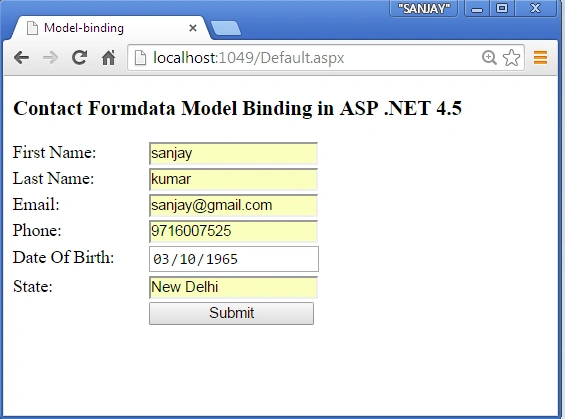
Now click the Submit button, it will display the data binding HTML p element.
I hope this article is useful. If you have any other questions then please provide your comments in the following.
Tom MohanPosted Mar 11, 2015, 4:54 AM
Nice one :
Rahul Kumar SaxenaPosted Mar 11, 2015, 3:07 AM
Nicely Explained
Anupam SinghPosted Mar 11, 2015, 12:40 AM
Well explained SAnjay, its misconception that we can use model binding only in ASP.NET MVC, and most of the ppl miss this flavor of binding data . .