


In this article, you will learn the following points about models in MVC 5.
- What is the Model in MVC 5?
- How to add Model in MVC 5?
- How to pass data from Controller to View ?.
- How to use the Model in View?
- How to bind model List in View?
What is the Model in MVC 5
- In MVC M stands for Model and Model is a normal C# class.
- Model is responsible for handling data and business logic.
- A model represents the shape of the data.
- Model is responsible for handling database related changes
Model diagram as follows.
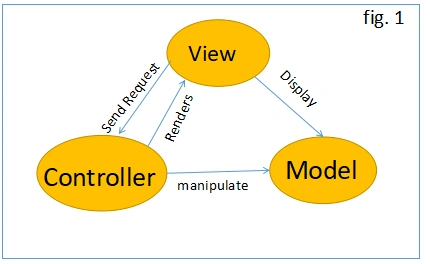
As per the above figure, user request enters the URL on the browser the given request go to the server and call the routing which will execute the appropriate controller. And, based on the request controller, execute the appropriate controller action method. It will pass the request to model if the model has a database related operation. Then, it will perform the database-related operation and send the request back to the controller. After completing this request, the controller returns the response to the user.
How to add Model in MVC 5?
Create a model name like 'Product.cs” inside the model folder.
Step 1
First, create an ASP.NET MVC application using Visual Studio 2017 and provide the name “MVC5ModelDemo”.
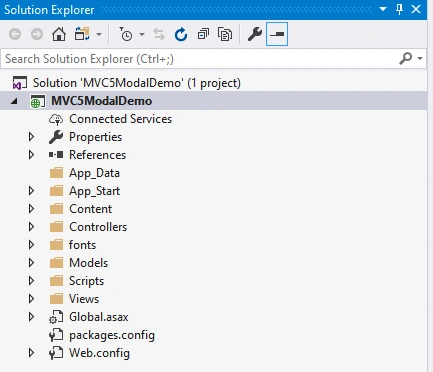
Step 2
Go to solution explorer => Views Folder => Right-click on “Model” Folder >> go to “Add” >> Click on [Class] as follow.
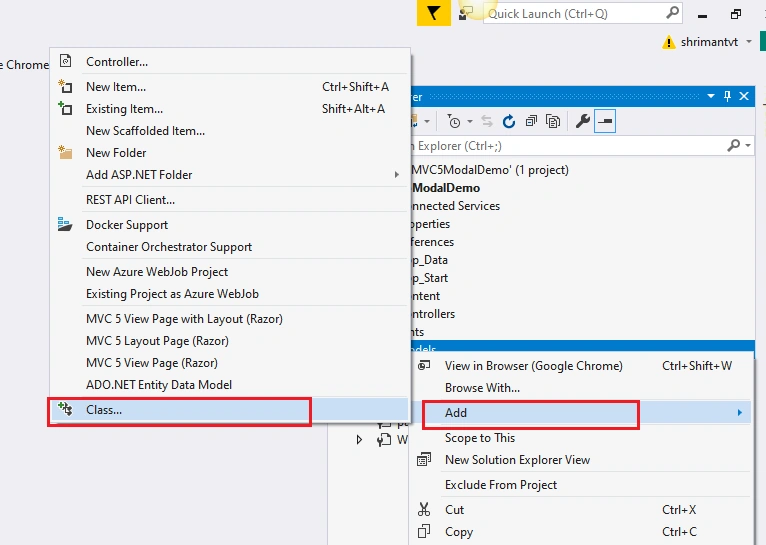
Step 3
Provide the required name like “Product.cs” then click on “Add” button as follow.
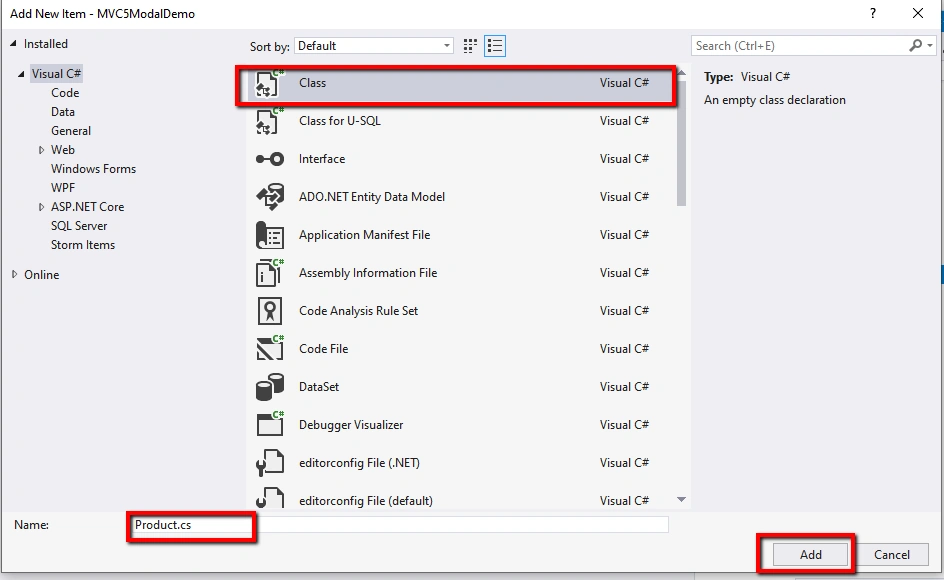
We can add properties and method in Product class as per our requirement as follow.
- public class Product
- {
- public int ProductId { get; set; }
- public string ProductName { get; set; }
- public int OrderId { get; set; }
- public int Quantity { get; set; }
- public static Product GetProduct()
- {
- Product product = new Product() { ProductId = 01, ProductName = "C# Book", OrderId = 02, Quantity = 2 };
- return product;
- }
- }
In the above product model class, we have added required properties and “GetProduct()” method which will return the product.
How to pass data from Controller to View?
First, we need to import the model namespace on HomeController “using MVC5ModelDemo.Models”. Add the following code in HomeController as follow.
- public class HomeController : Controller
- {
- // GET: Home
- public ActionResult Index()
- {
- Product product = Product.GetProduct();
- return View(product);
- }
- }
In the above code, we have passed the product model to View.
How to use the Model in View?
Create “Index.cshtml” page in Home folder inside the View. To access the product model in view first, we need to import the Product model namespace then we can use the product model in view. Use the namespace “@model MVC5ModelDemo.Models.Product” on top of the view page and add the following code in “Index.cshtml” View.
- @model MVC5ModelDemo.Models.Product
- @{
- ViewBag.Title = "Index";
- }
- <h3>Product Page</h3>
- <table border="1" class="table table-bordered table-responsive">
- <thead>
- <tr class="btn-primary">
- <th>Product ID</th>
- <th>Product Name</th>
- <th>Order ID</th>
- <th>Quantity</th>
- </tr>
- </thead>
- <tbody>
- <tr>
- <td>@Model.ProductId</td>
- <td>@Model.ProductName</td>
- <td>@Model.OrderId</td>
- <td>@Model.Quantity</td>
- </tr>
- </tbody>
- </table>
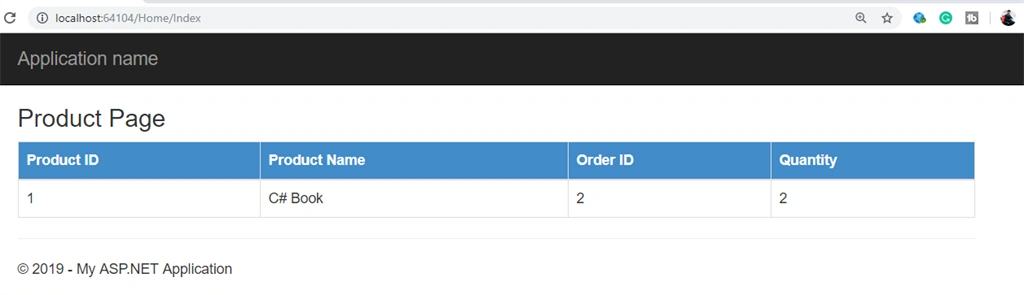
After importing model namespace create the HTML table to display the product model detail. We can use @Model property to get the product model property as above.
Output
How to bind model List in View
To bind the model list to view first we need to create a method which returns the list of product in Product Class as follow.
- public static List<Product> GetAllProduct()
- {
- List<Product> products = new List<Product>() {
- new Product() { ProductId = 01, ProductName = "C# Book", OrderId = 02, Quantity = 2 },
- new Product() { ProductId = 02, ProductName = "ASP.NET Book", OrderId = 02, Quantity = 2 },
- new Product() { ProductId = 03, ProductName = "ASP.NET CORE Book", OrderId = 02, Quantity = 2 }
- };
- return products;
- }
Call the “GetAllProduct()” method from the controller and pass the product list to the View as follow. Add following code in Home controller.
- public ActionResult Index()
- {
- List<Product> productList = Product.GetAllProduct();
- return View(productList);
- }
Add the following code in Index Html page to bind the model list and display the result to the browser.
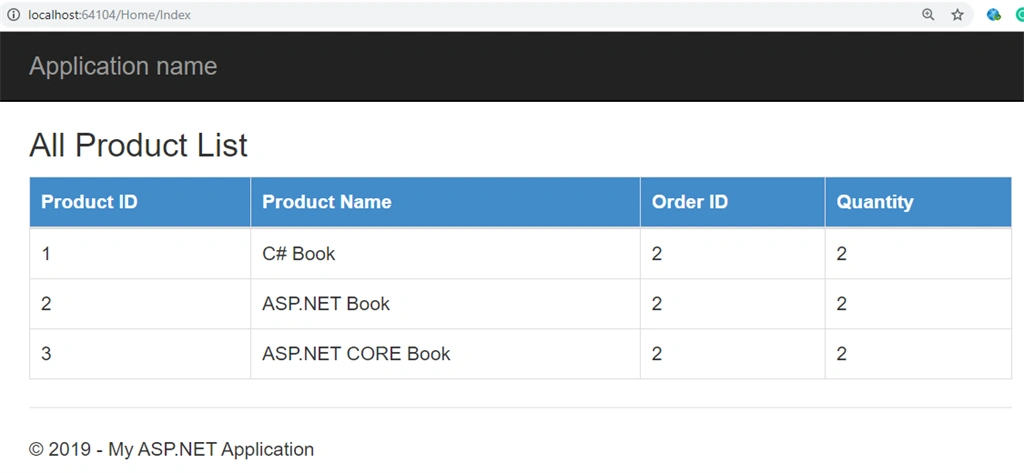
Use the foreach loop to retrieve the product model list data and display to the HTML table.
- @model IEnumerable<MVC5ModalDemo.Models.Product>
- @{
- ViewBag.Title = "Index";
- }
- <h3>All Product List</h3>
- <table border="1" class="table table-bordered table-responsive">
- <thead>
- <tr class="btn-primary">
- <th>Product ID</th>
- <th>Product Name</th>
- <th>Order ID</th>
- <th>Quantity</th>
- </tr>
- </thead>
- <tbody>
- @foreach (var item in Model)
- {
- <tr>
- <td>@item.ProductId</td>
- <td>@item.ProductName</td>
- <td>@item.OrderId</td>
- <td>@item.Quantity</td>
- </tr>
- }
- </tbody>
- </table>
Output
References
I hope you understand the concepts of Model in ASP.NET MVC 5. If you like this article then please share this article that will help other people to increase their knowledge.
Thanks for reading.
Prashant RewatkarPosted Sep 11, 2019, 12:36 PM
Explained step by step, Nice article @@