

I hope you are more or less familiar with the MVC architecture. If not, I suggest you become familiar with the basics of MVC architecture before going through this article. Here we will understand the concept of Model validation in Web API applications using the Data Annotation technique.
We know that a Model is nothing but a business object in an application, in other ways it’s nothing but our DTO classes. Now, since a Model is nothing but a pure C# class in the MVC architecture containing properties and functions it’s necessary to validate a Model before saving model data in persistent storage.
Implement Model class
Here is our Student Model class containing three properties and we have specified the necessary attributes over those properties.
- public class Student
- {
- [Required]
- [Range(1, 100)]
- public int Roll { get; set; }
- [MaxLength(5)]
- public string name { get; set; }
- public string surname { get; set; }
- }
- using System.ComponentModel.DataAnnotations;
Implement Post() method
Here we will implement the Post() method that will consume data from the client end. Have a look at the following code.
- public class ValuesController : ApiController
- {
- public HttpResponseMessage Post([FromBody] Student s)
- {
- if (ModelState.IsValid)
- {
- return new HttpResponseMessage(HttpStatusCode.OK);
- }
- else
- return Request.CreateErrorResponse(HttpStatusCode.BadRequest, ModelState);
- }
- }
- }
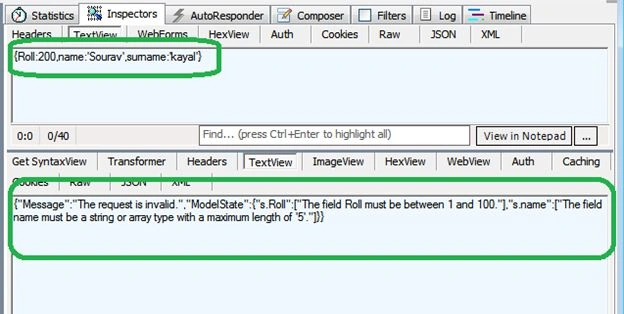
And in the response we are seeing that the model is not validated and the response message is in the lower section of the output screen.
Now, we will get a taste of the Model validation with valid input. Here is another output screen where we are feeding valid data in the POST request.
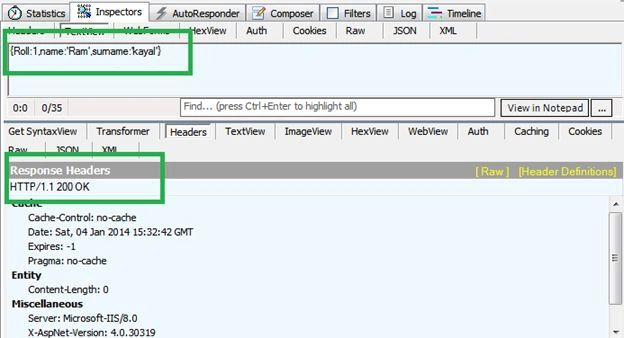
We are getting a 200 status code (though it should 201, in reality it should return the path of the new resource creation) that we can implement in a few lines of code.
Conclusion
In this example, we have learned Model validation using the Data Annotation method. I hope it will help in your actual MVC applications.
Join the conversation! Your thoughts help the community grow.