
Introduction
In this article we will see the LayoutPath properties that help in displaying
the items in the path in PathListBox in Silverlight 4.
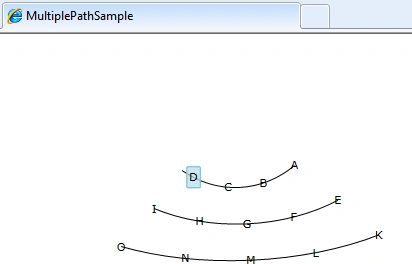
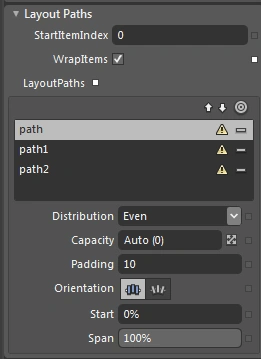
The above image shows the behaviour of paths in a PathListBox when default
properties of the path(s) are selected.
Let's discuss some of the properties.
Capacity
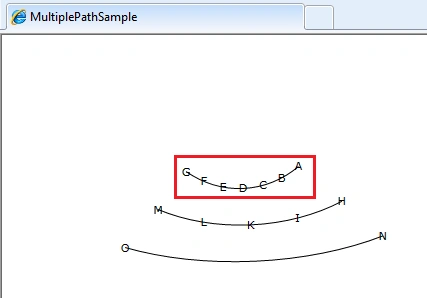
This is a number that is referred to how many items would be displayed on the
path.
In the above example we had seen default of 0 which is Auto. Now let's fix this
value for first path.
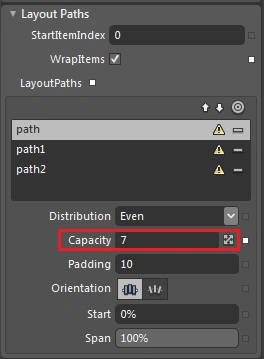
Now we can see the following change in the output.
Start
This is a property which gets or sets the distance from the start of the
LayoutPath to place the first item.
Now let's change the Start property of the 2nd path in the PathListBox.
Orientation
This is a property which gets or sets the orientation of the items in the path.
There are two kinds: None (default), and OrientToPath.
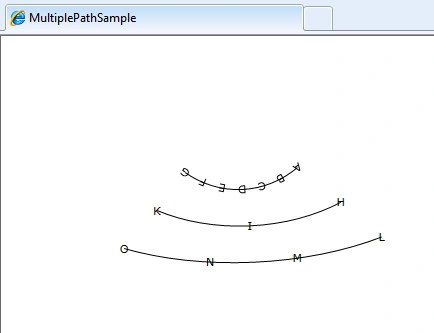
Let's set the first path's orientation to OrientToPath
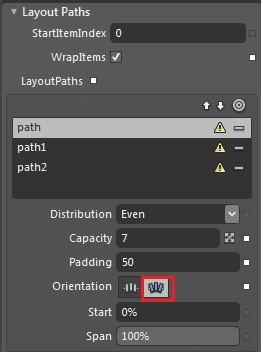
And the output is as below.
Span
This is a property which gets or sets, the percentage of the Layoutpath that
would participate in the layout.
Let's make the 3rd path's span as 50%.
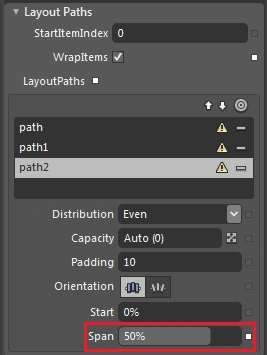
The following is the output of the above change.
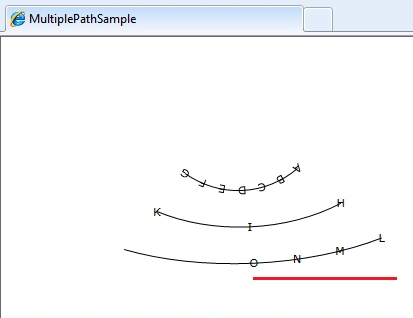
And 50% of the 3rd path is not participated in the layout.
Hope this article helps.

Modify Path Specific Properties in PathListBox in Silverlight 4
Join the conversation! Your thoughts help the community grow.
Sign in to leave a comment
It is the same account you read, post and publish with — and you will come straight back to this page.
Bryan LopezPosted Aug 12, 2010, 11:20 AM
Mr. Patra, Is it possible in Blend 4 to assign a pathlistbox (with multiple paths) sample data with let's say, 3 properties, and then assigning each of these properties to be displayed on each of the paths? Thanks. - Bryan