

Table of Content
- Introduction
- What is Module
- What is Controller
- What is $scope
- Example
- Working with multiple modules
Before reading this article, please go through my previous article on AngularJS.
Introduction
AngularJS module is nothing but a container of all angular components like controller, services, directive, filter, config, etc.
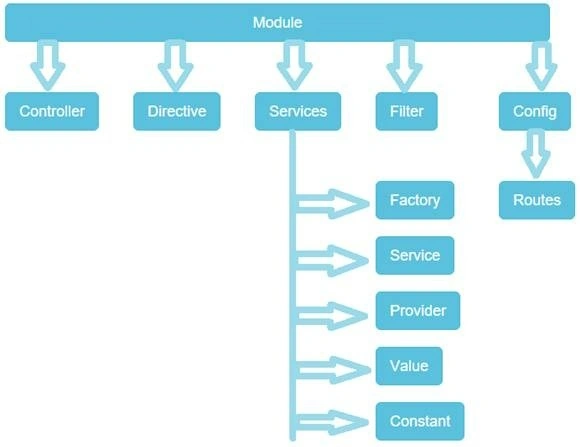
What is Module?
Let me explain why the module is required in AngularJS. In the .NET console application there is a main method and what the main method does is, it’s an entry point of the application. It is the same as an angular module and is an entry point. Using the module we can decide how the AngularJS application should be bootstrap.
We can create a simple module using the following code.
var myApp = angular.module('myModuleApp', []);
In the above code, myModuleApp is the module name and if this module is dependent on another module we can inject in “[]”.
What is Controller?
Controller is a JavaScript constructor function which controls the data. I am not going to cover what are the types of functions in this article but let me give some brief about constructor function. In constructor function when we call that function that function creates a new object each time.
Let’s make a controller.
myApp.controller('myController', function($scope) {
});
What is $scope?
$scope is nothing but it acts like glue between controller and view.
Example
<!DOCTYPE html>
<html>
<head>
    <title>My First App In AngularJS</title>
    <script src="scripts/angular.min.js"></script>
</head>
<body ng-app="myModuleApp" ng-controller="myController" style="">
    <div>{{AngularMessage}}</div>
    <div style="clear:both; height:20px; width:10px;"></div>
</body>
<script>
    var myApp = angular.module('myModuleApp', []);
    myApp.controller('myController', function($scope) {
        $scope.AngularMessage = "Angular Message";
    });
</script>
</html>
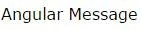
Output
Working with multiple modules
Let’s make another module and call that module in our app. There are several methods to work with multiple modules. We can write our own custom module. Some of these are the following.
Method 1
<!DOCTYPE html>
<html>

<head>
    <title>My First App In AngularJS</title>
    <script src="scripts/angular.min.js"></script>
</head>

<body ng-app="myModuleApp" style>
    <div ng-controller="myController">
        <div>{{AngularMessage}}</div>
        <div style="clear:both; height:20px; width:10px;"></div>
    </div>
    <div ng-controller="myController1">
        <div>{{AngularMessage}}</div>
        <div style="clear:both; height:20px; width:10px;"></div>
    </div>
</body>

<script>
    var myApp = angular.module('myModuleApp', ['myModuleApp1']);
    myApp.controller('myController', function($scope) {
        $scope.AngularMessage = "Angular Message";
    });

    var myApp1 = angular.module('myModuleApp1', []);
    myApp1.controller('myController1', function($scope) {
        $scope.AngularMessage = "Another Message";
    });
</script>

</html>
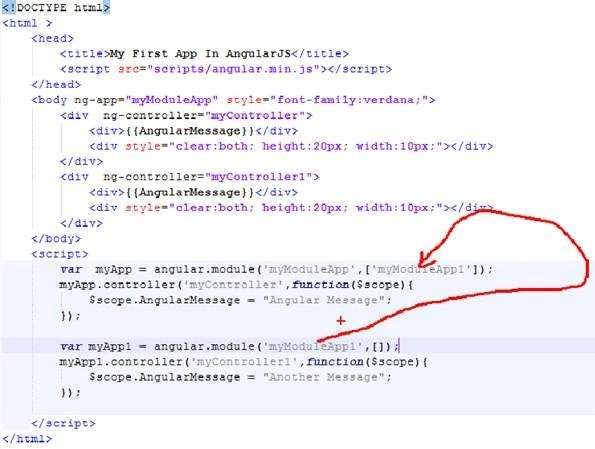
In the above code, I am injecting myModuleApp1 in myModuleApp.
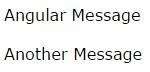
Output
Method 2
<!DOCTYPE html>
<html>

<head>
    <title>My First App In AngularJS</title>
    <script src="scripts/angular.min.js"></script>
</head>

<body ng-app="myMultipleModule" style>
    <div ng-controller="myController">
        <div>{{AngularMessage}}</div>
        <div style="clear:both; height:20px; width:10px;"></div>
    </div>
    <div ng-controller="myController1">
        <div>{{AngularMessage}}</div>
        <div style="clear:both; height:20px; width:10px;"></div>
    </div>
</body>

<script>
    var myApp = angular.module('myModuleApp', []);
    myApp.controller('myController', function($scope) {
        $scope.AngularMessage = "Angular Message";
    });

    var myApp1 = angular.module('myModuleApp1', []);
    myApp1.controller('myController1', function($scope) {
        $scope.AngularMessage = "Another Message";
    });

    angular.module('myMultipleModule', ['myModuleApp', 'myModuleApp1']);
</script>

</html>
Method 3
<!DOCTYPE html>
<html>

<head>
    <title>My First App In AngularJS</title>
    <script src="scripts/angular.min.js"></script>
</head>
<body style="">
    <div id="myDiv1">
        <div ng-controller="myController">
            {{AngularMessage}}
        </div>
        <div ng-controller="myController1">
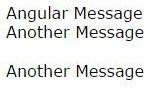
            {{AngularMessage}}
        </div>
    </div>
    <div style="clear:both; height:20px; width:10px;"></div>
    <div id="myDiv2">
        <div ng-controller="myController1">
            {{AngularMessage}}
        </div>
    </div>
    <script>
        var moduleA = angular.module("myModuleApp", []);
        moduleA.controller("myController", function ($scope) {
            $scope.AngularMessage = "Angular Message";
        });
        var moduleB = angular.module("myModuleApp1", []);
        moduleB.controller("myController1", function ($scope) {
            $scope.AngularMessage = "Another Message";
        });
        angular.element(document).ready(function () {
            var myDiv1 = document.getElementById("myDiv1");
            angular.bootstrap(myDiv1, ["myModuleApp", "myModuleApp1"]);

            var myDiv2 = document.getElementById("myDiv2");
            angular.bootstrap(myDiv2, ["myModuleApp1"]);
        });
    </script>
</body>

</html>
Note. This method is not recommended because using this method we can not create the loosely coupled application.
Output
Hope this article was helpful.
Read more articles on AngularJS.
Pramod ThakurPosted Aug 18, 2016, 2:34 AM
Thanks Subash
SubashPosted Aug 18, 2016, 12:52 AM
Easy to understand thank you sir
Pramod ThakurPosted Apr 2, 2016, 11:30 PM
thank you Gowtham Rajamanickam..
Gowtham RajamanickamPosted Apr 2, 2016, 12:39 PM
Good one..
Pramod ThakurPosted Mar 30, 2016, 10:03 PM
thank you Rahul Pushpendu Bhaskar...
Rahul Pushpendu BhaskarPosted Mar 30, 2016, 12:32 PM
Well n good with Clear Understanding... Thank you
Pramod ThakurPosted Mar 18, 2016, 3:01 AM
thanks Sonu Chaudhary..
Sonu ChaudharyPosted Mar 18, 2016, 2:37 AM
good one dear
Pramod ThakurPosted Mar 17, 2016, 11:47 PM
tnx Vignesh Mani..
Vignesh ManiPosted Mar 17, 2016, 4:56 PM
Nice