

In this article, we will discuss MongoDB basics and step-by-step implementation using .NET Core 7 Web API.
Agenda
- Introduction
- MongoDB Features
- MongoDB Basic Concepts
- MongoDB Installation
- Step-by-step implementation using .NET Core Web API
Prerequisites
- .NET Core 7 SDK
- Visual Studio 2022
- MongoDB
Introduction
- MongoDB is a general-purpose document-based No SQL database designed for modern and cloud applications.
- It is written in C++ programming language.
- Mongo DB works on the concept of collections and documents.
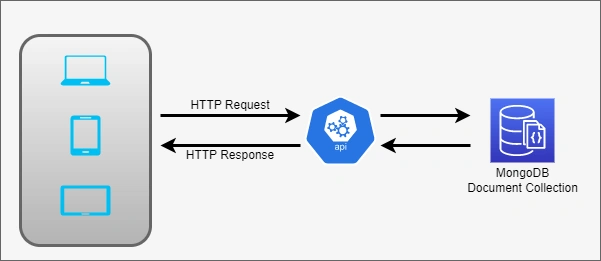
- It doesn’t have concepts like schema, table, row, and SQL because it’s a purely document-oriented database that works with any size and type of data.
- One another concept of MongoDB is that there should always be more than one copy of the database, and due to that, if one database fails, it will restore another.
- If you want to learn more about it, check the official documentation of MongoDB.
MongoDB Features
- Cross-platform
- Document-oriented database
- High Scalability and Performance
- High Availability and Durability
MongoDB Basic Concepts
- Database- In MongoDB database is a set of collections.
- Collection- In MongoDB, a collection is a group of documents. It is unlike a table in a relational database; inside the pool, many documents have different fields that are not tied to any schema, as we have seen in the SQL database.
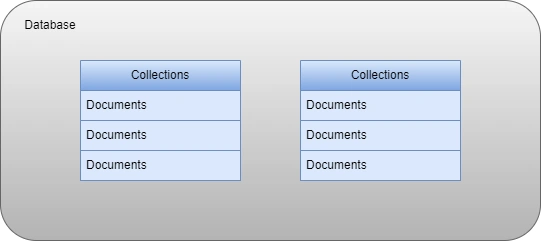
- Document- In MongoDB document is a set of key-value pairs, and it has a dynamic structure, which means the data we store inside the document do not necessarily have the same field and structure.
- Indexes- MongoDB provides multiple indexes to execute queries efficiently, which helps us speed up the queries while fetching data.
- Replica Sets- In MongoDB, while we create any database, in that case, it will create at least two copies of our database which provides high availability, and Mongo has a replica set for that which continuously replicates data between them.
- Sharding- In MongoDB, sharding is the method to distribute data across multiple clusters, and it will use sharding when the dataset is large and need to provide high throughput.
How do we install MongoDB?
Check the following link to install MongoDB on your machine.
https://www.mongodb.com/docs/manual/tutorial/install-mongodb-on-windows/
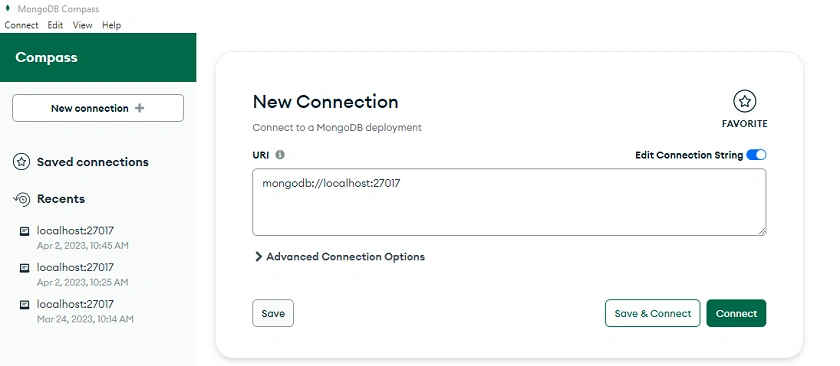
After installing, open the MongoDB Compass and create a new connection, mongodb://localhost:27017.
Step-by-step implementation using .NET Core Web API
Step 1
Create a new .NET Core Web API Application.
Step 2
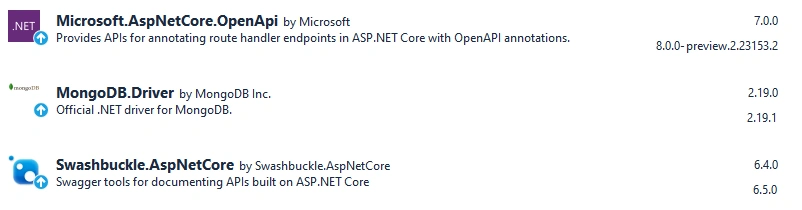
Install the following NuGet packages.
Step 3
Create a new Product Details class.
using MongoDB.Bson.Serialization.Attributes;
using MongoDB.Bson;
namespace MongoDbDemo.Entities {
    public class ProductDetails {
        [BsonId]
        [BsonRepresentation(BsonType.ObjectId)]
        public string Id {
            get;
            set;
        }
        [BsonElement("ProductName")]
        public string ProductName {
            get;
            set;
        }
        public string ProductDescription {
            get;
            set;
        }
        public int ProductPrice {
            get;
            set;
        }
        public int ProductStock {
            get;
            set;
        }
    }
}
Step 4
Next, add the Product DB Settings class.
namespace MongoDbDemo.Configurations {
    public class ProductDBSettings {
        public string ConnectionString {
            get;
            set;
        }
        public string DatabaseName {
            get;
            set;
        }
        public string ProductCollectionName {
            get;
            set;
        }
    }
}
Step 5
Create a new IProductService and IProductService inside the repositories folder.
IProductService
using MongoDbDemo.Entities;
namespace MongoDbDemo.Repositories {
    public interface IProductService {
        public Task < List < ProductDetails >> ProductListAsync();
        public Task < ProductDetails > GetProductDetailByIdAsync(string productId);
        public Task AddProductAsync(ProductDetails productDetails);
        public Task UpdateProductAsync(string productId, ProductDetails productDetails);
        public Task DeleteProductAsync(String productId);
    }
}
ProductService
using Microsoft.Extensions.Options;
using MongoDB.Driver;
using MongoDbDemo.Configurations;
using MongoDbDemo.Entities;
namespace MongoDbDemo.Repositories {
    public class ProductService: IProductService {
        private readonly IMongoCollection < ProductDetails > productCollection;
        public ProductService(IOptions < ProductDBSettings > productDatabaseSetting) {
            var mongoClient = new MongoClient(productDatabaseSetting.Value.ConnectionString);
            var mongoDatabase = mongoClient.GetDatabase(productDatabaseSetting.Value.DatabaseName);
            productCollection = mongoDatabase.GetCollection < ProductDetails > (productDatabaseSetting.Value.ProductCollectionName);
        }
        public async Task < List < ProductDetails >> ProductListAsync() {
            return await productCollection.Find(_ => true).ToListAsync();
        }
        public async Task < ProductDetails > GetProductDetailByIdAsync(string productId) {
            return await productCollection.Find(x => x.Id == productId).FirstOrDefaultAsync();
        }
        public async Task AddProductAsync(ProductDetails productDetails) {
            await productCollection.InsertOneAsync(productDetails);
        }
        public async Task UpdateProductAsync(string productId, ProductDetails productDetails) {
            await productCollection.ReplaceOneAsync(x => x.Id == productId, productDetails);
        }
        public async Task DeleteProductAsync(string productId) {
            await productCollection.DeleteOneAsync(x => x.Id == productId);
        }
    }
}
Step 6
Next, add a new product controller.
using Microsoft.AspNetCore.Mvc;
using MongoDbDemo.Entities;
using MongoDbDemo.Repositories;
namespace MongoDbDemo.Controllers {
    [Route("api/[controller]")]
    [ApiController]
    public class ProductsController: ControllerBase {
        private readonly IProductService productService;
        public ProductsController(IProductService productService) => this.productService = productService;
        [HttpGet]
        public async Task < List < ProductDetails >> Get() {
                return await productService.ProductListAsync();
            }
            [HttpGet("{productId:length(24)}")]
        public async Task < ActionResult < ProductDetails >> Get(string productId) {
                var productDetails = await productService.GetProductDetailByIdAsync(productId);
                if (productDetails is null) {
                    return NotFound();
                }
                return productDetails;
            }
            [HttpPost]
        public async Task < IActionResult > Post(ProductDetails productDetails) {
                await productService.AddProductAsync(productDetails);
                return CreatedAtAction(nameof(Get), new {
                    id = productDetails.Id
                }, productDetails);
            }
            [HttpPut("{productId:length(24)}")]
        public async Task < IActionResult > Update(string productId, ProductDetails productDetails) {
                var productDetail = await productService.GetProductDetailByIdAsync(productId);
                if (productDetail is null) {
                    return NotFound();
                }
                productDetails.Id = productDetail.Id;
                await productService.UpdateProductAsync(productId, productDetails);
                return Ok();
            }
            [HttpDelete("{productId:length(24)}")]
        public async Task < IActionResult > Delete(string productId) {
            var productDetails = await productService.GetProductDetailByIdAsync(productId);
            if (productDetails is null) {
                return NotFound();
            }
            await productService.DeleteProductAsync(productId);
            return Ok();
        }
    }
}
Step 7
Open the appsettings.json file and add MongoDB server URL, database, and collection name inside the same after creating that inside the MongoDB Compass.
{
  "Logging": {
    "LogLevel": {
      "Default": "Information",
      "Microsoft.AspNetCore": "Warning"
    }
  },
  "AllowedHosts": "*",
  "ProductDatabase": {
    "ConnectionString": "mongodb://localhost:27017",
    "DatabaseName": "ProductDB",
    "ProductCollectionName": "Product"
  }
}
Step 8
Register a few services inside the Program class.
using MongoDbDemo.Configurations;
using MongoDbDemo.Repositories;
var builder = WebApplication.CreateBuilder(args);
// Add services to the container.
builder.Services.Configure < ProductDBSettings > (builder.Configuration.GetSection("ProductDatabase"));
builder.Services.AddSingleton < IProductService, ProductService > ();
builder.Services.AddControllers();
// Learn more about configuring Swagger/OpenAPI at https://aka.ms/aspnetcore/swashbuckle
builder.Services.AddEndpointsApiExplorer();
builder.Services.AddSwaggerGen();
var app = builder.Build();
// Configure the HTTP request pipeline.
if (app.Environment.IsDevelopment()) {
    app.UseSwagger();
    app.UseSwaggerUI();
}
app.UseHttpsRedirection();
app.UseAuthorization();
app.MapControllers();
app.Run();
Step 9
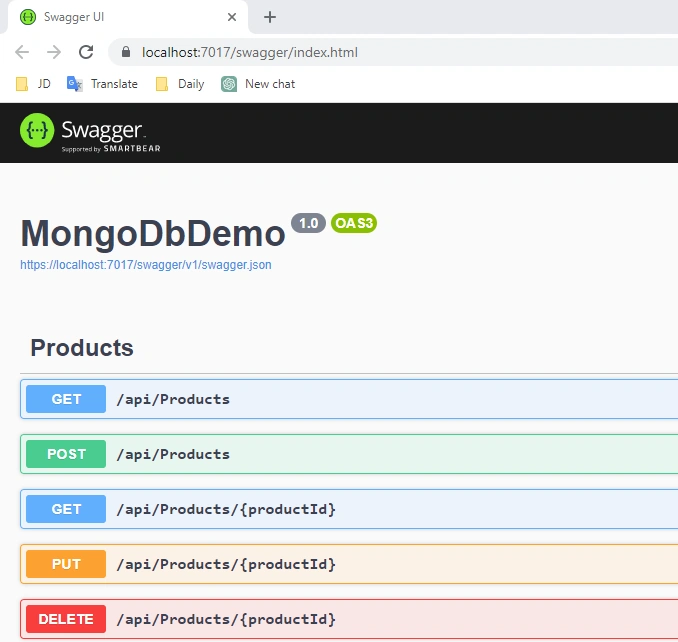
Run the application and add some product details using Swagger UI.
Step 10
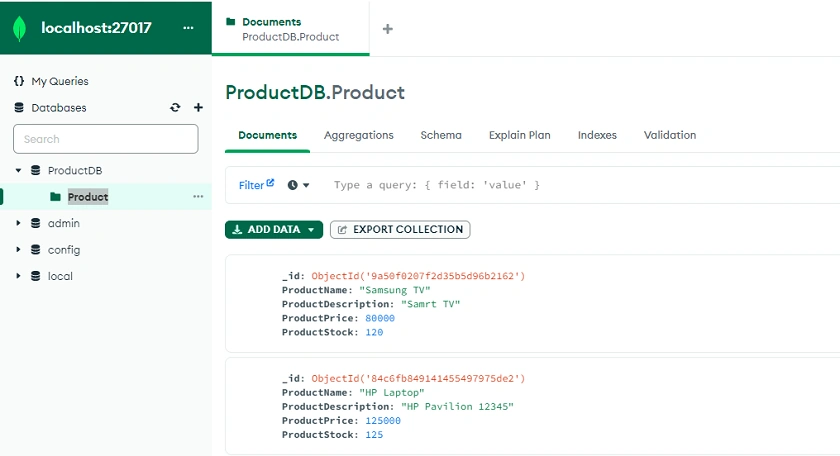
After adding some product data, you can see details inside MongoDB Compass, as I showed below.
GitHub URL
https://github.com/Jaydeep-007/MongoDbDemo
Conclusion
Here we discussed the introduction and basic concept of MongoDB and step-by-step implementation of product application API using .NET Core 7 Web API.
Happy Coding!!!
Ammar ShaukatPosted Apr 22, 2024, 7:52 AM
Thanks for sharing