

Introduction: In my previous SQL Server article I described all about Operators in SQL Server. In this article I will explain about most commonly used date and time function of the SQL Server.
The most commonly used DateTime function in SQL Server is listed below:
- GETDATE()
- DATEADD()
- DATEDIFF()
- DATEPART()
- DATENAME()
- DAY()
- MONTH()
- YEAR()
GETDATE()
GATEDATE() is very frequently used function. This method returns date and time of the system. This method doesn't accept any parameter.
Example:
- Declare @Date datetime
- set @Date = (SELECT GETDATE());
- Print @Date
Feb 8 2015 11:16PM
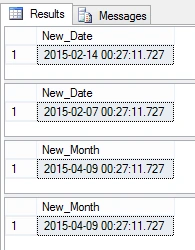
DATEADD() function is used to add the date-time and subtract the date-time. It returns a new date-time based on added or subtracted interval.
Syntax:
- DATEADD(datetimepart, number, date)
Example:
- --Adding days
- Select DATEADD(day, 5,getdate()) as New_Date
- --Subtracting days
- SELECT DATEADD(day, -2,getdate()) as New_Date
- --Adding Months
- SELECT DATEADD(MONTH, 2,getdate()) as New_Month
- --Subtracting Months
- SELECT DATEADD(MONTH, 2,getdate()) as New_Month
DATEDIFF()
DATEDIFF() function is a very common function which is used to find the difference between two days.
Syntax:
- DATEDIFF(datepart, starting_date, ending_date)
- -- Declare Four DateTime Variable
- Declare @Starting_Date datetime
- Declare @Ending_Date datetime
- Declare @Ending_Month datetime
- Declare @Ending_Year datetime
- -- Set @Staring_Date with Current Date
- set @Starting_Date = (SELECT GETDATE());
- -- Set @Ending_Date with 5 days more than @Ending_Date
- set @Ending_Date = (SELECT DATEADD(day, 5,@Starting_Date ))
- -- Get The Date Difference
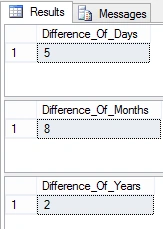
- SELECT DATEDIFF(day, @Starting_Date, @Ending_Date) AS Difference_Of_Days
- -- Set @Ending_Date with 8 Month more than @Ending_Date
- set @Ending_Month = (SELECT DATEADD(MONTH, 8,@Starting_Date ))
- -- Get The Date Difference
- SELECT DATEDIFF(MONTH, @Starting_Date, @Ending_Month) AS Difference_Of_Months
- -- Set @Ending_Date with 2 Month more than @Ending_Date
- set @Ending_Year = (SELECT DATEADD(YEAR, 2,@Starting_Date ))
- -- Get The Date Difference
- SELECT DATEDIFF(YEAR, @Starting_Date, @Ending_Year) AS Difference_Of_Years
DATEPART()
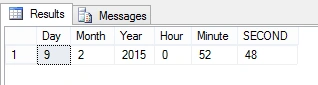
When we need a part of the date or time then we use DATEPART() function.
Syntax:
- DATEPART(datepart, date)
Example:
- declare @date datetime
- set @date=GETDATE();
- SELECT DATEPART(DAY, @date) AS Day,
- DATEPART(MONTH, @date) AS Month,
- DATEPART(YEAR, @date) AS Year,
- DATEPART(HOUR, @date) AS Hour,
- DATEPART(MINUTE,@date) AS Minute,
- DATEPART(SECOND, @date) AS SECOND
DATENAME()
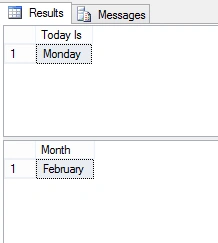
This function is very useful function by using this you can get the name from the datetime value.
Syntax:
- DATENAME(datepart, date)
- -- Get Today
- SELECT DATENAME(DW, getdate()) AS 'Today Is'
- -- Get Month name
- SELECT DATENAME(M, getdate()) AS 'Month'
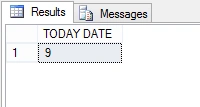
Day()
By using this function you can get the day from any datetime value.
Syntax:
- DAY(datetime)
- SELECT DAY(getdate()) 'TODAY DATE'
MONTH()
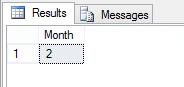
By using this function you can get the month from any datetime value.
Syntax:
- MONTH(datetime)
Example:
- SELECT MONTH(getdate()) 'MONTH'
Output:
YEAR
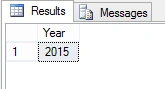
By using this function you can get the Year from any datetime value.
Syntax:
- YEAR(getdate()) 'Year'
Example:
- SELECT YEAR(getdate()) 'Year'
Omprakash GovekarPosted Feb 9, 2015, 6:08 AM
Good Article.....