

Introduction
Azure Resource Group is a container which holds the VM and its dependent infrastructure. The resource group can include all the resources for the solution, or only those resources that you want to manage as a group.
All the resources in the resource group will share the same life cycle. A resource can interact with the resources in other resources group. Resources can exist only in a resource group. A resource group can contain resources that reside in the different region.
Though a resource can be moved between resource groups or between the subscriptions, there are certain restrictions on some of the Azure resources like Virtual Machines, Virtual Network, App Service, Classic deployment, recovery services, HDInsight, and Search.
Migration
Migrating the resources between the resource groups involves a very few steps as shown below.
Step1
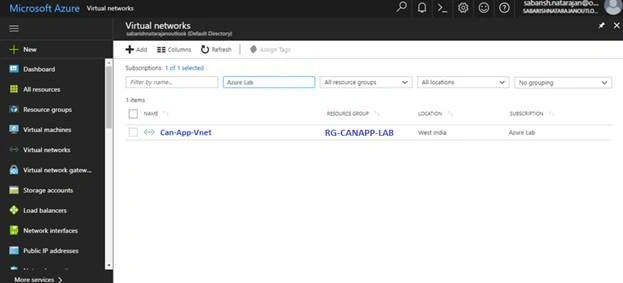
- Log in to the Azure portal.
- Search and Filter the resource which needs to be migrated to the different resource group.
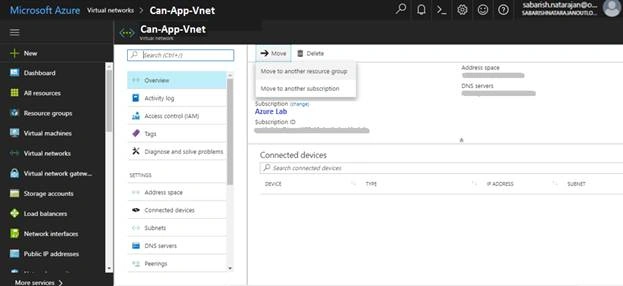
- On Overview page of the resource, select Move - Move to another Resource Group.
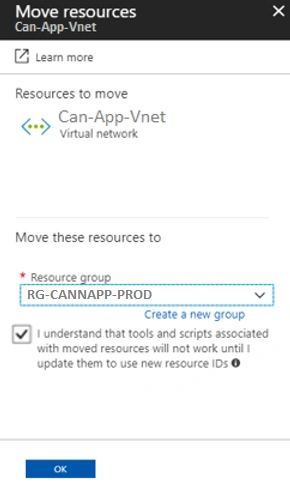
- Select the Target Resource group.
- Accept the terms and click OK.
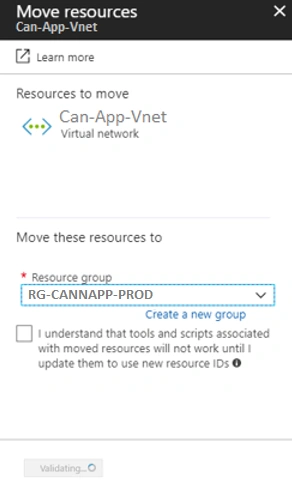
- Initially, Azure will validate the selected resource and configuration to verify the movement feasibility.
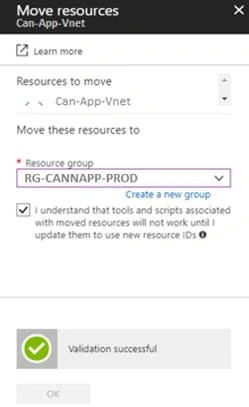
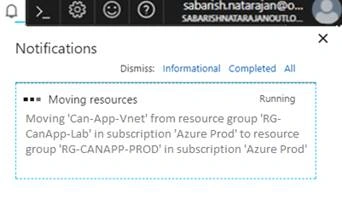
- On successful validation, the movement of the selected resource will be initiated.
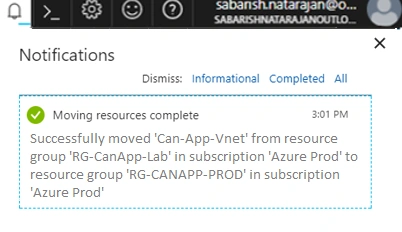
- Depends on the size of the resource, the move request will take time to complete.
Migrating the resources between the resources group through PowerShell is much easier. The below 2 commands can be used to migrate the resources between the resource group.
- $SourceAID = (Get-AzureRmResource –ResourceGroupName “RG-CanApp-Lab” -ResourceName “Can-App-Vnet”).ResourceID
- Move-AzureRmResource -DestinationResourceGroupName “RG-CanApp-Lab -ResourceId $SourceAID
To move multiple resources through PowerShell, “ResourceId” is a mandatory parameter. Get the resource id and store it in a variable and append the Move-AzureRmResource command with an additional variable preface by “,”.
Example
- $SourceAID = (Get-AzureRmResource –ResourceGroupName “RG-CanApp-Lab” -ResourceName “Can-App-Vnet”).ResourceID
- $SourceBID = (Get-AzureRmResource –ResourceGroupName “RG-CanApp-Lab” -ResourceName “Can-App-VM”).ResourceID
- Move-AzureRmResource -DestinationResourceGroupName “RG-CanApp-Lab -ResourceId $SourceAID, $SourceBID
Summary
In this article, I have explained about moving the resources between the Azure Resource Group through Azure Portal and PowerShell.
Multiple resources in same resource group can be moved to different resource groups simultaneously. During the movement, the resources will be locked and no action can be performed externally. Example: RDP access or configuration changes to the resources cannot be performed while the resources are being moved. But the communication between the resources which configured before the move request will be active, Example: communication between the application and DB server.
Grouping the resource in same resource group is one of the requirements to move the infrastructure between the subscriptions. We shall see the steps to move the resources between the subscription in the next article.
Join the conversation! Your thoughts help the community grow.