

Where we took two ListBoxes and their list item, we will put that list item inito each other list box.
Initial chamber
Step 1
Open your Visual Studio 2010 and create an Empty Website, provide a suitable name (listbox_demo).
Step 2
In Solution Explorer you get your empty website, then add two web forms and a SQL Server database as in the following.
For Web Form:
listbox_demo (your empty website) then right-click then select Add New Item -> Web Form. Name it listbox_demo.aspx.
Design chamber
Step 3
Now open your Listbox_demo.aspx file, where we create our design for our application.
Listbox_demo.aspx
- <%@ Page Language="C#" AutoEventWireup="true" CodeFile="Default.aspx.cs" Inherits="_Default" %>
- <!DOCTYPE html PUBLIC "-//W3C//DTD XHTML 1.0 Transitional//EN" "http://www.w3.org/TR/xhtml1/DTD/xhtml1-transitional.dtd">
- <html xmlns="http://www.w3.org/1999/xhtml">
- <head runat="server">
- <title></title>
- <style type="text/css">
- .style1
- {
- text-decoration: underline;
- font-size: large;
- color: #006600;
- }
- .style5
- {
- width: 69px;
- }
- .style6
- {
- width: 102px;
- }
- .style7
- {
- width: 238px;
- text-decoration: underline;
- color: #0000FF;
- }
- .style8
- {
- width: 102px;
- text-decoration: underline;
- color: #0000FF;
- }
- .style9
- {
- width: 238px;
- }
- .style10
- {
- width: 4px;
- }
- .style11
- {
- width: 4px;
- color: #0000FF;
- }
- </style>
- </head>
- <body id="nil">
- <form id="form1" runat="server">
- <div>
- <span class="style1"><strong>Move Data from one ListBox to other ListBox</strong></span><br />
- <br />
- <table style="width: 26%; height: 138px;">
- <tr>
- <td class="style8">
- <strong>ListBox1</strong></td>
- <td class="style11">
- </td>
- <td class="style7">
- <strong>ListBox2</strong></td>
- </tr>
- <tr>
- <td class="style6">
- <asp:ListBox ID="ListBox1" runat="server" Height="131px" Width="98px"
- SelectionMode="Multiple" BackColor="#66FF66">
- <asp:ListItem>Cricket</asp:ListItem>
- <asp:ListItem>Football</asp:ListItem>
- <asp:ListItem>Basketball</asp:ListItem>
- <asp:ListItem>Baseball</asp:ListItem>
- </asp:ListBox>
- </td>
- <td class="style10">
- <table style="width: 67%; height: 139px;">
- <tr>
- <td class="style5">
- <asp:ImageButton ID="ImageButton1" runat="server"
- ImageUrl="~/add 1on 1.jpg" onclick="ImageButton1_Click"
- ImageAlign="Bottom" />
- </td>
- </tr>
- <tr>
- <td class="style5">
- <asp:ImageButton ID="ImageButton2" runat="server"
- ImageUrl="~/remove 1 on 1.jpg" onclick="ImageButton2_Click" />
- </td>
- </tr>
- <tr>
- <td class="style5">
- <asp:ImageButton ID="ImageButton3" runat="server" ImageUrl="~/add all.jpg"
- onclick="ImageButton3_Click" />
- </td>
- </tr>
- <tr>
- <td class="style5">
- <asp:ImageButton ID="ImageButton4" runat="server" ImageUrl="~/remove all.jpg"
- onclick="ImageButton4_Click" />
- </td>
- </tr>
- </table>
- </td>
- <td class="style9">
- <asp:ListBox ID="ListBox2" runat="server" Height="131px" Width="98px"
- SelectionMode="Multiple" BackColor="#66FF66">
- <asp:ListItem>Volleyball</asp:ListItem>
- <asp:ListItem>Hockey</asp:ListItem>
- <asp:ListItem>Boxing</asp:ListItem>
- <asp:ListItem>Tennis</asp:ListItem>
- </asp:ListBox>
- </td>
- </tr>
- <tr>
- <td class="style6">
- </td>
- <td class="style10">
- <asp:Label ID="lbmsg" runat="server"></asp:Label>
- </td>
- <td class="style9">
- </td>
- </tr>
- </table>
- </div>
- </form>
- </body>
- </html>
Your design will look like this: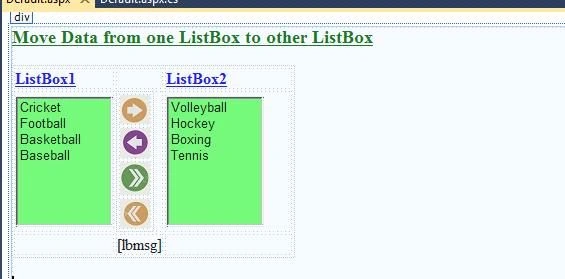
Code chamber
Step 4
Open your listbox_demo.aspx.cs and write some code so that our application works.
- using System;
- using System.Collections.Generic;
- using System.Linq;
- using System.Web;
- using System.Web.UI;
- using System.Web.UI.WebControls;
- using System.Collections;
- public partial class _Default : System.Web.UI.Page
- {
- ArrayList ar1 = new ArrayList();
- ArrayList ar2 = new ArrayList();
- protected void Page_Load(object sender, EventArgs e)
- {
- }
- protected void ImageButton1_Click(object sender, ImageClickEventArgs e)
- {
- if (ListBox1.SelectedIndex >= 0)
- {
- for (int i = 0; i < ListBox1.Items.Count; i++)
- {
- if (ListBox1.Items[i].Selected)
- {
- if (!ar1.Contains(ListBox1.Items[i]))
- {
- ar1.Add(ListBox1.Items[i]);
- }
- }
- }
- for (int i = 0; i < ar1.Count; i++)
- {
- if (!ListBox2.Items.Contains(((ListItem)ar1[i])))
- {
- ListBox2.Items.Add(((ListItem)ar1[i]));
- }
- ListBox1.Items.Remove(((ListItem)ar1[i]));
- }
- ListBox2.SelectedIndex = -1;
- }
- else
- {
- lbmsg.Text = "Please select atleast one listitem";
- lbmsg.ForeColor = System.Drawing.Color.Red;
- }
- }
- protected void ImageButton2_Click(object sender, ImageClickEventArgs e)
- {
- if (ListBox2.SelectedIndex >= 0)
- {
- for (int i = 0; i < ListBox2.Items.Count; i++)
- {
- if (ListBox2.Items[i].Selected)
- {
- if (!ar2.Contains(ListBox2.Items[i]))
- {
- ar2.Add(ListBox2.Items[i]);
- }
- }
- }
- for (int i = 0; i < ar2.Count; i++)
- {
- if (!ListBox1.Items.Contains(((ListItem)ar2[i])))
- {
- ListBox1.Items.Add(((ListItem)ar2[i]));
- }
- ListBox2.Items.Remove(((ListItem)ar2[i]));
- }
- ListBox1.SelectedIndex = -1;
- }
- else
- {
- lbmsg.Text = "Data removed from listbox";
- lbmsg.ForeColor = System.Drawing.Color.ForestGreen;
- }
- }
- protected void ImageButton3_Click(object sender, ImageClickEventArgs e)
- {
- while (ListBox1.Items.Count != 0)
- {
- for (int i = 0; i < ListBox1.Items.Count; i++)
- {
- ListBox2.Items.Add(ListBox1.Items[i]);
- ListBox1.Items.Remove(ListBox1.Items[i]);
- }
- }
- lbmsg.Text = "All data added to listbox2";
- lbmsg.ForeColor = System.Drawing.Color.ForestGreen;
- }
- protected void ImageButton4_Click(object sender, ImageClickEventArgs e)
- {
- while (ListBox2.Items.Count != 0)
- {
- for (int i = 0; i < ListBox2.Items.Count; i++)
- {
- ListBox1.Items.Add(ListBox2.Items[i]);
- ListBox2.Items.Remove(ListBox2.Items[i]);
- }
- }
- lbmsg.Text = "All data removed and moved to listbox1";
- lbmsg.ForeColor = System.Drawing.Color.ForestGreen;
- }
- }
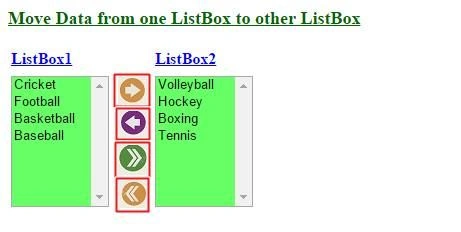
Here the first button is as:
- Move data one.
- Remove data one.
- Add all.
- Remove all.
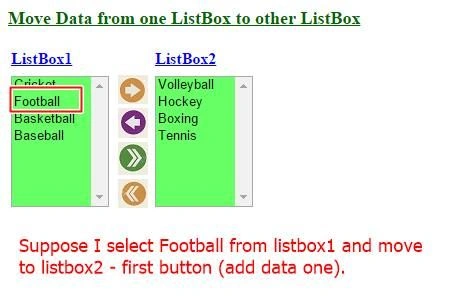
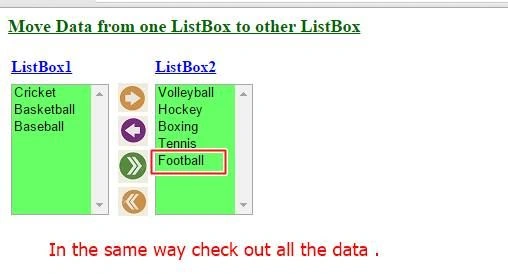
I hope you like this. Thank you for reading, have a good day.
kalai romiPosted Nov 28, 2019, 4:08 AM
Nice article..
Arul RPosted Oct 28, 2015, 5:37 AM
Good one !!!
RakeshPosted Jul 30, 2015, 1:02 PM
Good sharing
Vipul MalhotraPosted Jul 30, 2015, 7:35 AM
nice..Thanks for sharing
Santhakumar MunuswamyPosted Jul 30, 2015, 6:17 AM
Thanks for nice article
Sibeesh VenuPosted Jul 30, 2015, 5:03 AM
Nice Share
Neeraj KumarPosted Jul 30, 2015, 1:57 AM
Great Work
Debasis SahaPosted Jul 30, 2015, 12:49 AM
Good Article..
Rajeesh MenothPosted Jul 29, 2015, 11:45 PM
Good One Nilesh Jadav
Gopi ChandPosted Jul 29, 2015, 10:23 PM
Good work
Pankaj Kumar ChoudharyPosted Jul 29, 2015, 7:48 PM
Nice Show as Usual Sir........
Shridhar SharmaPosted Jul 29, 2015, 6:37 PM
good one :)