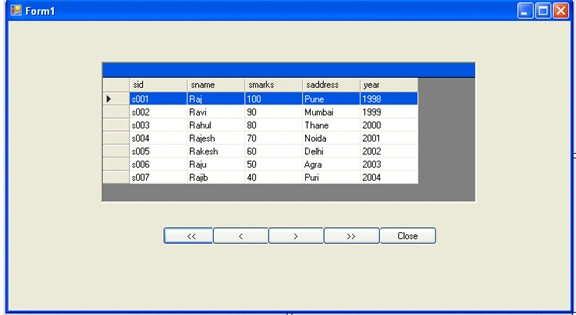
In this article we will know
how to move focus from one row to another row in a datagrid. Here we add one
datagrid and five buttons controls respectively to the form. First in the
Form1_Load event data will be loaded into the datagrid and with the help of four
buttons we will navigate the focus from one row to another.
Imports
System.Data
Imports
System.Data.OleDb
Public
Class
Form1
Dim
ConnectionString
As
String
= System.Configuration.ConfigurationSettings.AppSettings("dsn")
Dim
con
As
OleDbConnection
=
New
OleDbConnection(ConnectionString)
Dim
com
As
OleDbCommand
Dim
oledbda
As
OleDbDataAdapter
Dim
ds
As
DataSet
Dim
dt
As
DataTable
Dim
str
As
String
Private
Sub
Form1_Load(ByVal
sender
As
System.Object,
ByVal
e
As
System.EventArgs)
Handles
MyBase.Load
Try
con.Open()
str =
"select * from student"
com =
New
OleDbCommand(str,
con)
oledbda =
New
OleDbDataAdapter(com)
ds =
New
DataSet
oledbda.Fill(ds,
"student")
con.Close()
dt = ds.Tables("student")
DataGrid1.ReadOnly =
True
DataGrid1.DataSource = ds
DataGrid1.DataMember =
"student"
btnenadisi(True)
Catch
ex
As
Exception
MsgBox(ex.Message)
End
Try
End
Sub
Private
Sub
btnfirst_Click(ByVal
sender
As
System.Object,
ByVal
e
As
System.EventArgs)
Handles
btnfirst.Click
DataGrid1.UnSelect(DataGrid1.CurrentRowIndex)
DataGrid1.CurrentRowIndex = 0
DataGrid1.Select(DataGrid1.CurrentRowIndex)
btnenadisi(True)
End
Sub
Private
Sub
btnprev_Click(ByVal
sender
As
System.Object,
ByVal
e
As
System.EventArgs)
Handles
btnprev.Click
DataGrid1.UnSelect(DataGrid1.CurrentRowIndex)
DataGrid1.CurrentRowIndex -= 1
DataGrid1.Select(DataGrid1.CurrentRowIndex)
btnenadisi(True)
End
Sub
Private
Sub
btnnext_Click(ByVal
sender
As
System.Object,
ByVal
e
As
System.EventArgs)
Handles
btnnext.Click
DataGrid1.UnSelect(DataGrid1.CurrentRowIndex)
DataGrid1.CurrentRowIndex += 1
DataGrid1.Select(DataGrid1.CurrentRowIndex)
btnenadisi(True)
End
Sub
Private
Sub
btnlast_Click(ByVal
sender
As
System.Object,
ByVal
e
As
System.EventArgs)
Handles
btnlast.Click
DataGrid1.UnSelect(DataGrid1.CurrentRowIndex)
DataGrid1.CurrentRowIndex = dt.Rows.Count - 1
DataGrid1.Select(DataGrid1.CurrentRowIndex)
btnenadisi(True)
End
Sub
Private
Sub
btnenadisi(ByVal
x
As
Boolean)
btnfirst.Enabled = x
btnprev.Enabled = x
btnnext.Enabled = x
btnlast.Enabled = x
btnclose.Enabled = x
End
Sub
Private
Sub
btnclose_Click(ByVal
sender
As
System.Object,
ByVal
e
As
System.EventArgs)
Handles
btnclose.Click
Me.Close()
End
Sub
End
Class
Output
Thanks for reading


Join the conversation! Your thoughts help the community grow.