

Introduction
Up to Entity Framework 5.0, there were only single migrations possible to manage a single DbContext (user model) per physical database. Now Entity Framework 6.0 supports multiple model migrations per physical database.
This feature of Entity Framework is formerly known as "Multi-Tenant Migrations" or "Multiple Contexts per Database".
Generally, a multi-tenant database is able to isolate various groups of tables that might to be used for different purposes or may be used for different applications. There are multiple ways to make the database multi-tenant. One of the common methods is to use a different schema name for a different group of tables.
Entity Framework Code First model migration allows us to create a new database or update the existing database based on model classes. Entity Framework 5.0 Code First migration only supports one DbContext per physical database. Entity Framework 6.0 onward, Code First migration supports multiple DbContexts per single physical database.
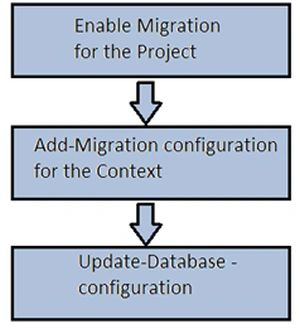
The following is the procedure to migrate a Code First model.
Syntax
Step 1. enable-migrations -ContextTypeName -DbContext-Name-with-Namespaces-MigrationsDirectory:-Migrations-Directory-Name-
Step 2. Add-Migration -configuration -DbContext-Migrations-Configuration-Class-with-Namespaces-Migrations-Name-
Step 3. Update-Database -configuration -DbContext-Migrations-Configuration-Class-with-Namespaces -Verbose
Important Note
The Connection String must be the same as the ADO.NET Connection String and also the name provided must be “System.Data.SqlClient” instead of “System.Data.EntityClient” that is used in a Database First model.
<configuration>
    .....
    .....
    <connectionStrings>
        <add name="Entities" connectionString="Data Source=serverName;Initial Catalog=DatabaseName;Persist Security Info=True;User ID=sa;Password=password ;MultipleActiveResultSets=True" providerName="System.Data.SqlClient" />
    </connectionStrings>
</configuration>
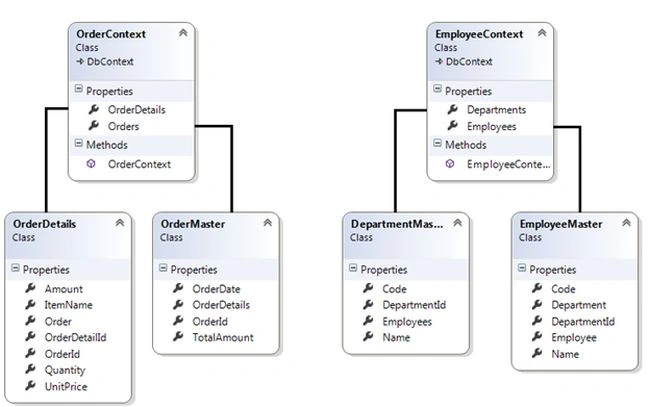
Example. Suppose I have two DbContexts (say EmployeeContext and OderContext) within the same project. The Model classes and DBContext class code is given below.
Model Classes (Employee context)
public class DepartmentMaster {
    [Key]
    public int DepartmentId { get; set; }
    public string Code { get; set; }
    public string Name { get; set; }
    public List<EmployeeMaster> Employees { get; set; }
}

public class EmployeeMaster {
    [Key]
    public int Employee { get; set; }
    public string Code { get; set; }
    public string Name { get; set; }
    public int DepartmentId { get; set; }
    public DepartmentMaster Department { get; set; }
}
Employee DbContext
public class EmployeeContext : DbContext {
    public EmployeeContext() : base("name=Entities") {
    }
    public DbSet<DepartmentMaster> Departments { get; set; }
    public DbSet<EmployeeMaster> Employees { get; set; }
}
Model Classes (Order context)
public class OrderMaster {
    [Key]
    public int OrderId { get; set; }
    public DateTime OrderDate { get; set; }
    public double TotalAmount { get; set; }
    public List<OrderDetails> OrderDetails { get; set; }
}

public class OrderDetails {
    [Key]
    public int OrderDetailId { get; set; }
    public int OrderId { get; set; }
    public string ItemName { get; set; }
    public int Quantity { get; set; }
    public string UnitPrice { get; set; }
    public double Amount { get; set; }
    public OrderMaster Order { get; set; }
}
Order context
public class OrderContext : DbContext {
    public OrderContext() : base("name=Entities") {

    }
    public DbSet<OrderMaster> Orders { get; set; }
    public DbSet<OrderDetails> OrderDetails { get; set; }
}
Graphical representation of the relationship
Code first migration procedure
For migrating, the following commands must run using the Package Manager Console of Visual Studio (2012 or 2013).
Step 1. Enable migration for DbContext
enable-migrations -ContextTypeName MultipleContextsperDatabase.Model.EmployeeContext -MigrationsDirectory: EmployeeMigrations
Output on Package Manager Console.

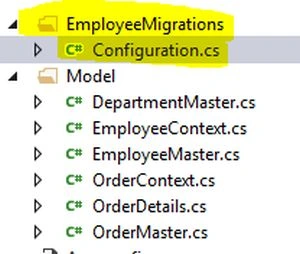
As a result of Step 1, the Configuration class is added to the EmployeeMigration folder.
Configuration class definition
internal sealed class Configuration: DbMigrationsConfiguration<MultipleContextsperDatabase.Model.EmployeeContext> {
    public Configuration() {
        AutomaticMigrationsEnabled = false;
        MigrationsDirectory = @"EmployeeMigrations";
    }

    protected override void Seed(MultipleContextsperDatabase.Model.EmployeeContext context) {

    }
}
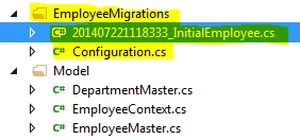
Step 2. Add migration configuration
Add-Migration -configuration MultipleContextsperDatabase.EmployeeMigrations.Configuration InitialEmployee
Output on Package Manager Console.




krunalPosted Aug 9, 2019, 2:33 AM
How do we achieve multi-tenancy? How do we run migrations at run time?
Marothi MahlakePosted Jan 2, 2019, 3:50 AM
Nice one. Highly useful ??
Maurice AboagyePosted Oct 2, 2018, 8:40 AM
Thanx very much Jignesh. Your solution has been very helpful
Kuppurasu NagarajPosted Apr 24, 2016, 12:52 PM
Nice Sharing..
Nimit JoshiPosted Jul 24, 2014, 1:37 AM
Nice