

The FileUpload control enables you to upload files to the server. It displays a text box control and a browse button that allows users to select a file to upload to the server.
Properties
- FileBytes
- FileContent
- Filename
- SaveAs
- PostedFile
The FileUpload control provides the HttpPostedFile class. Its has the following properties.
- ContentLength
- ContentType
- Filename
- InputStream
- SaveAs
Example
The following shows how to upload a single file.
<b>Upload File:</b>
<asp:FileUpload ID="FileUpload1" runat="server" />
The following shows how to upload multiple files.
<b>Upload Multiple File:</b>
<asp:FileUpload ID="fileuplaod1" runat="server" AllowMultiple="true" Font-Bold="true" />
We need to set AllowMultiple="true".
Example
The following shows how to upload multiple files from various folders.
DifferentFile.aspx
<%@ Page Language="C#" AutoEventWireup="true" CodeFile="differntfolder.aspx.cs" Inherits="differntfolder" %>

<!DOCTYPE html>

<html xmlns="http://www.w3.org/1999/xhtml">
<head runat="server">
    <title></title>
</head>
<body>
    <form id="form1" runat="server">
        <div align="center">
            <table border="1">
                <tr>
                    <th>Multiple File Upload</th>
                </tr>
                <tr>
                    <td></td>
                </tr>
                <tr>
                    <td>
                        <asp:FileUpload ID="fileuplaod1" runat="server" AllowMultiple="true" Font-Bold="true" />
                    </td>
                </tr>
                <tr>
                    <td>
                        <asp:Button ID="button1" runat="server" Text="upload" OnClick="button1_Click" Width="82px" />
                    </td>
                </tr>
                <tr>
                    <td></td>
                </tr>
                <tr>
                    <td>
                        <asp:Label ID="label1" runat="server" ForeColor="Green" Font-Size="Large" Font-Bold="true"></asp:Label><br />
                    </td>
                </tr>
                <tr>
                    <td></td>
                </tr>
                <tr>
                    <td>
                        <asp:Label ID="labbel2" runat="server" Font-Bold="true" ForeColor="Red" Font-Size="Large"></asp:Label><br />
                    </td>
                </tr>
                <tr>
                    <td>
                        <asp:Label ID="label3" runat="server" Font-Bold="true" ForeColor="Black" Font-Size="Large"></asp:Label>
                    </td>
                </tr>
            </table>
        </div>
    </form>
</body>
</html>
Code File DifferentFile.aspx.cs
using System;
using System.Collections.Generic;
using System.Linq;
using System.Web;
using System.Web.UI;
using System.Web.UI.WebControls;
using System.IO;

public partial class differntfolder : System.Web.UI.Page
{
    protected void Page_Load(object sender, EventArgs e)
    {
    }

    protected void button1_Click(object sender, EventArgs e)
    {
        label1.Text = "<b>uploaded file</b><br/>";
        labbel2.Text = "<b>not uploaded file</b><br/>";
        label1.Visible = true;

        try
        {
            // Check File Present or not
            if (fileuplaod1.HasFiles)
            {
                int filecount = 0;
                int fileuploadcount = 0;

                // Check No of Files Selected
                filecount = fileuplaod1.PostedFiles.Count();

                if (filecount <= 10)
                {
                    foreach (HttpPostedFile postfiles in fileuplaod1.PostedFiles)
                    {
                        // Get The File Extension
                        string filetype = Path.GetExtension(postfiles.FileName);

                        if (filetype.ToLower() == ".docx" || filetype.ToLower() == ".pdf" || filetype.ToLower() == ".txt" || filetype.ToLower() == ".doc")
                        {
                            // Get The File Size In Bite
                            double filesize = postfiles.ContentLength;

                            if (filesize < (1048576))
                            {
                                fileuploadcount++;
                                string serverfolder = string.Empty;
                                string serverpath = string.Empty;

                                // Adding File Into Specific Folder Depend On his Extension
                                switch (filetype)
                                {
                                    case ".doc":
                                    case ".docx":
                                        serverfolder = Server.MapPath(@"uplaodfiles\document\");
                                        // Check Folder available or not
                                        if (!Directory.Exists(serverfolder))
                                        {
                                            // Create Folder
                                            Directory.CreateDirectory(serverfolder);
                                        }
                                        serverpath = serverfolder + Path.GetFileName(postfiles.FileName);
                                        fileuplaod1.SaveAs(serverpath);
                                        label1.Text += "[" + postfiles.FileName + "]- document file uploaded successfully<br/>";
                                        break;

                                    case ".pdf":
                                        serverfolder = Server.MapPath(@"uplaodfiles\pdf\");
                                        // Check Folder available or not
                                        if (!Directory.Exists(serverfolder))
                                        {
                                            // Create Folder
                                            Directory.CreateDirectory(serverfolder);
                                        }
                                        serverpath = serverfolder + Path.GetFileName(postfiles.FileName);
                                        fileuplaod1.SaveAs(serverpath);
                                        label1.Text += "[" + postfiles.FileName + "]- pdf file uploaded successfully<br/>";
                                        break;

                                    case ".txt":
                                        serverfolder = Server.MapPath(@"uplaodfiles\text_document\");
                                        // Check Folder available or not
                                        if (!Directory.Exists(serverfolder))
                                        {
                                            // Create Folder
                                            Directory.CreateDirectory(serverfolder);
                                        }
                                        serverpath = serverfolder + Path.GetFileName(postfiles.FileName);
                                        fileuplaod1.SaveAs(serverpath);
                                        label1.Text += "[" + postfiles.FileName + "]- text_document file uploaded successfully<br/>";
                                        break;
                                }
                            }
                            else
                            {
                                labbel2.Text += "[" + postfiles.FileName + "]- files not uploaded size is greater than (1)MB.<br/>Your File Size is(" + (filesize / (1024 * 1024)) + ") MB </br>";
                            }
                        }
                        else
                        {
                            labbel2.Text += "[" + postfiles.FileName + "]- file type must be .doc or .pdf or .txt<br/>";
                        }
                    }
                }
                else
                {
                    label1.Visible = false;
                    labbel2.Text = "You selected (" + filecount + ") files <br/>";
                    labbel2.Text += "Please select a maximum of ten (10) files!!!";
                }

                label3.Visible = true;
                label3.Text = "Total File = (" + filecount + ")<br/> Uploaded file = (" + fileuploadcount + ")<br/> Not Uploaded = (" + (filecount - fileuploadcount) + ")";
            }
            else
            {
                label1.Visible = false;
                label3.Visible = false;
                labbel2.Text = "<b>Please select the file for upload!!!</b></br>";
            }
        }
        catch (Exception ex)
        {
            labbel2.Text = ex.Message;
        }
    }
}
Output
- If you are selecting more than 5 files.
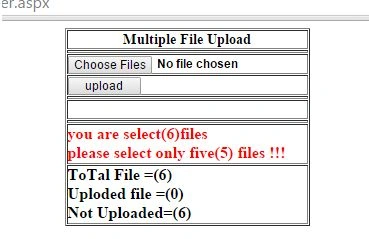
- If the file is not selected.
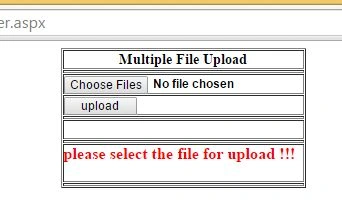
- After uploading multiple files.
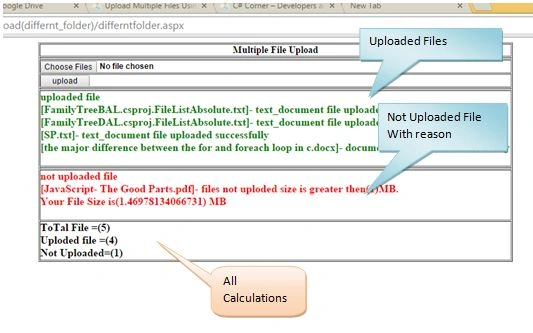
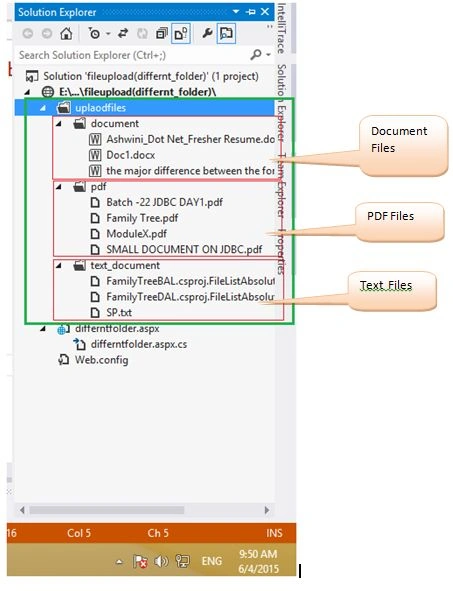
- After uploading files.
Antanijabaraj JPosted Oct 4, 2018, 8:14 AM
HasFiles is correct or need to change HasFile
sikhaPosted Dec 15, 2017, 6:56 AM
This not work in ie11 any suggestion
Amol S DighambarPosted Sep 1, 2015, 6:52 AM
great
Amol SarkatePosted Jun 29, 2015, 11:49 AM
thanks
Shivamala ShiralePosted Jun 29, 2015, 11:45 AM
good nice article it real time too much useful
Amol SarkatePosted Jun 15, 2015, 2:01 PM
thanks shekhar
GR ShekarPosted Jun 15, 2015, 10:19 AM
sh
GR ShekarPosted Jun 15, 2015, 10:19 AM
AMOL BABA............................superb.........its helpfull to us..........keep itup.......upload more functionalities...........thnks
Amol SarkatePosted Jun 15, 2015, 10:12 AM
thanks SIR..!
Santhakumar MunuswamyPosted Jun 8, 2015, 3:08 PM
Thanks for good work
Amol SarkatePosted Jun 8, 2015, 7:16 AM
Thanks Upendra
Upendra Pratap ShahiPosted Jun 8, 2015, 6:09 AM
nice Amol...
Amol SarkatePosted Jun 7, 2015, 1:25 AM
Thanks Santhakumar
Santhakumar MunuswamyPosted Jun 6, 2015, 2:34 AM
Thanks for good work
Kranthi KumarPosted Jun 5, 2015, 2:07 AM
Thank you.Superb Amol.
NitinPosted Jun 4, 2015, 9:41 AM
nice
Amol SarkatePosted Jun 4, 2015, 8:47 AM
thanq sar
Sibeesh VenuPosted Jun 4, 2015, 8:09 AM
Good one.
Amol SarkatePosted Jun 4, 2015, 7:57 AM
thanqqq
Atul GuptaPosted Jun 4, 2015, 7:47 AM
Well explained !