

Introduction
In a client requirement, I needed to create a page where two forms or models exist in a single view (page), like login and registration in the same single view.
Description
To fulfill this requirement, I used MVC with Entity Framework and SQL Server. For more details about MVC, go through my previous articles and blogs.
On the registration page, the user will register as new and on the login page, existing users will log in with their credentials. These two functionalities need to be implemented in the same view using MVC facility. The other script related part is added to show the message for successful or ivalid credentials during registration and login operations.
Source Code
Steps to be followed.
Step 1
Create a table named Users.
- CREATE TABLE [dbo].[Users](
- [UserID] [int] IDENTITY(1,1) NOT NULL,
- [Username] [varchar](50) NULL,
- [Password] [varchar](50) NULL,
- [FullName] [varchar](150) NULL,
- PRIMARY KEY CLUSTERED
- (
- [UserID] ASC
- )WITH (PAD_INDEX = OFF, STATISTICS_NORECOMPUTE = OFF, IGNORE_DUP_KEY = OFF, ALLOW_ROW_LOCKS = ON, ALLOW_PAGE_LOCKS = ON) ON [PRIMARY]
- ) ON [PRIMARY]
- GO
I have added entity data model named "Satyadatabasemodel.edmx" . After creating the Data model, we have to modify our generated entity (table) for applying the validation to the required fields. Here, we need to modify the User.cs file.
Code Ref
- namespace SatyaprakashMultimodels
- {
- using System;
- using System.Collections.Generic;
- using System.ComponentModel.DataAnnotations;
- public partial class User
- {
- public int UserID { get; set; }
- [Required]
- public string Username { get; set; }
- [Required]
- [DataType(System.ComponentModel.DataAnnotations.DataType.Password)]
- public string Password { get; set; }
- [Required]
- public string FullName { get; set; }
- }
- }
Code Description
Here, all the fields are put with the required attribute for validation purposes.
Step 3
I need a ViewModel for getting the data as a single entity. Here, I created a class file named "SignIn.cs" in the ViewModel folder.
Code Ref
- using System;
- using System.Collections.Generic;
- using System.Linq;
- using System.Text;
- using System.Threading.Tasks;
- using System.ComponentModel.DataAnnotations;
- namespace SatyaprakashMultimodels.ViewModel
- {
- public class SignIn
- {
- public User User { get; set; }
- public Login Login { get; set; }
- }
- public class Login
- {
- [Required]
- public string UserName { get; set; }
- [Required]
- [DataType(System.ComponentModel.DataAnnotations.DataType.Password)]
- public string Password { get; set; }
- }
- }
I used two classes, SignIn and Login, for new user registration and for logging the existing users in respectively.
Step 4
Then, I have added one controller action method named "LoginRegister" to the HomeController.cs file.
Code Ref
- using SatyaprakashMultimodels.ViewModel;
- using System;
- using System.Collections.Generic;
- using System.Linq;
- using System.Web;
- using System.Web.Mvc;
- namespace SatyaprakashMultimodels.Controllers
- {
- public class HomeController : Controller
- {
- public ActionResult Index()
- {
- return View();
- }
- public ActionResult LoginRegister(SignIn lr)
- {
- return View(new SignIn { Login = new Login(), User = new User() });
- }
- [HttpPost]
- public ActionResult Login(SignIn l)
- {
- string message = "";
- if (ModelState.IsValid)
- {
- using (CrystalGranite2016Entities1 dc = new CrystalGranite2016Entities1())
- {
- var v = dc.Users.Where(a => a.Username.Equals(l.Login.UserName) && a.Password.Equals(l.Login.Password)).FirstOrDefault();
- if (v != null)
- {
- message = "Login Success";
- return RedirectToAction("Success", new { message = message });
- }
- else
- {
- message = "login failed";
- }
- }
- }
- ViewBag.Message = message;
- return View("LoginRegister", l);
- }
- [HttpPost]
- public ActionResult Register(SignIn r)
- {
- string message = "";
- if (ModelState.IsValid)
- {
- using (CrystalGranite2016Entities1 dc = new CrystalGranite2016Entities1())
- {
- var v = dc.Users.Where(a => a.Username.Equals(r.User.Username)).FirstOrDefault();
- if (v == null)
- {
- dc.Users.Add(r.User);
- dc.SaveChanges();
- message = "Successfully Registered";
- return RedirectToAction("Success", new { message = message });
- }
- else
- {
- message = "Username no available";
- }
- }
- }
- ViewBag.Message = message;
- return View("LoginRegister", r);
- }
- public ActionResult Success(string message)
- {
- ViewBag.Message = message;
- return View();
- }
- public ActionResult About()
- {
- ViewBag.Message = "Your application description page.";
- return View();
- }
- public ActionResult Contact()
- {
- ViewBag.Message = "Your contact page.";
- return View();
- }
- }
- }
Code Description
This Action method is used to render one view for both Login & New User Registration.
- public ActionResult LoginRegister(SignIn lr)
- {
- return View(new SignIn { Login = new Login(), User = new User() });
- }
- [HttpPost]
- public ActionResult Login(SignIn l)
- {
- string message = "";
- if (ModelState.IsValid)
- {
- using (CrystalGranite2016Entities1 dc = new CrystalGranite2016Entities1())
- {
- var v = dc.Users.Where(a => a.Username.Equals(l.Login.UserName) && a.Password.Equals(l.Login.Password)).FirstOrDefault();
- if (v != null)
- {
- message = "Login Success";
- return RedirectToAction("Success", new { message = message });
- }
- else
- {
- message = "login failed";
- }
- }
- }
- ViewBag.Message = message;
- return View("LoginRegister", l);
- }
- public ActionResult Register(SignIn r)
- {
- string message = "";
- if (ModelState.IsValid)
- {
- using (CrystalGranite2016Entities1 dc = new CrystalGranite2016Entities1())
- {
- var v = dc.Users.Where(a => a.Username.Equals(r.User.Username)).FirstOrDefault();
- if (v == null)
- {
- dc.Users.Add(r.User);
- dc.SaveChanges();
- message = "Successfully Registered";
- return RedirectToAction("Success", new { message = message });
- }
- else
- {
- message = "Username no available";
- }
- }
- }
- ViewBag.Message = message;
- return View("LoginRegister", r);
- }
- public ActionResult Success(string message)
- {
- ViewBag.Message = message;
- return View();
- }
Add a View named "LoginRegister.cshtml" in Views >> Home Folder.
Code Ref
- @model SatyaprakashMultimodels.ViewModel.SignIn
- @{
- ViewBag.Title = "User SignIn";
- }
- <h2>Login Register</h2><link rel="stylesheet" href="https://maxcdn.bootstrapcdn.com/bootstrap/3.3.7/css/bootstrap.min.css">
- <script src="https://ajax.googleapis.com/ajax/libs/jquery/3.2.1/jquery.min.js"></script>
- <script src="https://maxcdn.bootstrapcdn.com/bootstrap/3.3.7/js/bootstrap.min.js"></script>
- <script src="https://cdnjs.cloudflare.com/ajax/libs/bootbox.js/4.4.0/bootbox.min.js">
- </script>
- <script>
- bootbox.alert({
- message: '@ViewBag.Message',
- size:'large'
- });
- </script>
- <div style="color:red">
- @ViewBag.Message
- </div>
- <style>
- table {
- font-family: arial, sans-serif;
- border-collapse: collapse;
- width: 100%;
- }
- td, th {
- border: 1px solid #dddddd;
- text-align: left;
- padding: 8px;
- }
- tr:nth-child(even) {
- background-color: #dddddd;
- }
- .button {
- background-color: #4CAF50;
- border: none;
- color: white;
- padding: 15px 32px;
- text-align: center;
- text-decoration: none;
- display: inline-block;
- font-size: 16px;
- margin: 4px 2px;
- cursor: pointer;
- }
- .button4 {
- border-radius: 9px;
- }
- input[type=text], select {
- width: 60%;
- padding: 12px 20px;
- margin: 8px 0;
- display: inline-block;
- border: 1px solid #ccc;
- border-radius: 4px;
- box-sizing: border-box;
- }
- input[type=password], select {
- width: 60%;
- padding: 12px 20px;
- margin: 8px 0;
- display: inline-block;
- border: 1px solid #ccc;
- border-radius: 4px;
- box-sizing: border-box;
- }
- </style>
- <table>
- <tr>
- <th style="background-color: Yellow;color: blue"><b>Existing User SignIn</b></th>
- <th style="background-color: Yellow;color: blue"><b>New User Register</b></th>
- </tr>
- <tr>
- <td>
- @using (Html.BeginForm("Login", "Home", FormMethod.Post))
- {
- <table>
- <tr>
- <td>Username : </td>
- <td>@Html.TextBoxFor(a => a.Login.UserName)</td>
- </tr>
- <tr>
- <td>Password : </td>
- <td>@Html.EditorFor(a => a.Login.Password)</td>
- </tr>
- <tr>
- <td></td>
- <td> <input type="submit" class="button button4" value="Go" /></td>
- </tr>
- </table>
- }
- </td>
- <td>
- @using (Html.BeginForm("Register", "Home", FormMethod.Post))
- {
- <table>
- <tr>
- <td>Fullname : </td>
- <td>@Html.TextBoxFor(a => a.User.FullName)</td>
- </tr>
- <tr>
- <td>Username : </td>
- <td>@Html.TextBoxFor(a => a.User.Username)</td>
- </tr>
- <tr>
- <td>Password : </td>
- <td>@Html.EditorFor(a => a.User.Password)</td>
- </tr>
- <tr>
- <td></td>
- <td>
- <input type="submit" class="button button4" value="Submit" />
- </td>
- </tr>
- </table>
- }
- </td>
- </tr>
- </table>
- @*@section Scripts {
- @Scripts.Render("~/bundles/jqueryval")
- }*@
- <footer>
- <p style="background-color: Yellow; font-weight: bold; color:blue; text-align: center; font-style: oblique">© @DateTime.Now.ToLocalTime()</p> @*Add Date Time*@
- </footer>
Code Description
I have added one single view for both Login and New User Registration. Inside BeginForm, we set the action tag to the specified controller and action for Login and Register action methods in Home Controller.
- @using (Html.BeginForm("Login", "Home", FormMethod.Post))
- {
- }
- @using (Html.BeginForm("Register", "Home", FormMethod.Post))
- {
- }
I have added Bootbox JavaScript library and Div tag to show an error message to the end user.
Error Message displayed using Bootbox.
- <script>
- bootbox.alert({
- message: '@ViewBag.Message',
- size:'large'
- });
- </script>
- <div style="color:red">
- @ViewBag.Message
- </div>
Step-6
I have added another View named "Success.cshtml".
Code Ref
- @{
- ViewBag.Title = "Success";
- }
- <h2>Message Confirmation....</h2>
- <link rel="stylesheet" href="https://maxcdn.bootstrapcdn.com/bootstrap/3.3.7/css/bootstrap.min.css">
- <script src="https://ajax.googleapis.com/ajax/libs/jquery/3.2.1/jquery.min.js"></script>
- <script src="https://maxcdn.bootstrapcdn.com/bootstrap/3.3.7/js/bootstrap.min.js"></script>
- <script src="https://cdnjs.cloudflare.com/ajax/libs/bootbox.js/4.4.0/bootbox.min.js">
- </script>
- <script>
- bootbox.alert({
- message: '@ViewBag.Message',
- size:'large'
- });
- </script>
- <div style="color:green">
- @ViewBag.Message
- </div>
- <footer>
- <p style="background-color: Yellow; font-weight: bold; color:blue; text-align: center; font-style: oblique">© @DateTime.Now.ToLocalTime()</p> @*Add Date Time*@
- </footer>
This View shows up in case of successful user login and user registration only. I have added Bootbox JavaScript library and Div tag to show this success message to the end user.
- <script>
- bootbox.alert({
- message: '@ViewBag.Message',
- size:'large'
- });
- </script>
- <div style="color:green">
- @ViewBag.Message
- </div>
Step-7
Check Web.Config for Database Connection String. Here, add name and nothing but the Autogenerate Database Entity class file name, i.e., "CrystalGranite2016Entities1".
- <connectionStrings>
- <add name="DefaultConnection" connectionString="Data Source=(LocalDb)\MSSQLLocalDB;AttachDbFilename=|DataDirectory|\aspnet-SatyaprakashMultimodels-20171223092521.mdf;Initial Catalog=aspnet-SatyaprakashMultimodels-20171223092521;Integrated Security=True" providerName="System.Data.SqlClient" />
- <add name="CrystalGranite2016Entities1" connectionString="metadata=res://*/Satyadatabasemodel.csdl|res://*/Satyadatabasemodel.ssdl|res://*/Satyadatabasemodel.msl;provider=System.Data.SqlClient;provider connection string="data source=SODN-PAVILION\SQLEXPRESS;initial catalog=CrystalGranite2016;persist security info=True;user id=sa;password=satya;multipleactiveresultsets=True;application name=EntityFramework"" providerName="System.Data.EntityClient" />
- </connectionStrings>
In RouteConfig File, I have added Controller name and Action method name for setting the start page.
- routes.MapRoute(
- name: "Default",
- url: "{controller}/{action}/{id}",
- defaults: new { controller = "Home", action = "LoginRegister", id = UrlParameter.Optional }
- );
OUTPUT
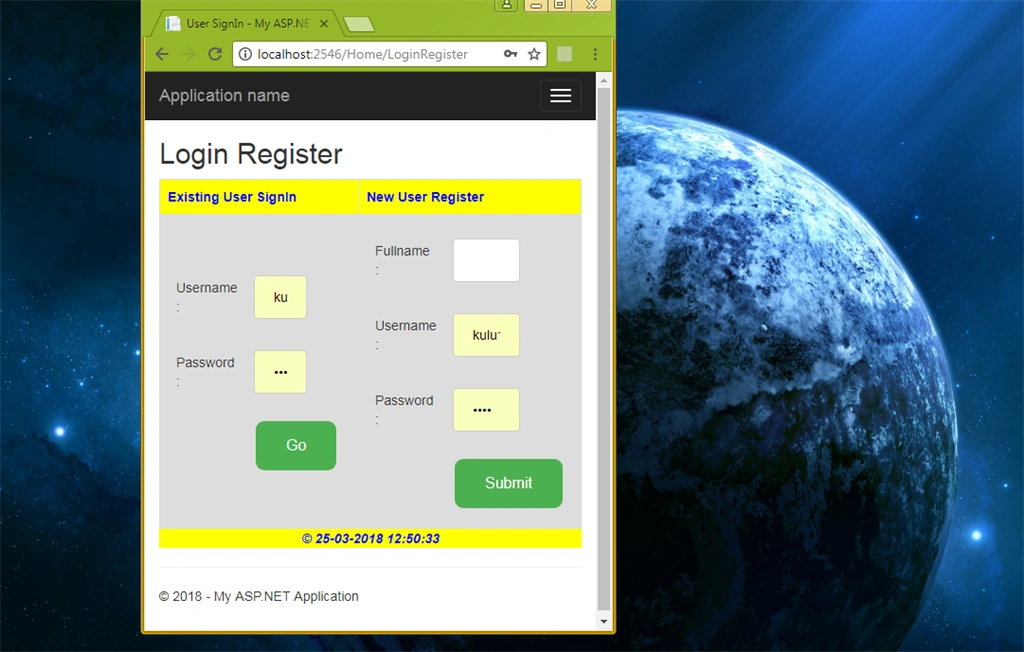
The URL is: http://localhost:2546/Home/LoginRegister
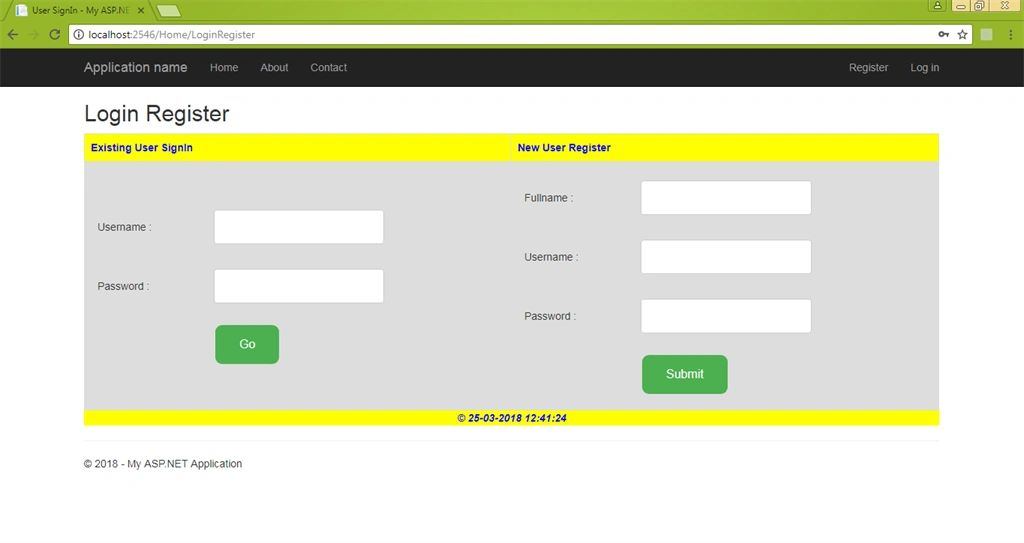
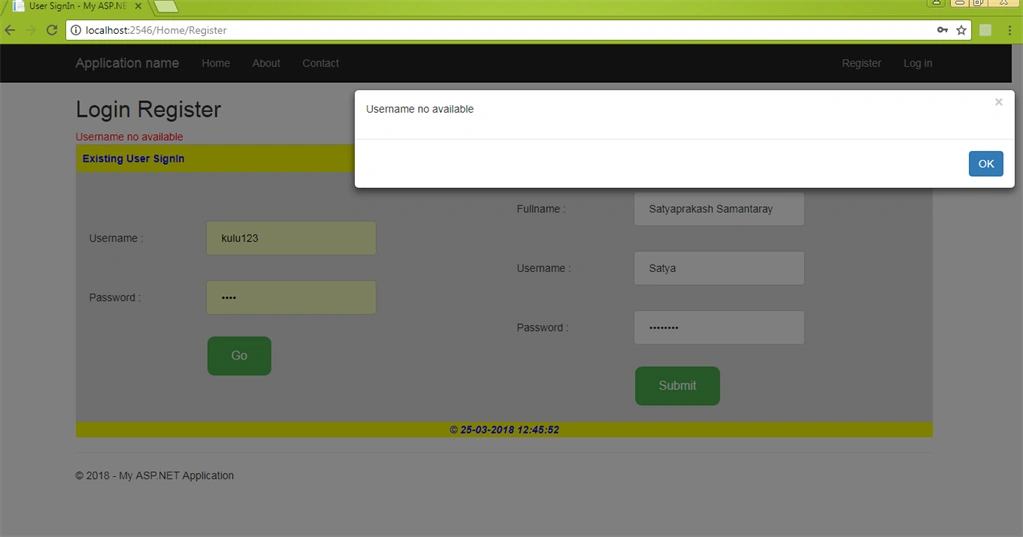
I created a new user as the below image. But already, a user in our database goes by the same username, Satya.
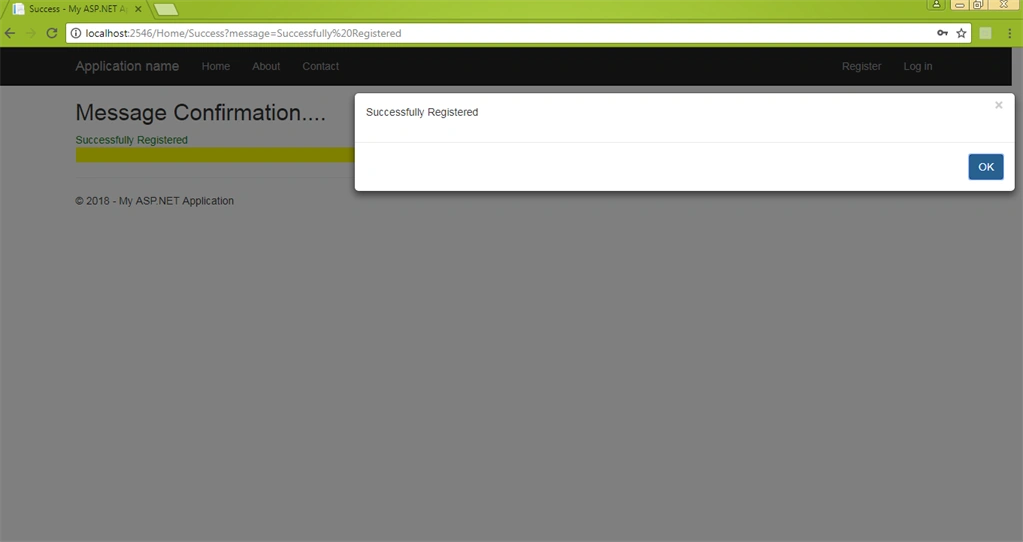
So, I tried different names Satyadev. After that, I got a successful message.
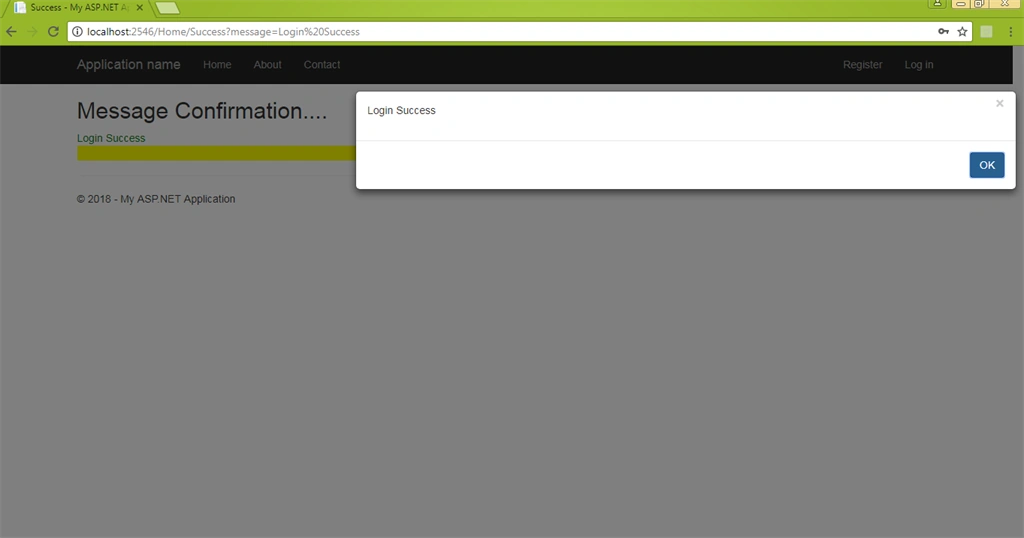
Try for the login part using Satyadev username.
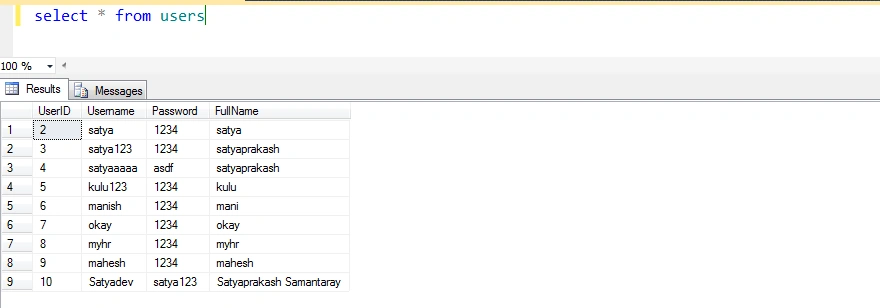
Check In the database:
Mobile View
Summary
- Use more than one model in one view.
- MVC with Entity Framework and Bootstrap.
- Bootbox library for message display.
Tin Ho QuangPosted Nov 25, 2018, 11:57 PM
Thank you for the useful article. BTW may I know why do you use "partial type" in "public partial class User". Thanks
Joe WilsonPosted Mar 31, 2018, 5:17 AM
Thank you for sharing it.
Bhavesh JadavPosted Mar 29, 2018, 6:46 AM
Very good explanation with example which is simple and easy to understand. Thanks to share.