Introduction
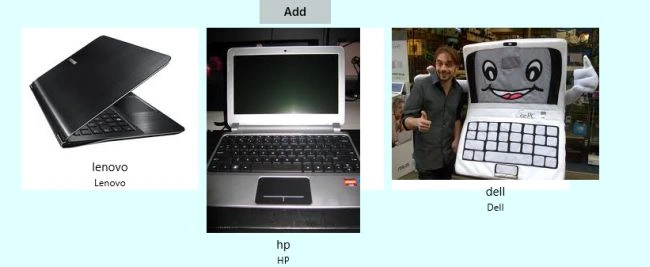
In this article I describe how to create Windows Store Apps for Multiple Selection using JavaScript. This app shows how to use the List View to create an items list such as what you might see in an online store. You can select multiple items by using this app.
I assume you can create a simple Windows Store App using JavaScript; for more help visit Simple Windows Store Apps using JavaScript.
To start the creation of the apps, add one JavaScript page by right-clicking on the js folder in the Solution Explorer and select Add > new item > JavaScript Page and then provide an appropriate name. In the same way, add a HTML page to your project.
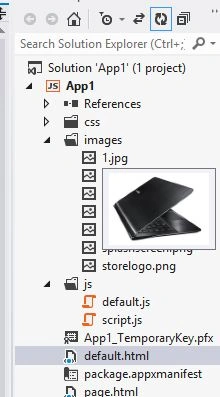
Write the following code in the default.html:
<!DOCTYPE html>
<html>
<head>
<meta charset="utf-8" />
<title></title>
<link rel="stylesheet" href="//Microsoft.WinJS.1.0/css/ui-light.css" />
<script src="//Microsoft.WinJS.1.0/js/base.js"></script>
<script src="//Microsoft.WinJS.1.0/js/ui.js"></script>
<link rel="stylesheet" href="/css/default.css" />
<script src="/js/default.js"></script>
</head>
<body role="application" style="background-color: lightcyan">
<center><div id="rootGrid">
<div id="content">
<h1 id="featureLabel"></h1>
<div id="contentHost"></div>
</div>
</div>
</center>
</body>
</html>
Write the following code in the default.js:
(function () {
"use strict";
var appTitle = "";
var pages = [
{ url: "page.html" }
];
function activated(eventObject) {
if (eventObject.detail.kind === Windows.ApplicationModel.Activation.ActivationKind.launch) {
eventObject.setPromise(WinJS.UI.processAll().then(function () {
var url = WinJS.Application.sessionState.lastUrl || pages[0].url;
return WinJS.Navigation.navigate(url);
}));
}
}
WinJS.Navigation.addEventListener("navigated", function (eventObject) {
var url = eventObject.detail.location;
var host = document.getElementById("contentHost");
host.winControl && host.winControl.unload && host.winControl.unload();
WinJS.Utilities.empty(host);
eventObject.detail.setPromise(WinJS.UI.Pages.render(url, host, eventObject.detail.state).then(function () {
WinJS.Application.sessionState.lastUrl = url;
}));
});
WinJS.Namespace.define("App", {
appTitle: appTitle,
pages: pages
});
WinJS.Application.addEventListener("activated", activated, false);
WinJS.Application.start();
})();
Write the following code in the page.html:
<!DOCTYPE html>
<html>
<head>
<title></title>
<link rel="stylesheet" href="/css/page1.css" />
<script src="/js/script.js"></script>
</head>
<body>
<div data-win-control="App.pageInput">
<button id="page1Cart" class="action">Add </button>
</div>
<div data-win-control="App.pageOutput">
<div id="mediumListIconTextTemplate" data-win-control="WinJS.Binding.Template" style="display: none">
<div class="mediumListIconTextItem">
<img src="#" class="mediumListIconTextItem-Image" data-win-bind="src: picture" />
<div class="mediumListIconTextItem-Detail">
<h4 data-win-bind="innerText: title"></h4>
<h6 data-win-bind="innerText: text"></h6>
</div>
</div>
</div>
<div id="listView1"
class="win-selectionstylefilled"
data-win-control="WinJS.UI.ListView"
data-win-options="{
itemDataSource: myStoreData.dataSource,
itemTemplate: mediumListIconTextTemplate,
selectionMode: 'multi',
tapBehavior: 'invoke',
layout: { type: WinJS.UI.GridLayout }
}">
</div>
</div>
</body>
</html>
Write the following code in the script.js:
var myStoreData = new WinJS.Binding.List([
{ title: "lenovo", text: "Lenovo", picture: "images/1.jpg", stock: "in_stock" },
{ title: "hp", text: "HP", picture: "images/2.jpg", stock: "in_stock" },
{ title: "dell", text: "Dell", picture: "images/3.jpg", stock: "out_stock" },
]);
(function () {
"use strict";
var page = WinJS.UI.Pages.define("page.html", {
ready: function (element, options) {
var listView = element.querySelector("#listView1").winControl;
listView.forceLayout();
function addSelectionToCart() {
if (listView.selection.count() === 0) {
WinJS.log && WinJS.log("No Items Selected!", "app", "error");
} else {
listView.selection.getItems().done(function (items) {
var selectedItemsString = "You have added ";
for (var i = 0; i < items.length; i++) {
if (i !== 0 & i === items.length - 1) {
selectedItemsString += "and ";
}
selectedItemsString += items[i].data.title;
if (i !== items.length - 1) {
selectedItemsString += ", ";
}
}
selectedItemsString += " to the cart.";
WinJS.log && WinJS.log(selectedItemsString, "app", "status");
listView.selection.clear();
});
}
}
function itemInvokedHandler(eventObject) {
eventObject.detail.itemPromise.done(function (invokedItem) {
var itemData = invokedItem.data;
WinJS.log && WinJS.log("You have been navigated to the product detail page for " + itemData.title + " - " + itemData.text, "app", "status");
});
}
element.querySelector("#page1Cart").addEventListener("click", addSelectionToCart, false);
listView.addEventListener("iteminvoked", itemInvokedHandler, false);
}
});
})();
Output:
Summary
In this article I described how to create a Windows Store App for selecting multiple items using JavaScript. I hope this article has helped you to understand this topic. Please share it. If you know more about this, your feedback and constructive contributions are welcome.


Join the conversation! Your thoughts help the community grow.