Multi‑tenancy lets a single application instance serve multiple customers (tenants) while preserving data isolation, security, and room for customization. Selecting the right strategy is foundational for any SaaS platform because it shapes scalability, operational complexity, compliance posture, and cost.
In a .NET Clean Architecture, multi‑tenancy is best treated as an Infrastructure concern. The API layer identifies the tenant on each request; the Infrastructure layer decides where and how to store and retrieve data. Keeping Domain and Application layers tenant‑agnostic preserves business logic and reduces the cost of future storage strategy changes.
Multi‑Tenancy Models
1) Shared Database, Shared Schema
All tenants share the same database and tables, with a TenantId column separating data.
Example:
Customers
----------
Id
Name
TenantId
Entity Framework Core typically enforces tenant separation via Global Query Filters.
Advantages
Lowest infrastructure and licensing cost.
Simple deployment and maintenance.
Efficient resource utilization and fast onboarding.
Scales well for many small/medium tenants.
Challenges
Lowest isolation; a misconfigured filter risks cross‑tenant leakage.
Large, multi‑tenant tables can slow down over time.
Harder to meet strict compliance or data residency requirements.
Best fit
2) Shared Database, Separate Schema
Tenants share a database instance, but each gets its own schema (e.g., TenantA.Users, TenantB.Users).
Advantages
Better isolation than shared tables.
Easier tenant‑level backups and targeted restores.
Space for tenant‑specific customizations.
Cleaner segregation for reporting/administration.
Challenges
Schema migrations grow complex as tenant count rises.
Requires tooling for managing many schemas.
Some cloud DBs limit schema counts or management operations.
Higher operational complexity than shared tables.
Best fit
3) Separate Database per Tenant
Each tenant gets a dedicated database. A connection string resolver selects the database per request, commonly via middleware, a tenant context, and a DbContextFactory.
Advantages
Strongest data isolation; natural blast‑radius containment.
Independent backup/restore and disaster recovery.
Supports rigorous compliance (e.g., GDPR, HIPAA, residency).
Per‑tenant performance tuning and maintenance windows.
Eliminates accidental cross‑tenant access via queries.
Challenges
Higher infra and ops costs.
Provisioning, migrations, and monitoring multiply with tenant count.
Requires mature tenant lifecycle automation.
Best fit
Enterprise SaaS.
Finance, healthcare, public sector.
Tenants with dedicated SLAs and compliance demands.
4) Hybrid Multi‑Tenancy
Mix strategies by tenant profile or plan to align cost with value.
| Tenant Type | Storage Model |
|---|
| Free Tier | Shared Schema |
| SMB | Separate Schema |
| Enterprise | Dedicated Database |
Advantages
Serves diverse customer segments efficiently.
Optimizes cost while preserving isolation where needed.
Enables seamless tenant upgrades across tiers.
Adapts as business and regulatory needs evolve.
Challenges
Most complex to design, test, provision, and monitor.
Requires disciplined DevOps and observability.
Cross‑strategy testing adds overhead.
Best fit
Large, multi‑segment SaaS platforms.
Products with tiered subscriptions and varied compliance/SLA needs.
Implementing Multi‑Tenancy in .NET Clean Architecture
Keep tenant awareness in Infrastructure while preserving domain purity. A common request flow looks like this:
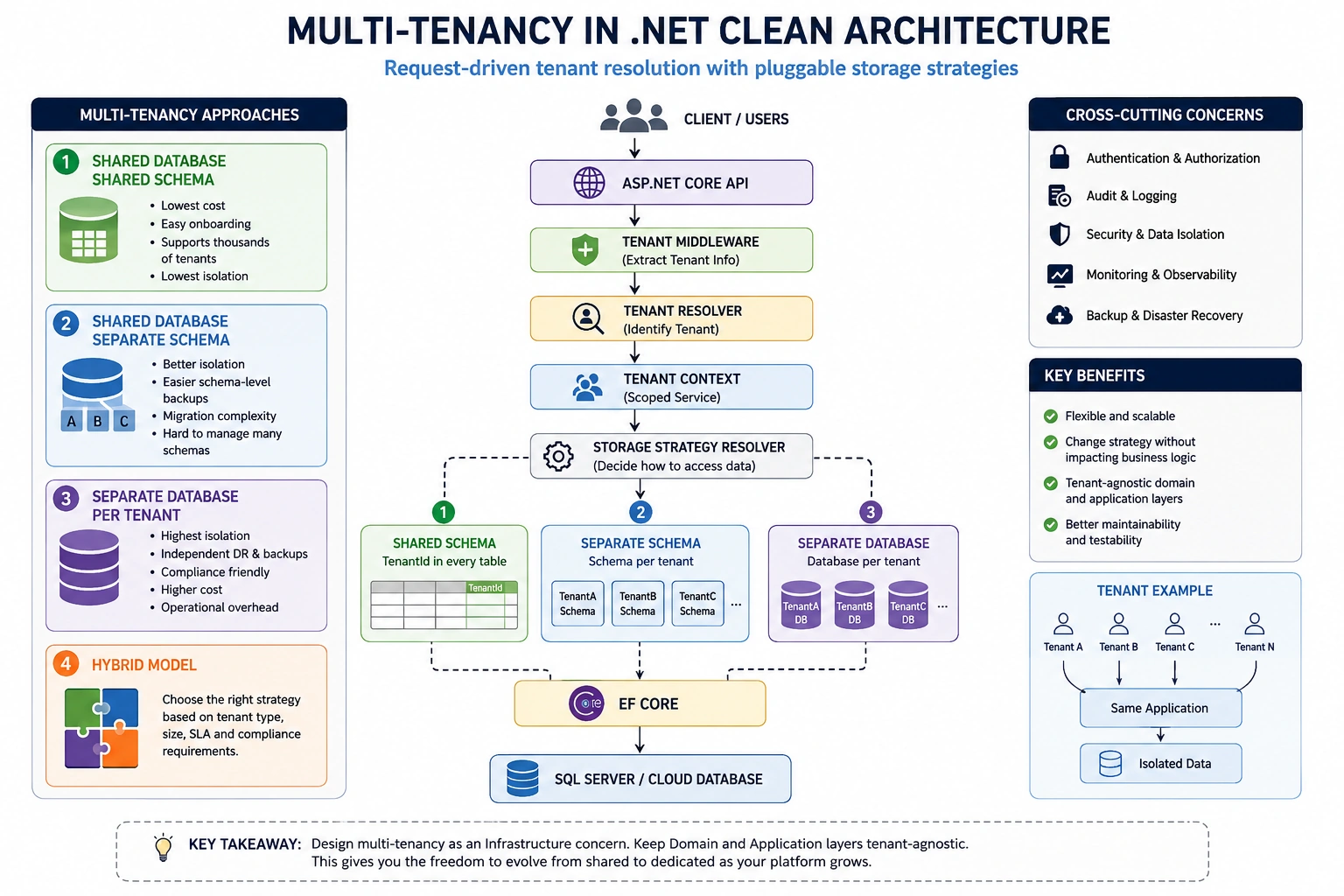
Key building blocks
Tenant Middleware (extract tenant from header/host/route; validate and attach to context).
Tenant Context (scoped service holding TenantId, plan, region, and flags).
Tenant Resolver (maps request data to a known tenant record).
Connection String Resolver (selects DB/schema/credentials per tenant).
Storage Strategy Resolver (routes to shared schema, per‑schema, or per‑DB path).
EF Core Global Query Filters (enforce TenantId in shared models).
DbContextFactory (create contexts with the right connection/filters at runtime).
Tenant Provisioning Service (create schemas/DBs, seed data, manage lifecycle).
Design tips
Make Domain/Application layers tenant‑agnostic; pass TenantId only where necessary for invariants.
Centralize multi‑tenant concerns (filters, resolvers) to avoid scattering cross‑cutting logic.
Use value objects or typed identifiers for TenantId to reduce accidental misuse.
Log with tenant context for traceability; avoid logging sensitive data.
In shared models, add unique indexes that include TenantId to prevent collisions.
For query performance, partition or shard large multi‑tenant tables; consider row‑level security where supported.
For migrations at scale, invest early in orchestration (e.g., background workers, queues) and idempotent scripts.
Choosing the Right Strategy
Choose Shared Schema when cost and speed trump isolation, and compliance is light.
Choose Separate Schema when you need a balance of isolation and operational simplicity.
Choose Separate Database for strict isolation, bespoke SLAs, or regulated workloads.
Choose Hybrid to serve distinct customer tiers efficiently with a path for upgrades.
There is no one‑size‑fits‑all answer. The best strategy is the one you can evolve. Design your .NET solution so you can move from shared to dedicated storage as your customer base, compliance landscape, and scale demands change—without rewriting your business logic.
Appendix: Practical .NET Implementation Sketches
Adding a tenant filter with EF Core
public class AppDbContext : DbContext
{
    private readonly TenantContext _tenant;
    public AppDbContext(DbContextOptions<AppDbContext> options, TenantContext tenant)
        : base(options) => _tenant = tenant;
    protected override void OnModelCreating(ModelBuilder modelBuilder)
    {
        modelBuilder.Entity<Customer>()
            .HasQueryFilter(c => c.TenantId == _tenant.Id);
    }
}
ASP.NET Core middleware to resolve the tenant
public class TenantMiddleware
{
    private readonly RequestDelegate _next;
    public TenantMiddleware(RequestDelegate next) => _next = next;
    public async Task InvokeAsync(HttpContext context, ITenantResolver resolver, TenantContext tenantCtx)
    {
        var tenant = await resolver.ResolveAsync(context.Request);
        if (tenant is null)
        {
            context.Response.StatusCode = StatusCodes.Status401Unauthorized;
            await context.Response.WriteAsync("Unknown tenant");
            return;
        }
        tenantCtx.Set(tenant); // sets Id, plan, region, etc.
        await _next(context);
    }
}
Per‑tenant connection selection with DbContextFactory
public class TenantDbContextFactory : IDbContextFactory<AppDbContext>
{
    private readonly IConnectionStringResolver _connResolver;
    private readonly IDbContextOptionsFactory _optionsFactory;
    private readonly TenantContext _tenant;
    public TenantDbContextFactory(
        IConnectionStringResolver connResolver,
        IDbContextOptionsFactory optionsFactory,
        TenantContext tenant)
    {
        _connResolver = connResolver;
        _optionsFactory = optionsFactory;
        _tenant = tenant;
    }
    public AppDbContext CreateDbContext()
    {
        var conn = _connResolver.GetFor(_tenant);
        var options = _optionsFactory.Create(conn);
        return new AppDbContext(options, _tenant);
    }
}
Migration orchestration hint
Maintain a migrations history per storage unit (schema or DB).
Run migrations idempotently across tenants through a queued job.
Record success/failure with tenant IDs for observability and retries.
By encapsulating multi‑tenant concerns in Infrastructure and keeping your core logic clean, you set yourself up to iterate on storage strategies as your SaaS grows—without compromising correctness, security, or delivery velocity.

Join the conversation! Your thoughts help the community grow.