

Topics Covered
- MVC Framework
- Model in details
- View in details
- Controller in details
- Pipeline in MVC
- Routing
MVC Framework
Model View Controller (MVC) is simply a framework for designing web applications, as simple as its definition could be.
- Model: This layer represents the core of an application. It is responsible for maintaining the data of the application or can be called the Business Layer.
- View: As the name says, this layer displays the data fetched or the designs. This can be called simply the Display Layer.
- Controller: This handles the input to the database or fetches the data from the database records. This can be simply called the Input Layer.
The three layers are interconnected and are dependent on each other. The following figure will explain that better: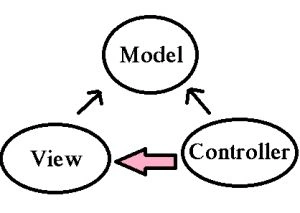
As we can see in the preceding, the Data layer or the Model that deals with the data is accessed both by the View and the Controller. Here, in MVC there is a separation between every layer, that helps in loose coupling the items and also in the application development process. Now, one might wonder what exactly Separation of Concerns means! This can be framed as there should not be or there should be a minimum of overlapping/dependency of functions in an application. For example, take the scenario of the View and the Controller. Can they be separately done? That is, can their be no dependency among them? The View is the presentation layer and the Controller is the action layer. We can have in a real scenario a controller without a View, but a view without a controller sounds a bit radical. This is not necessarily always true. So, we can conclude here that Separation of Concerns can be minimal but there still lies a Grey area. Note: Thus always have a separate UI layer, Data Access Layer & Logic Layer to get clean separation. 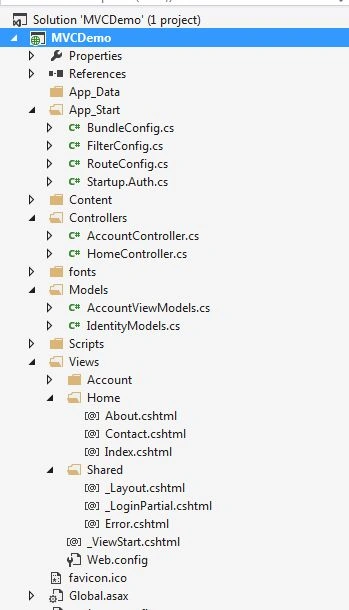
The preceding image displays the simple MVC folder structure. The Models having the Entities, Controllers as well as the Views for each controller, the shared folder having the master pages.

Let's get into more details.
Models
Models (in a bit more depth): Contains all the application logic, in other words:
- Business logic
- Validation Logic
- Data access logic
This holds as well as manipulates the data in the database. This folder contains the classes/entities that are required and present in the application.
Views
Views (in a bit more depth): The View generally stores the HTML files that may be .cshtml or .vbhtml (C# and VB) respectively. These may have extensions as html, asp, aspx. The interesting thing is that for every controller there is a view folder and for every action a view. There is always a Shared folder inside View, that is used to have the Layout or the Master pages.
Controllers
Controllers (in a bit more depth): This contains the controller classes responsible for input and responses. The name of the Controller ends with Controller to distinguish. For example, "HomeController.cs". Every controller implements the Icontroller interface from the System.Web.Mvc namespace.
- public interface Icontroller {
- void Execute(RequestContext requestContext);
- }
- HttpHandlers and HttpModules: Module or the HttpModules is an assembly, that is called on every request that is made to our application. Where as the HttpHandlers is the solution/answer or running in response to the request made.
- ROUTING: This is the first step in the MVC pipeline, it is a pattern to match the incoming URL request to the application. These URLs are matched to the URLs registered to the Route Table. The route table has its set up done in the Global.asax. The routes are registered to the RouteConfig class that has the route URLs to be mapped and ignored in the application. Let's have a look at it:
- protected void Application_Start()
- {
- RouteConfig.RegisterRoutes(RouteTables.Routes);
- }
Then the UrlRoutingModule discussed previously finds a matching route for the incoming URL from the Route Table. When it matches, it retrieves the IRouteHandler instance for that route (MvcRoutehandler). Then the IRouteHandler's GetHttpHandler() is called and finally the ProcessRequest() method is invoked. Then MvcRoutehandler instantiates and executes controller.- public class RouteConfig
- {
- public static void RegisterRoutes(RouteCollection routes)
- {
- routes.Ignore(“{resource}.axd/{*pathinfo}”);
- routes.MapRoute(
- name:"",
- url:"{controller}/{action}/{id}",
- defaults: new {controller = "Home",action="Index",id=UrlParameter.optional}
- );
- }
- }
Here as you can see, the URL has the {controller}/{action}/{id}, the id is optional that is defined in the defaults. The URL may also be only {controller}/{action}. Since the routes will be specified or registered in the Route Table, so will be the navigation.
This is how the routing works on an incoming request from the browser. Similarly we can use custom routes also since we do not always use Home/Index .. ;)- public class TenantController : Controller //Derived from Base controller
- {
- public ActionResult Index() //Default Action method-URL: /Home/Index
- {
- return View();
- }
- public ActionResult Index(int id) //Action Method with an Id as parameter // -URL: /Home/Index/3
- {
- return View();
- }
- }
If the URL matches any of the routings registered in the Table, the user lands on the View else 404 error not found page.- public class RouteConfig
- {
- public static void RegisterRoutes(RouteCollection routes)
- {
- routes.Ignore(“{resource}.axd/{*pathinfo}”);
- routes.MapRoute(
- name:"Employee",
- url:"{controller}/{action}/{id}",
- defaults: new{controller = "Employee",action="Add",id=UrlParameter.optional}//Adds a new employee action
- );
- }
- }

- Initialization of Controller: The real processing starts by the use of ProcessRequest(), that uses the IcontrollerFactory instance to create the corresponding controller for the URL request. The IcontrollerFactory returns the appropriate controller for the request and instantiates that. Then the Execute() method mentioned above is invoked.
- Invoking Controller Action: The Execute() method refers to the RouteData to get the appropriate action for the controller in the URL request. The controller then invokes its own InvokeAction() method as in the following:
public virtual bool InvokeAction(ControllerContext controllerContext, string actionName)
After getting the appropriate action, then comes the work of the model binders, the default being System.Web.Mvc.DefaultModelBinder, receives the Http request, validates and does the conversions required and also maps the input values from the user.
- Render View: The user will now be expecting the beauty of the application to be shown. The View follows the same pattern as the Route. That is, the controller factory has a property known as ViewFactory(), that is a type of IviewFactory. This IviewFactory defines a method called CreateView(), that gets a name and instantiates and returns an IView that has a property/method called RenderView() that has the necessary context information from the HttpResponse and returns the HTML data as the response.

This was the basic and foremost things to understand about MVC. These are all done on the background. Being developers, not bothering about the flow is now worthy enough. Thus, just adding an action and obviously a View to the Controller does not mean we have done something great!! You would always prefer a pot full with water rather than the one that is nearly empty!

We are done with the first part. We will be covering interesting topics for learning MVC in Part 2 I hope this helps at least. Any suggestions, queries and comments are most welcome.
Roshan RathodPosted Jul 23, 2020, 6:40 AM
Good one ...keep it up
Joginder BangerPosted Mar 16, 2018, 9:37 AM
Sir what is the exect use of Pipeline or why we need technichque. If I'm right Pipeline is the innternal part of Route class. please can you more explore for me.
Suraj SahooPosted Jan 19, 2015, 1:05 PM
Thanks Sibeesh
Sibeesh VenuPosted Jan 19, 2015, 1:03 PM
Good one
Saineshwar BageriPosted Jan 13, 2015, 11:24 PM
nice one
Sandeep Singh ShekhawatPosted Jan 13, 2015, 4:41 AM
Dear Buddy, I am so happy to see you here.
Gaurav Kumar AroraPosted Jan 13, 2015, 2:39 AM
Good contents Suraj. I noticed similar contents on CodeProject. Csharpcorner is good platform to enhance skills, keep it up!
Dinesh BeniwalPosted Jan 13, 2015, 2:00 AM
Good start Suraj, Welcome to C# Corner.