

The MVVM Light Toolkit helps you to separate your View from your Model and View model, which creates Applications, that are cleaner and easier to maintain.
Let’s see the steps.
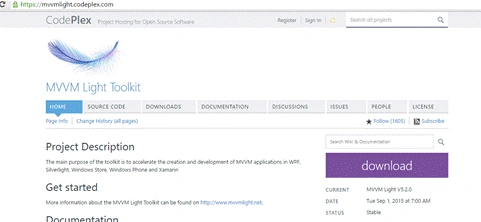
First, install the MVVM Light toolkit. For it, you need to click here , download and install it, as shown below:
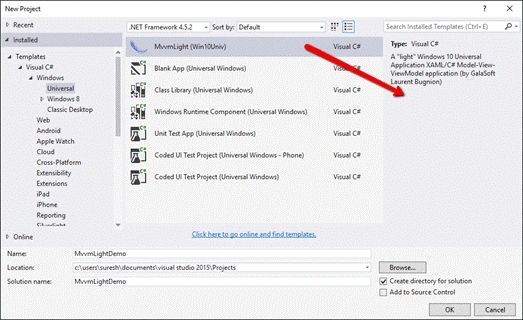
Once installed successfully, create new Application with MVVM Pattern, shown in the screenshot, given below:.
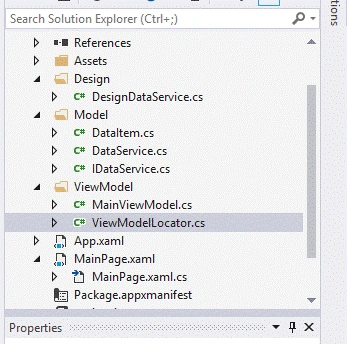
Once created, look at the Solution Explorer, shown in the structure, given below:
If you already have a project, just install the MVVM Light, using NuGet Package Manager. Right click on the Reference and select the NuGet Package Manager. Search mvvm light toolkit and install it, shown in the image, given below:.

Let’s see the important points.
ViewModelBase: All the VieModel need to inherits from ViewModelBase and uses its methods. Like the following code.
- public class MainViewModel : ViewModelBase
- {
- }
- SimpleIoc.Default.Register<MainViewModel>();
- public MainViewModel Main => ServiceLocator.Current.GetInstance<MainViewModel>();
- public class MainViewModel: ViewModelBase
- {
- private readonly INavigationService _navigationService;
- public MainViewModel(INavigationService navigationService) {
- _navigationService = navigationService;
- _navigationService.NavigateTo("Page2");
- Initialize();
- }
- }
- To Navigate back
- _navigationService.GoBack();
- var dialog = ServiceLocator.Current.GetInstance<IDialogService>();
- await dialog.ShowMessage("MVVM Light ToolKit","http://windowsapptutorials.wordpress.com/");
We will see more details in the upcoming articles.
Ramesh PalaniappanPosted Aug 10, 2016, 10:19 AM
Nice Article.
Prasanna MuraliPosted Aug 9, 2016, 9:11 PM
Nice post...