
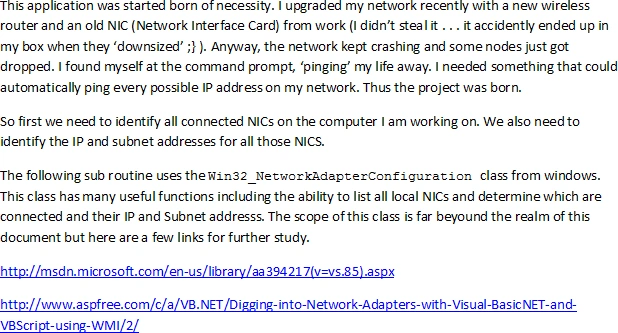
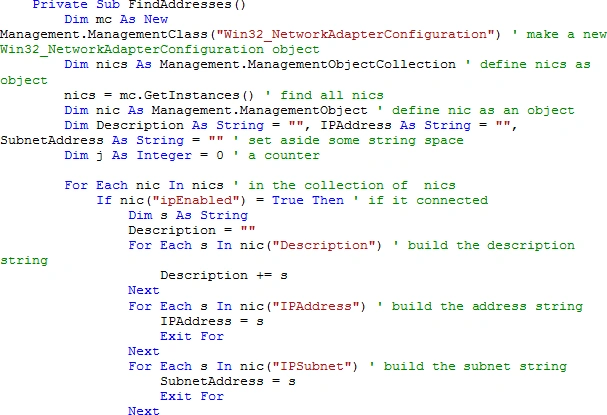
Now that we have an address and subnet, we know exactly what we can do as far as
pinging. The next step is to actually start the ping.
We can define a ping as follows:
Dim
png As New
Net.NetworkInformation.Ping
The Ping.Send method has several
overloaded methods but the one that we will use here is Ping.Send(IPAddress).
All send methods return a PingReply structure which contains the address and
round trip time. So we can send a ping and get a reply which can then be
analyzed.
PingReply =
png.Send(PingAddress) ' ping the IP and capture the
responce
From the address we can then
determine the node name like so:
Dim IpToDomainName
As IPHostEntry = Dns.GetHostEntry(IP)
'return information about a particular
address
Return (IpToDomainName.HostName)
' the name of that node is in that info
Putting all that together we get the following code snippet.
Static row As
Long
Dim pr
As PingReply '
pinging an address returns a structure called ping reply
Dim ComputerName
As String =
""
Timer1.Enabled = False
' since we are doing this periodically on a timer,
just disable the timer while we are in here to prevent re-entry
' turn the timer back on when we
leave. This ensures the fastest turn around
If DataGridView1.ColumnCount <
3 Then '
initialize the colums of the grid view
DataGridView1.Columns.Add("Column1",
"IP")
DataGridView1.Columns.Add("Column1",
"Time")
DataGridView1.Columns.Add("Column1",
"Name")
End If
If txtIP.Text <>
"" Then
' if there is an IP selected
If PingAddress =
"" Then
' if the ping address is empty
PingAddress = txtIP.Text '
fill it from the text box otherwise just ping the address in the box (for
inrementing the address
If
Not FindAddressBytes()
Then ' convert the
IP address into a four byte array
Exit
Sub 'if that
didn't work . . . give up
End
If
End
If
Else
PingAddress = ""
End
If
Try
ToolStripStatusLabel2.Text =
"initializing"
' inform the user
RebuildPingAddress() ' this
reconverts the address from four byte array back to a string (after we have
automatically incremented it
txtIP.Text = PingAddress ' show
the user where we are
' we are now ready to send a ping
to see if anyone is home
'Dim png As New
Net.NetworkInformation.Ping
pr = png.Send(PingAddress) ' ping
the IP and capture the responce
ToolStripStatusLabel2.Text =
"pinging " & PingAddress
If pr.Status = IPStatus.Success
Then ' if the
responce was good
DataGridView1.Rows.Add() ' we
should add a new row to the grid view
DataGridView1.Rows(row).Cells(0).Value = pr.Address
' and fill that row in with address
DataGridView1.Rows(row).Cells(1).Value =
pr.RoundtripTime.ToString & " ms"
' round trip time
' we should now show the name
of the device / computer at that address
ComputerName = DoGetHostEntry(pr.Address.ToString)
DataGridView1.Rows(row).Cells(2).Value = ComputerName
' display that nodes name
'b = pr.Buffer ' the buffer
contains the returned data from the ping (most often just a series of bytes
If
Not active Then
' allow the user to cancel
ToolStripStatusLabel2.Text =
"User Canceled"
Exit
Sub
So we have 'pinged' our own address and found that we are there. It didn't take all that code to figure that out. What we would like to know is whether or not there are others on the same network. That's the same only a different address. If we knew all the addresses that were on the network, we would just make a list and ping them but we don't. Therefore we must ping all addresses that are within the range of our subnet by incrementing the address after each ping. If the ping is successful then we add that info to the list and keep going.
Of course 'if it is worth doing, it is worth overdoing . . . we might like to see what ports are open and thus vulnerable. This can be done in the straightforward / slow manner by trying to open every port from 0 to 65535. If it connects then that port is open. If an error occurs that port is not open. Opening a port that is available is quite quick. If all ports were open this would be fast and furious but any time the port is not open, it takes atleast a second to throw an error, So we are looking at more that 65000 seconds to check a normal node and there are usually more than one nodes.
I think I just fell asleep thinking about all that waiting . . . excuse me while I make some coffee.
If you are only checking a few of the more commonm nodes there is no need to get fancy so lets look at the easy way first.
To check to see if a port is open you can use the TCPClient.Connect method:
'instanciate a new instance of the TCPClient Class
' try to use the connect method to connect to the particular port on the particular address
' if the connection worked
' close the connection since we really don't need to do anything more
' mark the status as connected
' if an exception occured then the port os not open
' clear the error for general principals
' mark it as not open
Dim TCP As TcpClient = New TcpClient()
Try
TCP.Connect(IPAddress, p.Portid)
If TCP.Connected Then
TCP.Close()
ClassStatus = ClassStatusEnum.DoneConnected
End If
Catch
ex As Exception
Err.Clear()
ClassStatus = ClassStatusEnum.DoneNotConnected
End
Try
Of course we now need to write code that checks each port one at a time to see
if the call (to the previous code) suceeded in connecting. Pretty straight
forward, so I won't go deeply into the details except that you need to pass it
two lists of PortStruct (Int32 PortNumber, and String PortUsage ). The first
list is a list of ports to check passed by value. The second is a list to be
filled in of ports that are open and is therefore passed by referance (pointer).
Check each port in sequence and if it connected add it to the list of open ports
and voila (as they say somewhere).
Private Function
SlowCheckThem(ByVal PortsToTest
As List(Of
PortStruct), ByVal openPorts
As List(Of
PortStruct)) As
Boolean
Dim rv
As Boolean =
False
Dim c()
As clsCheckPort =
Nothing ' create an array of clsCheckPort
Dim prt
As PortStruct
Dim j As
Integer = 0
Dim ThreadArray()
As Thread ' Create
an array of Threads
Try
For Each p
As PortStruct In
PortsToTest ' check each port
ReDim
Preserve c(j) '
instanciate a clsCheckPort for each port to check
ReDim
Preserve ThreadArray(j)
' instanciate a threasd for each port to check
c(j) = New
clsCheckPort(PingAddress, p.PortId)
c(j).CheckPort() ' start the thread
. . . passing the port structure to the thread
j += 1
Application.DoEvents()
Next
For i
As Integer =
0 To j - 1 ' check
each instance of the class
If c(i).CheckStatus =
clsCheckPort.ClassStatusEnum.DoneConnected Then
'if the status nis done and connected
prt.PortId = c(i).Port '
create and fill in a structure
prt.PortUse = c(i).PortUse
openPorts.Add(prt) ' to add it
to the openPorts list
End
If
Application.DoEvents()
Next
rv = True
Catch ex
As Exception
End Try
Return rv
End Function
If you want to check a lot of ports (for instance
. . . all of them), you won't use the previous method. You will want to create a
bunch (an array) of threads that will each check one port. Give it a small
amount of time to finish checking and then check the results.
Private Function
CheckThem(ByVal PortsToTest
As List(Of
PortStruct), ByVal openPorts
As List(Of
PortStruct)) As
Boolean
Dim rv
As Boolean =
False
Dim c()
As clsCheckPort =
Nothing ' create an array of clsCheckPort
Dim prt
As PortStruct
Dim j As
Integer = 0
Dim ThreadArray()
As Thread ' Create
an array of Threads
Try
For Each p
As PortStruct In
PortsToTest ' check each port
ReDim
Preserve c(j)
ReDim
Preserve ThreadArray(j)
c(j) = New
clsCheckPort(PingAddress, p.PortId) ' instanciate a
clsCheckPort for each port to check
ThreadArray(j) = New
Thread(AddressOf c(j).CheckPort)
' instanciate a threasd for each port to check
ThreadArray(j).Start() '
start the thread
j += 1
Application.DoEvents()
Next
Wait(1000) ' give the last thread
a moment ot complete
For i
As Integer =
0 To j - 1 ' check
each instance of the class
If c(i).CheckStatus =
clsCheckPort.ClassStatusEnum.DoneConnected Then
'if the status nis done and connected
prt.PortId = c(i).Port '
create and fill in a structure
prt.PortUse = c(i).PortUse
openPorts.Add(prt) ' to add it
to the openPorts list
End
If
Application.DoEvents()
Next
rv = True
Catch ex
As Exception
End Try
Return rv
End Function
To check many ports efficiently and quickly we
pass a different function the same lists as before. In the function we first
create an array of the class that does the work and then we create an array of
threads to do the work. Loop through and start all the threads. While you are
busy starting one thread, the previous thread will have been working its magic.
If it connects, it will probably be done before you call the next thread. if not
. . . who cares?
When you finish calling the last thread, just wait for a moment (a few
milliseconds) to let the last few threads connect if they can. Then start
checking the class array to see who has connected. Fill the open list in and
voila (as they say somewhere else). The rest is just normal code.
Join the conversation! Your thoughts help the community grow.