
Use the following reference for MySQL
- using MySql.Data.MySqlClient;
1.Open the visual Studio
2.Create the new website and save it
3.Now open the Default.aspx form and drag some Labels, text boxes and button.
- <asp: Label ID="Label1" runat="server" Text="Name">
- </asp:Label>
- <asp:TextBox ID="TextBox1" runat="server"></asp:TextBox><br /> <br />
- <asp:Label ID="Label2" runat="server" Text="Address"></asp:Label>
- <asp:TextBox ID="TextBox2" runat="server">
- </asp: Textbox> <br /> <br />
- <asp:Label ID="Label3" runat="server" Text="Age"></asp:Label>
- <asp:TextBox ID="TextBox3" runat="server">
- </asp: Textbox> <br /> <br /> <br /> <br />
- <asp:Button ID="Button1" runat="server" onclick="Button1_Click" Text="Button" /> <br /> <br /> <br /> <br />
4.Now create the connection
- public partial class _Default: System.Web.UI.Page
- {
- MySqlConnection con;
- MySqlCommand cmd;
- string str;
- }
5.Write the Code on Page_load event.
- protected void Page_Load(object sender, EventArgs e) {
- con = new MySqlConnection("Data Source=localhost;Database=brijesh;User ID=root;Password=sys123");
- con.Open();
- Response.Write("connect");
- }
Here Localhost is the
server
name, brijesh is the database name, the root is the user id and password is sys123. You must ensure that you have installed
MYSQL Administrator.
It's a great little application that provides a GUI to help you manage your new database server. While you can get up and running using only the
command
line,
for users who are used to using Windows applications and wince at the thought of editing configuration files by hand or using a
command prompt
it's almost a necessity. For the rest of this article, I'll assume you've installed MySQL Administrator and I'll be using it for illustration.
,
for users who are used to using Windows applications and wince at the thought of editing configuration files by hand or using a
command prompt
it's almost a necessity. For the rest of this article, I'll assume you've installed MySQL Administrator and I'll be using it for illustration.
6.Now write the code on button_click event
- protected void Button1_Click(object sender, EventArgs e) {
- str = "insert into emp_info1 values ('" + TextBox1.Text + "','" + TextBox2.Text + "','" + TextBox3.Text + "')";
- cmd = new MySqlCommand(str, con);
- cmd.ExecuteNonQuery();
- }
OUTPUT OF THIS APPLICATION:
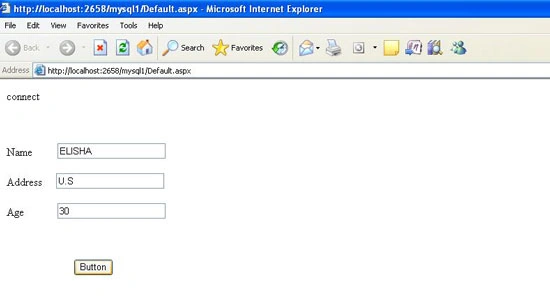 The name, address, and age automatically added to the MySQL database server, and if you want you to check it using the MySql command line.

Now the name ELISHA is inserted Successfully.
srinivas prabhuPosted Nov 18, 2021, 6:54 AM
It is giving error like Could not load file or assembly 'MySql.Data, Version=8.0.27.0, Culture=neutral, PublicKeyToken=c5687fc88969c44d' or one of its dependencies.
pushpendra singhPosted Feb 3, 2012, 12:26 PM
I am new to C# and mysql database connectivity. What I want to do is ....to connect my c# window based application to the mysql database which is online. Please send the solution to my id [email protected] thanks in advance..