

Introduction
C# 4.0 introduced two new concepts, Named parameters and Optional parameters. In this article and code examples, let's see how we can use and take advantages of named parameters and optional parameters in C# and .NET.
Named Parameter
Named Parameters allow developers to pass a method arguments with parameter names. Prior to these this feature, the method parameters were passed using a sequence only. Now, using named parameters in C#, we can put any parameter in any sequence as long as the name is there. The right parameter value based on their names will be mapped to the right variable. The parameters name must match with the method definition parameter names.
The syntax of parameter names is (parametername: value).
In the following code example, the method AddNumber(int firstNumber, int secondNumber) takes two parameters and returns a sum of the two numbers. Here, firstNumber and secondNumber are two parameters that are passed in AddNumber() method using named parameters. If it doesn’t match the method definition parameter name and Named Parameter Name then it throws compilation error “The best overload for 'AddNumber' does not have a parameter named 'secondNumber1'”.
The following method definition I will also use in my following examples.
public static int AddNumber(int firstNumber, int secondNumber)
{
    return firstNumber+ secondNumber;
}
To call the above method, we use the following method call. As you can see from this below code snippet, the name of the parameter is used with a ":" followed by the value.
AddNumber(firstNumber: 123, secondNumber: 64);
Here are some cases that show how to pass parameters in a method.
Case 1: Using Normal Way
This is the way we usually call methods. In this case, the value of the parameters are passed to the arguments in same order. In this case, the order of the parameters in the call must be exactly same as in the method definition. It means in above
AddNumber(12, 13);
example, firstNumber value will be 12 and secondNumber value will be 13.
Case 2: Using Named Parameters
AddNumber(firstNumber: 12, secondNumber: 13);
It is another way to pass parameters to a method. It is not mandatory to keep the parameter sequence because we are using named parameters. Regardless of the order of the parameters, the value of the agument will be matched based on their names. Here we are passing firstNumber as 12 and secondNumber as 13. We can write same code like:
AddNumber(firstNumber: 12, secondNumber: 13);
A parameter can be positional parameter as shown below:
AddNumber(12, secondNumber: 13);
Here we pass 12 as first parameter and 13 as second parameter.
But positional parameters doesn’t follow Named Parameters. It throws compilation error “Named argument specifications must appear after all fixed arguments have been specified”.
AddNumber(firstNumber: 12, 13); // It will throw compilation error.
Here is the complete C# code shows how to use named parameters.
static void Main(string[] args)
{
  // The method can be called in the normal way, by using positional arguments.
  Console.WriteLine(AddNumber(12, 13));

  // Named arguments can be supplied for the parameters in either order.
  Console.WriteLine(AddNumber(firstNumber: 12, secondNumber: 13));
  Console.WriteLine(AddNumber(secondNumber: 13, firstNumber: 12));

  // Positional arguments cannot follow named arguments. It throws compilation error.
  Console.WriteLine(AddNumber(firstNumber: 12, 13);

  // Named arguments can follow positional arguments.
  Console.WriteLine(AddNumber(12, secondNumber: 13));
}
Optional Parameters
By default, all parameters of a method are required. But in C# 4.0, the concept of optional parameters was introduced that allows developers to declare parameters as optional. That means, if these arguments are not passed, they will be ommitted from the execution. Optional parameters are not mandatory.
For instance, there is a method called AddNumber(int firstNumber, int secondNumber) which takes two parameters and returns the sum of two parameters. By default, it is mandatory to pass both parameter values when we call the method. However Optional Parameters allow us not to pass these values.
It can be implemented in the following ways:
Option 1: Using Default Values
It is the common way to implement Optional Parameters. Here we need to set the default values of the parameters in the method definition. In the following code snippet, secondNumber default value is “0”. So we can pass one parameter to the method only and the complier will assume the second parameter value “0”. The method will return the result as “12”.
namespace ConsoleApp2
{
    public class MyDemo
    {
        public int AddNumber(int firstNumber, int secondNumber = 0)
        {
            return firstNumber + secondNumber;
        }


        public void MainMethod()
        {
            AddNumber(12);
        }
    }
}
VisualStudio IntelliSense uses Square bracket to indicate Optional Parameters. It is shown in the following figure:
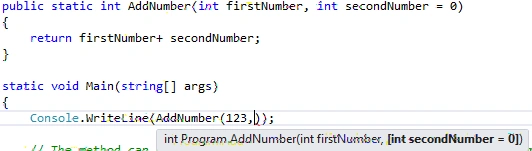
Figure 1: VisualStudio shows IntelliSense to implement Optional Parameter
Note: Default values always need to define in the end of the parameters list.
Option 2: Using OptionalAttribute
There is another way to implement Optional Parameters, i.e., using the Optional Attribute. To implement this, we need to import System.Runtime.InteropServices namespace. Then we need to add “Optional” keyword surrounded with the square bracket in the front of the method definition parameter. The “Optional” keyword is defined in the “Runtime.InteropServices” namespace.
In the following example, I define the second parameter (secondNumber) as optional; Compiler will consider “0” as default value. Optional attribute always need to be defined in the end of the parameters list.
Here is the complete code:
using System.Runtime.InteropServices;

namespace ConsoleApp2
{
    public class MyDemo
    {
        public int AddNumber(int firstNumber, [Optional] int secondNumber)
        {
            return firstNumber + secondNumber;
        }

        public void MainMethod()
        {
            AddNumber(12);
        }
    }
}
Option 3: Using Method Overloading
One more ways we can implement optional parameters is using method overloading. Method overloading allows us to create multiple definitions of same method with different parameters. If you're new to method overloading, read Method Overloading In C#.
In the following code, we've defined two methods with same names (AddNumber) but different number of parameters. First, AddNumber() method takes only one parameter and second AddNumber() method takes two parameters. When we call AddNumber() method with one parameter only, the compiler will execute the first AddNumber() method. And similarly when we pass two parameters, the compiler will execute the second AddNumber() method.
Here is the complete code:
namespace ConsoleApp2
{
    public class MyDemo
    {
        public int AddNumber(int firstNumber)
        {
            return firstNumber;
        }

        public int AddNumber(int firstNumber, int secondNumber)
        {
            return firstNumber + secondNumber;
        }

        public void MainMethod()
        {
            AddNumber(12);
            AddNumber(12, 13);
        }
    }
}
Option 4: Using Params Keyword.
Using params, we can pass a number of parameters to a method and implement optional parameters concept.
There are some restrictions using the params keyword:
- You can only use the params keyword for one parameter in your method declaration.
- Params must be always the last parameter in method.
More on this visit Using Params in C#.
In the following example, numbers is the second parameter of AddNumber(), which is of type Integer Array type using “params”. The array items can be accessed using the array items index.
You can see, we have three different calls of the AddNumber method and values are read back and added to the result. In the first call, we call AddNumber() with one parameter(12) only and the result is 12. In the second call, we call AddNumber() with two parameters(12, 13). The result will be 25. In the third case, we pass three parameters (12,13,14). The result will be 39.
Here is the C# complete code example:
namespace ConsoleApp2
{
    public class MyDemo
    {
        public int AddNumber(int firstNumber, params int[] numbers)
        {
            int temp = 0;
            foreach (int tempNum in numbers)
            {
                temp += tempNum;
            }
            return temp + firstNumber;
        }

        public void MainMethod()
        {
            AddNumber(12); // Result: 12
            AddNumber(12, 13); // Result: 25
            AddNumber(12, 13, 14); // Result: 39
        }
    }
}
Conclusion
In this article, we discussed Named and Optional Parameters in C#. We also saw different examples of these features of C#.
Saravanakumar SekaranPosted Apr 3, 2022, 6:56 AM
Wow amazing article
Shaun HunterPosted Jan 13, 2022, 11:34 AM
Thanks for the article but any chance of running your articles through a spellchecker before posting them? I count six typos in this one article (adn, parameber, Optinal, Numer, restult, thrid). Numer is a misspelt method name which isn't helpful. This really doesn't make your articles look professional and is offputting.
sandeep gatekarPosted Apr 16, 2019, 7:52 AM
Thank you very much
Ashish ZalkePosted Dec 4, 2017, 1:39 AM
Good explanation.....
Ashok SivaPosted Nov 28, 2017, 9:08 AM
Very well explanation !!!
Ramakrishna GaddePosted Jan 17, 2017, 2:22 PM
Very well explanation !!!
Debsankar PatraPosted Jun 13, 2016, 12:30 AM
well explained.
Humayun Kabir MamunPosted Nov 4, 2015, 12:31 AM
Nice...
Sibeesh VenuPosted Nov 4, 2015, 12:26 AM
Nice Share
Ajay GandhiPosted Nov 4, 2015, 12:03 AM
Cool
Ravi PatelPosted Nov 3, 2015, 11:00 AM
nice explanation
Former memberPosted Nov 3, 2015, 7:45 AM
very good article
Harshad PansuriyaPosted Nov 3, 2015, 6:14 AM
Nice one