

Introduction
This article demonstrates an interesting and very useful concept in C#.
Question: What are named delegates?
In simple terms "Delegates that are associated with a named method, where the method can be used at an invocation point by passing respective input parameters to obtain an expected result".
Step 1: Create a new web application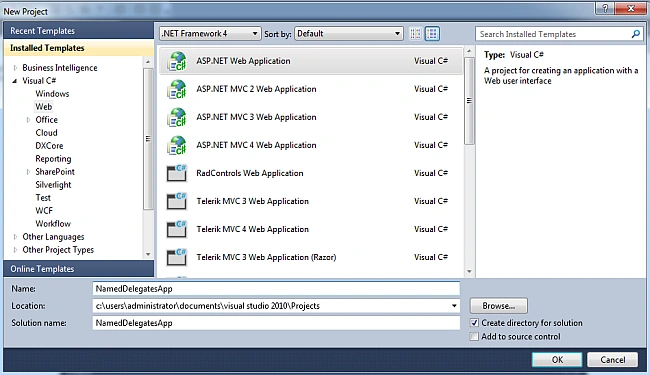
Step 2: Add a new Addition class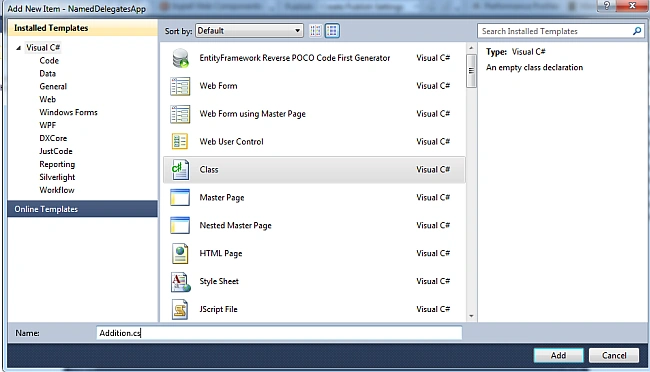
Step 3: The complete code of Addition.cs is as in the following:
using System;
using System.Collections.Generic;
using System.Linq;
using System.Web;
namespace NamedDelegatesApp
{
public class Addition
{
public double Add(double a, double b)
{
return a + b;
}
}
}
Step 4: The complete code of WebForm1.aspx is as in the following:
<%@ Page Language="C#" AutoEventWireup="true" CodeBehind="WebForm1.aspx.cs" Inherits="NamedDelegatesApp.WebForm1" %>
<!DOCTYPE html PUBLIC "-//W3C//DTD XHTML 1.0
Transitional//EN" "http://www.w3.org/TR/xhtml1/DTD/xhtml1-transitional.dtd">
<html xmlns="http://www.w3.org/1999/xhtml">
<head id="Head1" runat="server">
<title></title>
</head>
<body>
<form id="form1" runat="server">
<center>
<div>
<table>
<tr>
<td colspan="2" align="center">
<asp:label id="Label1" runat="server" text="Named Delegates" font-bold="true" font-size="Large" font-names="Verdana" forecolor="Maroon"></asp:label>
</td>
</tr>
<tr>
<td>
<asp:label id="Label6" runat="server" text="Please Enter FirstNumber" font-size="Large" font-names="Verdana" font-italic="true"></asp:label>
</td>
<td>
<asp:textbox id="TextBox4" runat="server"></asp:textbox>
</td>
</tr>
<tr>
<td>
<asp:label id="Label2" runat="server" text="Please Enter SecondNumber" font-size="Large" font-names="Verdana" font-italic="true"></asp:label>
</td>
<td>
<asp:textbox id="TextBox1" runat="server"></asp:textbox>
</td>
</tr>
<tr>
<td colspan="2" align="center">
<asp:button id="Button1" runat="server" text="Addition" font-names="Verdana" width="213px" backcolor="Orange" font-bold="True" onclick="Button1_Click" />
</td>
</tr>
<tr>
<td colspan="2" align="center">
<asp:label id="Label5" runat="server" font-bold="true" font-names="Verdana"></asp:label>
</td>
</tr>
</table>
</div>
</center>
</form>
</body>
</html>
Step 5: The complete code of WebForm1.aspx.cs is as in the following:
using System;
using System.Collections.Generic;
using System.Linq;
using System.Web;
using System.Web.UI;
using System.Web.UI.WebControls;
namespace NamedDelegatesApp
{
public partial class WebForm1 : System.Web.UI.Page
{
protected void Page_Load(object sender, EventArgs e){ }
public delegate double namedDelegate(double a, double b);
protected void Button1_Click(object sender, EventArgs e)
{
if (string.IsNullOrEmpty(TextBox4.Text) || string.IsNullOrEmpty(TextBox1.Text))
{
Label5.Text = "Please Enter Some Values";
Label5.ForeColor = System.Drawing.Color.Red;
}
else
{
namedDelegate namedDel = objAddition.Add;
Label5.Text = "Addition Result is: " + namedDel(double.Parse(TextBox4.Text), double.Parse(TextBox1.Text));
Label5.ForeColor = System.Drawing.Color.Green;
TextBox4.Text = string.Empty;
TextBox1.Text = string.Empty;
}
}
#region Instance MembersAddition objAddition = new Addition();
#endregion
}
}
Step 6: The output of the application is as in the following: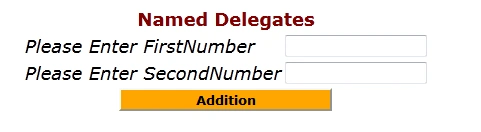
Step 7: The addition data output of the application is as in the following: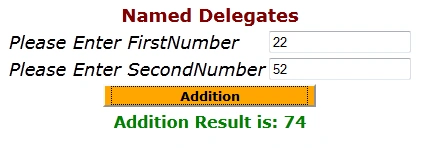
I hope this article was useful for you.
Gowtham RajamanickamPosted Mar 11, 2015, 8:33 AM
good....