

I was working on a project that has a large amount of data that I need to transfer from one place to another. In that process I must also change the data format. That process is so lengthy, that it was taking around 19 minutes to transfer around 50K data. Then we become familiar with Named Pipes. We used that and we got a comparatively very good result.
In this article I will describe some basics of Named Pipes using one simple example. Again we are not going too deep into the theory.
Named PipesA Named Pipe is one-way or duplex pipe for communication between a pipe server and one or more pipe clients. All instances of a Named Pipe share the same pipe name but each instance has its own buffers and handles. Named Pipes provide shared memory for inter-process communication.
The application that creates the pipe is the pipe server and the process that connects to the pipe server is the client. Named Pipes can be used for communication between a process running on the same computer or a process running on a different computer over the Local Area Network.
ExampleIn this example we will have one class, employee. We will create pipes. One will fetch data from the given list and the other pipe will fetch data provided by the first and store it in another place. This is a simple console application. We are using two threads. Instead of that you can also have another console application or another process.
Process Flow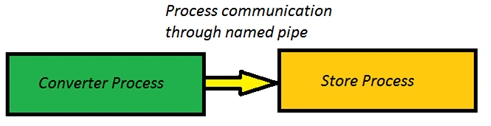
Here we created default data and sent this data to a converter process. After the complete process we just print data to check that all the data is transferred properly.
- static void Main(string[] args)
- {
- ResultData = new List<Client>();
- GenerateDefaultData();
- Thread resultPipeThread = new Thread(ResultPipe);
- resultPipeThread.Start();
- Thread converterPipeThread = new Thread(() =>ConverterPipe(DefaultData));
- converterPipeThread.Start();
- resultPipeThread.Join();
- if (_converterStream != null)
- _converterStream.Close();
- if (_resultStream != null)
- _resultStream.Close();
- Console.WriteLine("ID\tName\tDefault Phone\tResult Phone");
- for (int i = 0; i < 500; i++)
- {
- Console.WriteLine(DefaultData[i].Id + "\t" + DefaultData[i].Name + "\t" + DefaultData[i].PhoneNo + "\t" + ResultData[i].PhoneNo);
- }
- Console.ReadLine();
- }
In this process, we make a change in our data and send it to the result pipe.
- /// <summary>
- /// Process default data and send it to pipe.
- /// </summary>
- /// <param name="defaultData"></param>
- static void ConverterPipe(List<Client> defaultData)
- {
- _converterStream = new NamedPipeClientStream("MyPipeName");
- _converterStream.Connect();
- foreach (var client in defaultData)
- {
- //changed client data
- Client newClient = new Client() { Name = client.Name, Id = client.Id, PhoneNo = "+91" + client.PhoneNo };
- Client messageToSend = newClient;
- IFormatter formatter = new BinaryFormatter();
- formatter.Serialize(_converterStream, messageToSend);
- }
- _convertProcessCompleted = true;
- }
As you can see in the following code, we get data from the converter pipe and store it to the result.
- /// <summary>
- /// Create final result from default data.
- /// </summary>
- static void ResultPipe()
- {
- Console.WriteLine("Waiting for connection on named pipe mypipe");
- _resultStream = new NamedPipeServerStream("MyPipeName");
- _resultStream.WaitForConnection();
- while (_resultProcessCompleted == false)
- {
- if (_convertProcessCompleted)
- {
- _resultProcessCompleted = true;
- break;
- }
- IFormatter formatter = new BinaryFormatter();
- Client clientReceived = (Client)formatter.Deserialize(_resultStream);
- Thread.Sleep(1);
- ResultData.Add(clientReceived);
- }
- _resultStream.Close();
- }
The following are some variables, property and one simple method to generate default data for the process.
- static NamedPipeClientStream _converterStream;
- static NamedPipeServerStream _resultStream;
- static bool _convertProcessCompleted = false;
- static bool _resultProcessCompleted = false;
- public static List<Client> DefaultData { get; set; }
- public static List<Client> ResultData { get; set; }
- /// <summary>
- /// Generates default data to transfer.
- /// </summary>
- private static void GenerateDefaultData()
- {
- DefaultData = new List<Client>();
- for (int i = 0; i < 500; i++)
- {
- Client client = new Client();
- client.Id = i;
- client.Name = "Client " + i.ToString();
- client.PhoneNo = "00111" + i.ToString();
- DefaultData.Add(client);
- }
- }
As I said, we are not going into detailed theory, we have seen one example. For more details about Named Pipe please check links below:
Inter-Process Communication in .NET Using Named Pipes, Part 2
Thanks.
Vijay SPosted Apr 4, 2015, 9:57 AM
Nice
Mayank RajpuraPosted Apr 4, 2015, 8:41 AM
Thanks.
NitinPosted Apr 4, 2015, 5:54 AM
Good one
Santhakumar MunuswamyPosted Apr 4, 2015, 12:49 AM
Good work
Sam HobbsPosted Apr 3, 2015, 3:22 PM
Thank you, Mayank. Years ago I tried to use a Named Pipe with C# and could not figure it out. I think that was before the articles and samples you referenced were available. So your article will help others in the future. Also, I think it is worth noting that WCF can also be used for Named Pipes.