

In this article (multi-part article) you will learn how to create an MVC application that will allow adding multiple phone numbers using the Nested Model Concept. The user will be able to add or remove (zero or more) phone numbers for any single employee
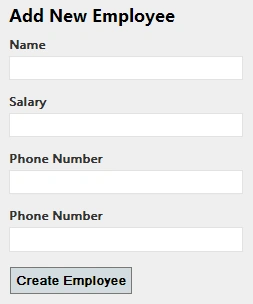
Here is the first look of the concept.
Now, I will go step-by-step so that you can understand what is going on.
Step 1. Database
First things first. You need database tables with a proper relationship. The main concept is, that there will be zero or more Phone Numbers in the "Phone" table for each employee in the "Employee" table.
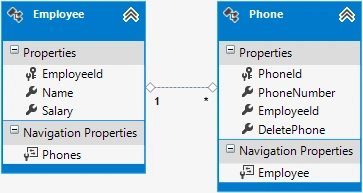
Note, that we have navigation properties in both tables and "EmployeeId" in the Phone table for each phone number.
You will find a property "DeletePhone" in the Phone table, this property will be used as a flag to delete a contact number by the controller method when the user is marked for deletion in the view. Actually, this field is not required in a database table when you have a ViewModel class, and this is a quick demo so rather than creating a class I will prefer adding a property in the database table.
I will share the script file to generate this database at the end of this article. I am using the Entity Data Model to generate model classes and the DbContext. Once you are done with this, move to the next step.
Step 2. Prepopulating Collection (Phone Number input boxes)
In the very first animated image, you will see the page is loaded with two "Phone Number" input boxes. To do this I need to update the "Employee" model (this model is generated by Entity Data Model) with the following highlighted method.
public partial class Employee
{
    public Employee()
    {
        this.Phones = new HashSet<Phone>();
    }

    public int EmployeeId { get; set; }
    public string Name { get; set; }
    public string Salary { get; set; }
    public virtual ICollection<Phone> Phones { get; set; }

    internal void CreatePhoneNumbers(int count = 1)
    {
        for (int i = 0; i < count; i++)
        {
            Phones.Add(new Phone());
        }
    }
}
This highlighted method "CreatePhoneNumbers" will take a parameter and add that collection to the "Phones" model property.
Now, let's add a new controller "Employee" and an action method "Add" and then we will make a call to the highlighted method above, here you go.
public ActionResult New()
{
    var employee = new Employee();
    employee.CreatePhoneNumbers(2);
    return View(employee);
}
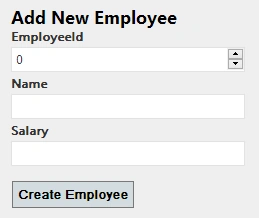
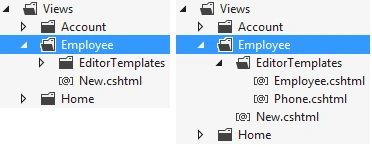
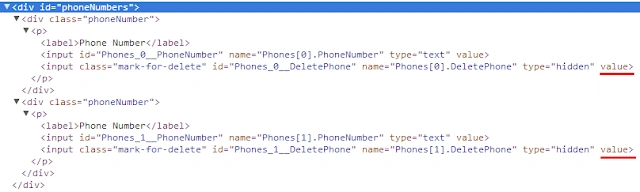
I just created an object of the Employee model class and made a call to the "CreatePhoneNumbers" method with 2 as a parameter, this will help in generating two input boxes on the View page. Add the View Page for this Action method.
ashutosh parmarPosted Aug 8, 2023, 11:49 AM
Not working same code
ashutosh parmarPosted Aug 8, 2023, 11:49 AM
Not helped at all
Anil PurswaniPosted Oct 6, 2014, 8:18 AM
didn't got the logic behind two phone numbers generated by mvc in Add New Employee form....How did you got the two textbox for phone numbers
Anil PurswaniPosted Oct 6, 2014, 8:17 AM
link to part2 please....