

Here is an example of Nesting Controls in WPF. In this example we have a Button Control with an Ellipse in it, TextBlock and a ListBox Control.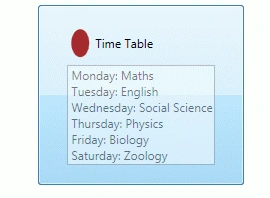
In this example we use a TimeTable of a class.
Step 1: First we use a Button Control:
<Button Margin="49,46,80,36">
</Button>
Step 2: Then we use an Ellipse in it:
<StackPanel Orientation="Vertical">
<StackPanel Margin="6"
VerticalAlignment="Center"
Orientation="Horizontal">
<Ellipse Fill="Brown" Width="18" />
</StackPanel>
</StackPanel>
Step 3: After that we create a TextBlock in it:
<TextBlock VerticalAlignment="Center"
Margin="6" Text="Time Table" />
Step 4: Now we create a ListBox in it:
<ListBox FontSize="12" Opacity="0.5"
Margin="2" x:Name="lstTimeTable">
<ListBoxItem>
<TextBlock VerticalAlignment="Center" Text="Monday: Maths " />
</ListBoxItem>
<ListBoxItem>
<TextBlock VerticalAlignment="Center"
Text="Tuesday: English" />
</ListBoxItem>
<ListBoxItem>
<TextBlock VerticalAlignment="Center"
Text="Wednesday: Social Science" />
</ListBoxItem>
<ListBoxItem>
<TextBlock VerticalAlignment="Center"
Text="Thursday: Physics" />
</ListBoxItem>
<ListBoxItem>
<TextBlock VerticalAlignment="Center"
Text="Friday: Biology" />
</ListBoxItem>
<ListBoxItem>
<TextBlock VerticalAlignment="Center"
Text="Saturday: Zoology" />
</ListBoxItem>
</ListBox>
Complete Program:
<Window x:Class="Nesting_Controls_In_WPF.Window1"
xmlns="http://schemas.microsoft.com/winfx/2006/xaml/presentation"
xmlns:x="http://schemas.microsoft.com/winfx/2006/xaml"
Title="Window1" Height="300" Width="300">
<Grid>
<Button Margin="39,46,39,36">
<StackPanel Orientation="Vertical">
<StackPanel Margin="6"
VerticalAlignment="Center"
Orientation="Horizontal">

Akash AhlawatPosted Mar 13, 2012, 12:20 AM
Nice concept..keep posting similar articles
Arjun PanwarPosted Mar 13, 2012, 12:15 AM
It is a great effort keep it up and thanks for sharing.