

“Microsoft.Data.Sqlite“, is an open-source library and is also available as a NuGet package. Here’s the Github source code for reference.
The good thing about this library is, it’s build for .NET Core, meaning you can develop and run applications on Windows and non-Windows platform (Mac, Linux) supporting .NET Core Runtime.
Here’s the quick definition of SQLite from the official website.
“SQLite is a software library that implements a self-contained, serverless, zero-configuration, transactional SQL database engine. SQLite is the most widely deployed database engine in the world”.
SQLite is a very popular, lightweight, and open source database engine and has gained industry popularity. That’s one reason I believe Microsoft wanted to come-up with an official .NET Core based library.
At this point, the .NET Core is evolving. It’s still in pre-release mode. Especially when it comes to “Microsoft.Data.Sqlite,” it supports basic functionalities for managing data in-memory or file system. In the near future, we can expect some changes.
The primary purpose or intention of writing this article is to provide an introduction and usage about “SQLite” library that Microsoft is currently building. Since it’s at the early stage of development, we cannot expect a full documentation. However, I was able to easily understand by taking a look into the source code and unit tests.
Prerequisite
- Previous knowledge and understanding of ADO.NET.
- Make sure to install .NET Core. Please follow the link if you want install the same on your Window machine.
Using the Code
Let us see with an example to understand the usage of Microsoft.Data.Sqlite library. We are going to build a tiny cross-platform console application to demonstrate the usage of the SQLite library.
We are going to perform “CRUD” operation on “User” table. Here’s the code snippet for our “User” entity.
- public class User
- {
- public int Id
- {
- get;
- set;
- }
- public string Username
- {
- get;
- set;
- }
- publicstring Email
- {
- get;
- set;
- }
- public string Password
- {
- get;
- set;
- }
- }
- string connectionString = "Data Source=:memory:";
- public staticvoid Main(string[] args) {
- string connectionString = "Data Source=:memory:";
- DbConnetionTypedatabaseType = DbConnetionType.Sqlite;
- using(UserRepositoryuserRepository =
- new UserRepository(connectionString, databaseType)) {
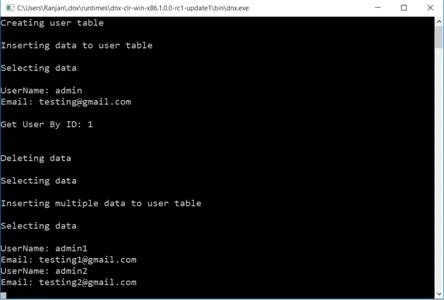
- Console.WriteLine("Creating user table\n");
- userRepository.CreateUserTable();
- Console.WriteLine("Inserting data to user table\n");
- userRepository.InsertIntoUserTable();
- Console.WriteLine("Selecting data\n");
- userRepository.SelectFromUserTable();
- Console.WriteLine("\nGet User By ID: 1\n");
- var user = userRepository.GetUserdById(1);
- if (user != null) {
- Console.WriteLine("User Name: {0}", user.Username);
- Console.WriteLine("Email: {0}", user.Email);
- }
- Console.WriteLine("\nDeleting data\n");
- userRepository.DeleteFromUserTable();
- Console.WriteLine("Selecting data\n");
- userRepository.SelectFromUserTable();
- Console.WriteLine("Inserting multiple data to user table\n");
- userRepository.InsertMultipleWithTransaction();
- Console.WriteLine("Selecting data\n");
- userRepository.SelectFromUserTable();
- }
- Console.ReadLine();
- }
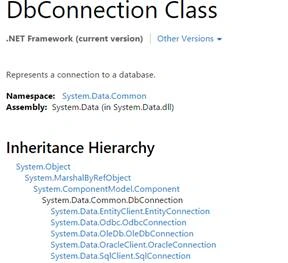
- // Reused and Modified Code - https://github.com/aspnet/Microsoft.Data.Sqlite/blob/dev/src/Microsoft.Data.Sqlite/Utilities/DbConnectionExtensions.cs
- public static class DbConnectionExtensions {
- public static int ExecuteNonQuery(thisDbConnection connection,
- string commandText, int timeout = 30) {
- var command = connection.CreateCommand();
- command.CommandTimeout = timeout;
- command.CommandText = commandText;
- return command.ExecuteNonQuery();
- }
- public static TExecuteScalar < T > (thisDbConnection connection,
- stringcommandText, int timeout = 30) =>
- (T) connection.ExecuteScalar(commandText, timeout);
- private static objectExecuteScalar(thisDbConnection connection,
- string commandText, int timeout) {
- var command = connection.CreateCommand();
- command.CommandTimeout = timeout;
- command.CommandText = commandText;
- returncommand.ExecuteScalar();
- }
- public static DbDataReader ExecuteReader(thisDbConnection connection,
- string commandText) {
- var command = connection.CreateCommand();
- command.CommandText = commandText;
- return command.ExecuteReader();
- }
- }
- public enum DbConnetionType {
- Sqlite
- }
- public class ConnectionHelper {
- public DbConnectionGetDbConnection(stringconnectionString,
- DbConnectionType type) {
- switch (type) {
- caseDbConnetionType.Sqlite:
- return newSqliteConnection(connectionString);
- default:
- return null;
- }
- }
- }
- public class ParameterHelper {
- public DbParameter GetParameter(stringparameterName, object value,
- DbConnetionTypedatabaseType) {
- switch (databaseType) {
- case DbConnetionType.Sqlite:
- var sqliteParameter = newSqliteParameter {
- ParameterName = parameterName,
- Value = value
- };
- return sqliteParameter;
- default:
- return null;
- }
- }
- }
- public void CreateUserTable() {
- OpenConnection();
- using(var command = connection.CreateCommand()) {
- command.CommandText = @ "CREATE TABLE IF NOT EXISTS Users([Id] INTEGER NOT NULL PRIMARY KEY AUTOINCREMENT, [Username] NVARCHAR(64) NOT NULL, [Email] NVARCHAR(128) NOT NULL, [Password] NVARCHAR(128) NOT NULL )";
- // Create table if not exist
- command.ExecuteNonQuery();
- }
- }
- public void InsertIntoUserTable() {
- OpenConnection();
- using(var command = connection.CreateCommand()) {
- // Insert a record
- connection.ExecuteNonQuery(@ "INSERT INTO Users(Username, Email, Password) VALUES('admin', '[email protected]', 'test') ");
- }
- }
- Open a DB connection if we have not already opened a connection.
- Based on the connection instance, Create a Command instance.
- Set the command text to select from Users table. Make sure to specify only the columns you are interested in.
- Execute the command by making a call to “ExecuteReader”. Which will return a DataReader.
- Loop through until we have records by making a call to “Read” method of DataReader.
- Get the “UserName” and “Email” values from the DataReader by specifying the appropriate ordinal value.
- public void SelectFromUserTable() {
- OpenConnection();
- using(var command = connection.CreateCommand()) {
- command.CommandText = "SELECT UserName,Email from Users;";
- var result = command.ExecuteReader();
- while (result.Read()) {
- Console.WriteLine(string.Format("UserName: {0}",
- result.GetString(0)));
- Console.WriteLine(string.Format("Email: {0}",
- result.GetString(1)));
- }
- }
- }
- public void DeleteFromUserTable() {
- OpenConnection();
- using(var command = connection.CreateCommand()) {
- connection.ExecuteNonQuery("DELETE FROM Users");
- }
- }
- public UserGetUserdById(intuserId) {
- try {
- var command = connection.CreateCommand();
- command.CommandText = "SELECT * From Users WHERE Id = @UserId;";
- var sqliteParameter = parameterHelper.GetParameter("@UserId", userId, databaseType);
- command.Parameters.Add(sqliteParameter);
- var result = command.ExecuteReader();
- if (result.Read()) {
- var user = newUser {
- Id = result.GetInt32(0),
- Username = result.GetString(1),
- Email = result.GetString(2),
- Password = result.GetString(3)
- };
- }
- } catch (Exception ex) {
- Console.WriteLine(ex.ToString());
- }
- return null;
- }
- public void InsertMultipleWithTransaction() {
- OpenConnection();
- var transaction = connection.BeginTransaction();
- try {
- connection.ExecuteNonQuery(@ "INSERT INTO Users(Username, Email, Password) VALUES('admin1', '[email protected]', 'test1') ");
- connection.ExecuteNonQuery(@ "INSERT INTO Users(Username, Email, Password) VALUES('admin2', '[email protected]', 'test2') ");
- transaction.Commit();
- } catch (Exception ex) {
- Console.WriteLine(ex.ToString());
- transaction.Rollback();
- } finally {
- transaction.Dispose();
- }
- }
Read more articles on .NET Core:
Ammar ShaukatPosted Mar 2, 2016, 12:06 PM
Good effort.
Vignesh ManiPosted Feb 27, 2016, 2:51 PM
Nice
Sonu ChaudharyPosted Feb 25, 2016, 6:33 AM
good one!
Rupali ShindePosted Feb 23, 2016, 5:08 AM
really useful article on sqlite , thanks for sharing
Nitin PanditPosted Feb 22, 2016, 11:17 PM
great article keep it up :)
Raja TPosted Feb 21, 2016, 11:14 PM
Thanks for sharing
Saineshwar BageriPosted Feb 21, 2016, 11:05 PM
Nice one
Mohammad MirshahiPosted Feb 21, 2016, 12:21 AM
good
Former memberPosted Feb 20, 2016, 1:56 AM
Good article
Ehsan SajjadPosted Feb 18, 2016, 1:17 PM
Good written
Sibeesh VenuPosted Feb 18, 2016, 12:11 AM
Nice Share
srinivas vPosted Feb 17, 2016, 2:13 PM
Nice article..
sreenivasa kPosted Feb 17, 2016, 1:23 PM
nice one
Gowtham KPosted Feb 17, 2016, 12:13 PM
Good One, Thanks for sharing:)
Santhakumar MunuswamyPosted Feb 16, 2016, 2:40 PM
Thanks for nice article. Keep it up
Muhammad Aqib ShehzadPosted Feb 16, 2016, 8:57 AM
nice share
Debasis SahaPosted Feb 16, 2016, 12:29 AM
Nice one...
Ranjan DailataPosted Feb 15, 2016, 7:53 AM
Thank you all for inspiring me :)
Kumaresh RajalingamPosted Feb 15, 2016, 7:07 AM
Nice share sir
Shubham KumarPosted Feb 15, 2016, 4:54 AM
nice explanation
Nanddeep NachanPosted Feb 15, 2016, 4:29 AM
Nice share
Raja TPosted Feb 15, 2016, 2:59 AM
Good,Thanks for sharing