


Introduction
Welcome to our newest blog post, where we explore the vibrant realm of MVVM (Model-View-ViewModel) architecture using the cutting-edge MVVM Toolkit in .NET MAUI. In this comprehensive guide, we will unravel the intricacies of MVVM and demonstrate how the MVVM Toolkit in .NET MAUI empowers developers to create robust, responsive, and easily maintainable cross-platform mobile applications. Join us on this enlightening journey as we unravel the secrets of mastering MVVM in the context of .NET MAUI.
Table of content
- Project Setup
- Install Plugin
- Implementation
- Demo
- Download Code
Project Setup for .NET MAUI
- Launch Visual Studio 2022, and in the start window, click Create a new project to create a new project.
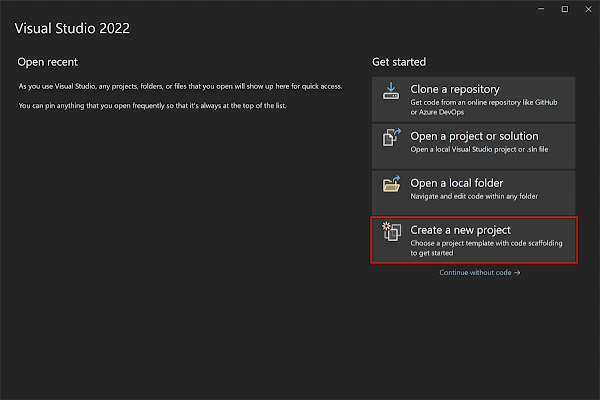
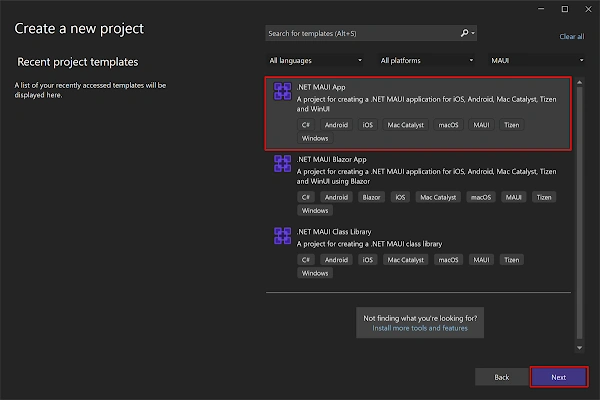
- In the Create a new project window, select MAUI in the All project types drop-down, select the .NET MAUI App template, and click the Next button.
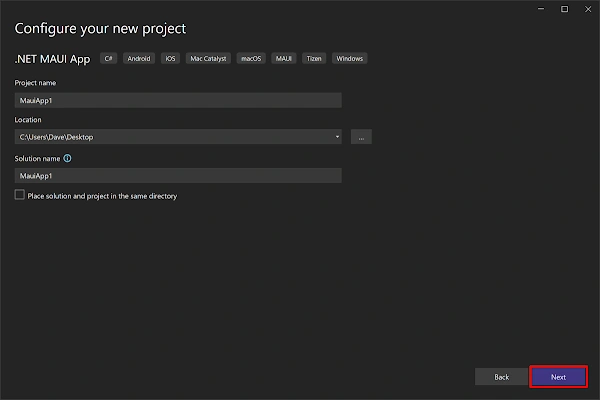
- In the Configure your new project window, name your project, choose a suitable location for it, and click the Next button.
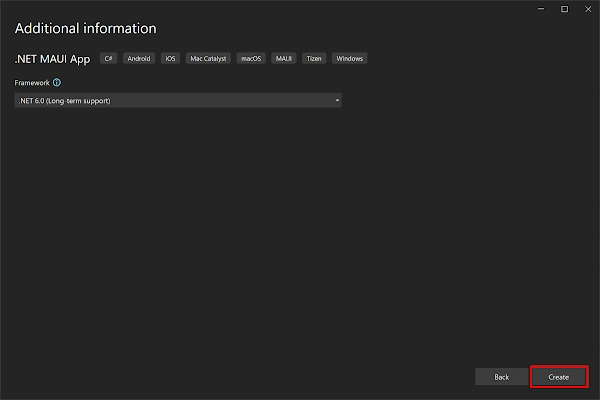
- In the Additional Information window, click the Create button.
- Once the project is created, we can able to see the Android, iOS, Windows and other running options in the toolbar. Press the emulator or run button to build and run the app.

Install Plugin
In these steps, we will see the steps to install " MVVM Toolkit" in the .NET MAUI project.
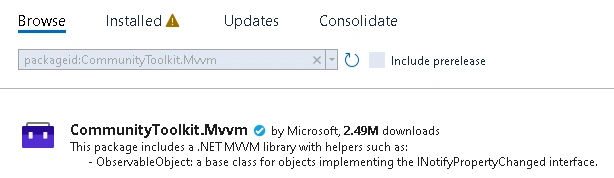
- Access NuGet Package Manager: In Visual Studio, right-click on your .NET MAUI project in the Solution Explorer. From the context menu, select " Manage NuGet Packages."
- Search for "CommunityToolkit.Mvvm" In the NuGet Package Manager, click on the " Browse" tab. In the search bar, type " CommunityToolkit.Mvvm" and hit Enter. The package should appear in the search results.
- Select and Install the Package: Once you find "CommunityToolkit.Mvvm" in the search results, click on it to select it. Ensure you choose the appropriate version compatible with your .NET MAUI project. Click on the "Install" button to begin the installation process.
- Accept License Agreement: During the installation, you may be prompted to accept the license agreement. Review the terms and conditions and click on the " Accept" button to proceed.
- Wait for Installation to Complete: Visual Studio will download and install the package along with its dependencies. This process may take a few moments, depending on your internet connection speed.
- Verify Installation: After the installation is complete, verify that there are no error messages in the Output window. This indicates a successful installation of the package.
Implementation of View Model
In this step, we create a ViewModel that inherits from the ObservableObject class. This inheritance is pivotal because ObservableObject implements the INotifyPropertyChanged interface. By doing so, we gain the ability to trigger the PropertyChanged event, a vital mechanism enabling the notification of property value changes to subscribers, primarily the UI. This synchronization is fundamental for effective data binding, ensuring seamless coordination between the user interface and the underlying ViewModel.
For example
public partial class ItemEntryPageModel : ObservableObject
{
    [ObservableProperty]
    private int _id;
    [ObservableProperty]
	private string _name;
	[ObservableProperty]
	private string _description;

    [ICommand]
	public async void Save()
	{
        await Application.Current.MainPage.DisplayAlert("MAUI MVVM Sample", "Item Saved Successfully", "OK");
    }
}
- When we use the [ObservableProperty] attribute, properties can send automatic alerts when they change. This is important for connecting data and updating the user interface (UI) when properties change. When you apply the [ObservableProperty] attribute to a property, it does a lot of necessary coding work behind the scenes. It sets up the code needed to tell other parts of the program when a property changes. This attribute saves time because you don't have to write all this code manually. For Example: "_description" & "_name" produces "Description" & "Name" respectively.
- The [ICommand] implementation is a way to connect methods or actions in the app with what the user sees on the screen. For instance, it can create a command called SaveCommand that's linked to the Save method. This linking is crucial for making sure that when a user does something, like clicking a button, the right action happens in the app.
View
<?xml version="1.0" encoding="utf-8" ?>
<ContentPage xmlns="http://schemas.microsoft.com/dotnet/2021/maui"
             xmlns:x="http://schemas.microsoft.com/winfx/2009/xaml"
             x:Class="MauiMVVM.Views.ItemEntryPage"
             Title="Item Entry">
    <StackLayout Margin="20"
                 Spacing="10">
        <VerticalStackLayout>
            <Label Text="Name:"
                   FontSize="16"/>
            <Entry Text="{Binding Name}"
                   Placeholder="Item Name"/>
        </VerticalStackLayout>

        <VerticalStackLayout>
            <Label Text="Description:"
                   FontSize="16"/>
            <Entry Text="{Binding Description}"
                   Placeholder="Item Description"/>
        </VerticalStackLayout>


        <Button x:Name="btn_save"
                Text="Save"
                Command="{Binding SaveCommand}"/>
    </StackLayout>
</ContentPage>
- Finally, we will design the View, where we create the user interface using XAML. Here, we connect the UI elements to the ViewModel properties using data binding expressions.
- This connection enables the View to show and modify task data in real time, ensuring a dynamic and responsive user experience.
- In .NET MAUI, data binding makes sure that data stays in sync between the ViewModel and the View without manual intervention.
- For instance, we can link a task's title in the ViewModel to a label in the View. When the title changes, it instantly updates in the UI.
- This automatic synchronization simplifies UI updates and eliminates the need for handling events manually.
Wire-up View and View Model
- The created view and view model should be added in MauiProgram.cs like below.
var builder = MauiApp.CreateBuilder();
		builder
			.UseMauiApp<App>()
			.ConfigureFonts(fonts =>
			{
				fonts.AddFont("OpenSans-Regular.ttf", "OpenSansRegular");
				fonts.AddFont("OpenSans-Semibold.ttf", "OpenSansSemibold");
			});

#if DEBUG
		builder.Logging.AddDebug();
#endif
        builder.Services.AddTransient<ItemEntryPage>();
        builder.Services.AddTransient<ItemEntryPageModel>();

        return builder.Build();
Demo

Download Code
References
Join the conversation! Your thoughts help the community grow.