
.Net MVC has the ability to create areas to better organize code. It is well documented on MSDN how to create Areas and how to configure routing for Areas. In the application startup code, you can call AreaRegistration.RegisterAllAreas() to register all areas. This needs a routing cs file for each area as described in the preceding article.
Once registered, all the areas will start showing up in the Routing Table. The more the number of areas, the greater the depth of the routing table. You can use the Route Debugger to see your application's routing table and how incoming URLs are matched before passing to the controller. The deeper the table the more time it would take the table to match since MVC matches in sequential order in the routing table.
It is advisable to put the routes that are most used at the top of the routing table. But RegisterAllAreas does not allow the definition of the order of registration or allow the sorting of the routing. It is not clear how Register All Area sequences are registered and your most-wanted route might end up at the bottom of the routing table. There is a way to customize the sequence handling of the compile sequence.
Let's say you have two areas transactions and a workflow as shown below and each has its own registration cs file.

Here is the sample registration cs file code for transactions. Similarly one would exist for the workflow area. You can see the second method actually register the route.
- public override string AreaName
- {
- get
- {
- return "Transactions";
- }
- }
- public override void RegisterArea(AreaRegistrationContext context)
- {
- context.MapRoute
- (
- "Transactions_default",
- "Transactions/{controller}/{action}/{id}",
- new
- {
- action = "Index", id = UrlParameter.Optional
- }
- );
- }
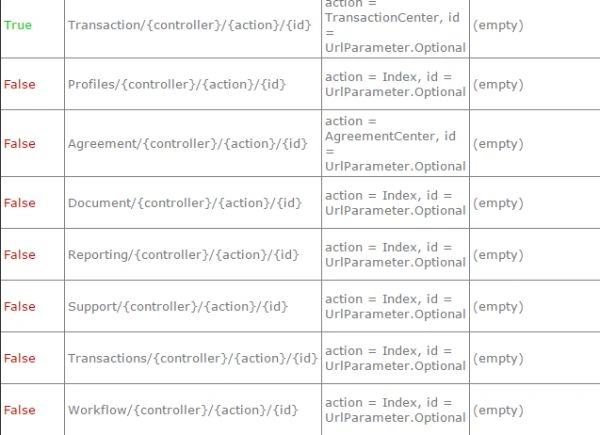
Now if the workflow is the most-used route then the route mapping will match against all the others that are above it and then finally matches to the workflow. If you want to move it up then open the the .csproj file and look for "<compile include=". This is the area in the project file that lists the sequence in which cs files should be compiled and the order of the compile. Here is the extract from mine.
- <Compile Include="Areas\Transaction\TransactionAreaRegistration.cs" />
- <Compile Include="Areas\Profiles\ProfilesAreaRegistration.cs" />
- <Compile Include="Areas\Agreement\AgreementAreaRegistration.cs" />
- <Compile Include="Areas\Workflow\WorkflowAreaRegistration.cs" />
- <Compile Include="Areas\Transaction\TransactionAreaRegistration.cs" />
- <Compile Include="Areas\Profiles\ProfilesAreaRegistration.cs" />
- <Compile Include="Areas\Agreement\AgreementAreaRegistration.cs" />
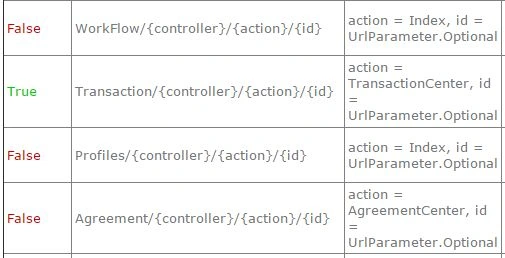
That's it, now you can define the sequence of the area registrations and thus the sequence in the routing table.
Karthik Muthu KaruppanPosted Apr 23, 2015, 11:20 AM
Good start
Vijay KumarPosted Apr 22, 2015, 8:22 AM
Good Start
NitinPosted Apr 22, 2015, 5:51 AM
Good one
RVPosted Apr 22, 2015, 1:00 AM
Thank you
Santhakumar MunuswamyPosted Apr 21, 2015, 10:24 PM
Good Start
Santhakumar MunuswamyPosted Apr 21, 2015, 10:24 PM
Welcome
Krishnanand SivarajPosted Apr 21, 2015, 10:07 PM
Thanks for sharing