

Introduction
Concurrency is a crucial aspect of modern software development, enabling applications to handle multiple tasks simultaneously and efficiently. In the .NET ecosystem, developers have access to various tools for managing concurrency, including the Task Parallel Library (TPL) and System.Threading.Channels. This article aims to provide a practical comparison of these two features by exploring real-world examples to illustrate their usage and benefits.
What is a Task Parallel Library (TPL)?
TPL simplifies the process of adding parallelism and concurrency to applications. It allows developers to write parallel code by breaking tasks into smaller sub-tasks, which can be executed concurrently. TPL abstracts the underlying complexities of thread management and synchronization, making it easier to write efficient, scalable, and responsive applications.
Example Using TPL
using System;
using System.Threading.Tasks;

class Program
{
    static void Main()
    {
        Console.WriteLine("Starting parallel processing...");

        // Parallel Processing with Parallel.ForEach
        ParallelProcessing();

        // Asynchronous Programming with async/await
        Console.WriteLine("\nStarting asynchronous processing...");
        Task.Run(() => AsynchronousProcessing()).Wait();

        Console.WriteLine("Processing completed.");
    }

    static void ParallelProcessing()
    {
        // Create an array of integers
        int[] numbers = { 1, 2, 3, 4, 5, 6, 7, 8, 9, 10 };

        // Parallel processing using Parallel.ForEach
        Parallel.ForEach(numbers, number =>
        {
            // Simulate processing by adding a delay
            Task.Delay(1000).Wait();
            Console.WriteLine($"Processed {number} on thread {Task.CurrentId}");
        });
    }

    static async Task AsynchronousProcessing()
    {
        // Simulate asynchronous tasks
        Task<string> task1 = ProcessAsyncTask("Task 1");
        Task<string> task2 = ProcessAsyncTask("Task 2");

        // Asynchronously wait for the completion of tasks
        string result1 = await task1;
        string result2 = await task2;

        Console.WriteLine($"Result from {result1}");
        Console.WriteLine($"Result from {result2}");
    }

    static async Task<string> ProcessAsyncTask(string taskName)
    {
        Console.WriteLine($"Started {taskName} on thread {Task.CurrentId}");

        // Simulate asynchronous operation with delay
        await Task.Delay(2000);

        Console.WriteLine($"Completed {taskName} on thread {Task.CurrentId}");
        return taskName;
    }
}
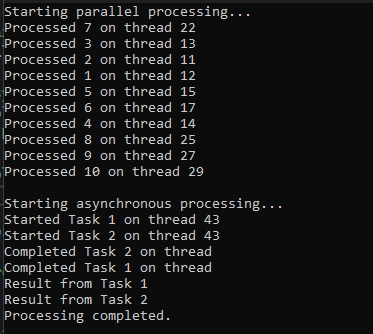
Output
Introducing System.Threading.Channels
System.Threading.Channels provide a low-level, high-performance API for building data pipelines and implementing producer-consumer patterns. Channels are particularly useful for managing asynchronous I/O operations where tasks spend time waiting for external resources.
Example using System.Threading.Channels
using System;
using System.Threading.Channels;
using System.Threading.Tasks;

class Program
{
    static async Task Main()
    {
        // Create an unbounded channel (can buffer an unlimited number of items)
        var channel = Channel.CreateUnbounded<string>();

        // Start a producer task
        _ = Task.Run(async () =>
        {
            for (int i = 1; i <= 5; i++)
            {
                string message = $"Message {i}";
                await channel.Writer.WriteAsync(message);
                Console.WriteLine($"Produced: {message}");
                await Task.Delay(TimeSpan.FromSeconds(1));
            }

            // Mark the channel as complete when the producer is done
            channel.Writer.Complete();
        });

        // Start multiple consumer tasks
        var consumers = new Task[3];
        for (int i = 0; i < consumers.Length; i++)
        {
            consumers[i] = ConsumeMessagesAsync(channel.Reader, i + 1);
        }

        // Wait for all consumer tasks to complete
        await Task.WhenAll(consumers);

        Console.WriteLine("All messages consumed. Press any key to exit.");
        Console.ReadKey();
    }

    static async Task ConsumeMessagesAsync(ChannelReader<string> reader, int consumerId)
    {
        await foreach (string message in reader.ReadAllAsync())
        {
            Console.WriteLine($"Consumer {consumerId} consumed: {message}");
            // Simulate processing delay
            await Task.Delay(TimeSpan.FromSeconds(2));
        }

        Console.WriteLine($"Consumer {consumerId} completed.");
    }
}
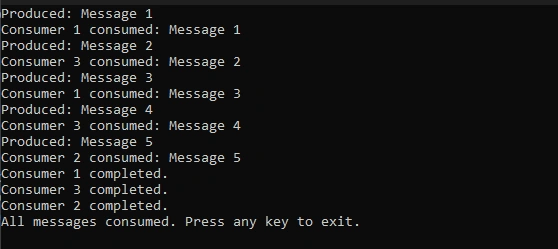
Output
Choosing the Right Approach
-
Use TPL
- You have CPU-bound tasks that can be parallelized.
- You want a higher-level abstraction for parallel programming.
- You need to parallelize loops or collections easily.
-
Use System.Threading.Channels
- You have I/O-bound tasks, especially those involving network requests or file operations.
- You need explicit control over buffering and data communication.
- You want to implement efficient producer-consumer patterns.
Conclusion
In the world of .NET concurrency, both the Task Parallel Library and System.Threading.Channels offer powerful tools to handle parallelism and asynchronous operations. TPL simplifies parallel programming, making it accessible and efficient for CPU-bound tasks. On the other hand, System.Threading.Channels provide low-level control over data pipelines, making them ideal for managing I/O-bound operations and implementing complex producer-consumer patterns.
By understanding the strengths and use cases of each approach, developers can choose the right tool for the job, ensuring their applications are responsive, scalable, and capable of handling diverse concurrency requirements. Whether you're dealing with computationally intensive tasks or managing asynchronous I/O efficiently, the .NET ecosystem offers the right tools to meet your needs.
Join the conversation! Your thoughts help the community grow.