

Introduction
One of the fantastic features of Windows 10 is to monitor network or internet usage, and we can segregate how much each app consumed.
Step 1
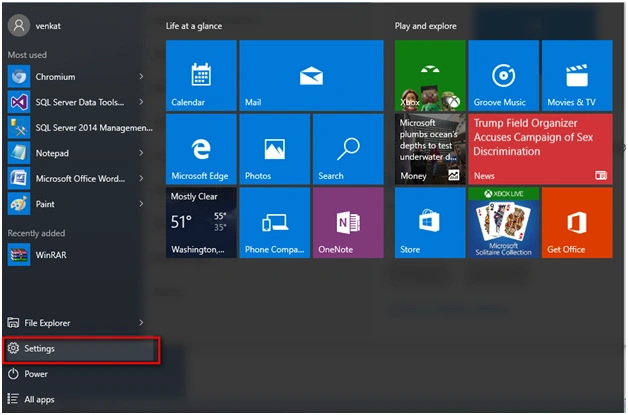
Go to the Settings tab in your Windows 10 Operating System.
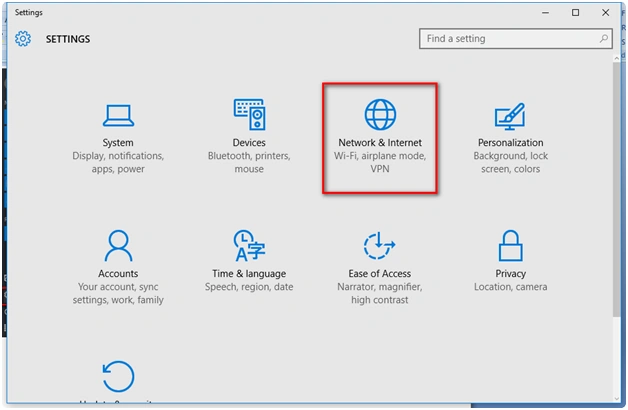
Under "Settings", go to "Network & Internet".
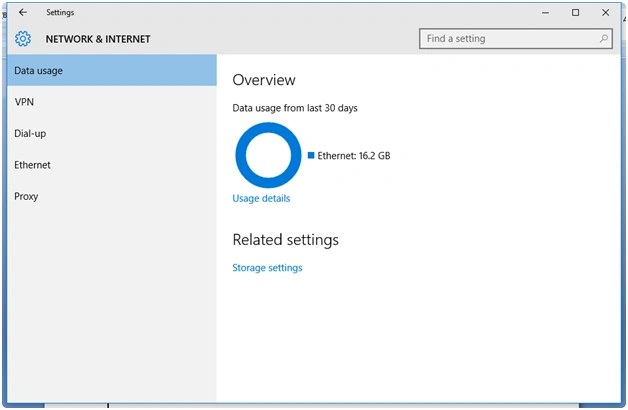
Under "Network & Internet" go to the "Data usage" option. You can see the data used in the last 30 days. I am using the Ethernet port to access the internet and the data usage is approx 16.2 GB.
Step 4
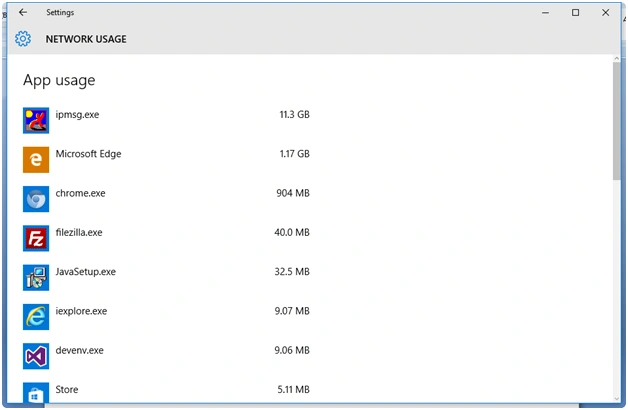
Further, check out "How much data is used for each app" by clicking the option of "Usage detail".

Now you can see the "Network Usage" for each app and how much data was transferred in the network.
Read more articles on Windows 10:
Summary
In this article, we learned about Network Data Usage Monitoring Option In Windows 10.
Gowtham RajamanickamPosted Apr 26, 2016, 9:12 AM
thank u so much
Nigel FernandesPosted Feb 15, 2016, 12:03 PM
Useful
Kumaresh RajalingamPosted Feb 15, 2016, 7:09 AM
Nice share sir
Shubham KumarPosted Feb 15, 2016, 12:59 AM
good share
Sibeesh VenuPosted Feb 15, 2016, 12:35 AM
Nice Share
Mohammed IbrahimPosted Feb 14, 2016, 11:21 PM
nice
Praveen KumarPosted Feb 14, 2016, 10:16 PM
Nice
Kumaresh RajalingamPosted Feb 14, 2016, 8:16 PM
Nice share