

Microsoft continues to improve the Power BI Desktop authoring experience, making it easier for report developers to work with the tools they use every day. One useful feature is the ability to expand and collapse the Ribbon.
If you have worked with Power BI Desktop for a while, you will know that the Ribbon contains several tabs, including Home, Insert, Modeling, View, Optimize, and other contextual tools. While these options are important, having the full Ribbon displayed at all times can take up valuable screen space, particularly when working on smaller monitors or designing complex reports.
With the expand and collapse functionality, users have more control over how much of the Ribbon is displayed while developing their reports.
Collapse the Ribbon to Save Space
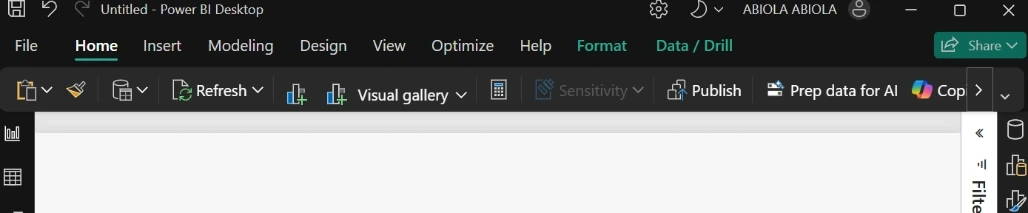
When you collapse the Ribbon, Power BI Desktop reduces it to a single line, hiding the expanded collection of commands and options.
This gives you more available workspace for your report canvas, which can be particularly useful when working with multiple visuals, large reports, or complex dashboard layouts.
Rather than having the Ribbon occupy a significant portion of your screen, you can keep it collapsed and focus more on the report you are building.
Expand the Ribbon When You Need It
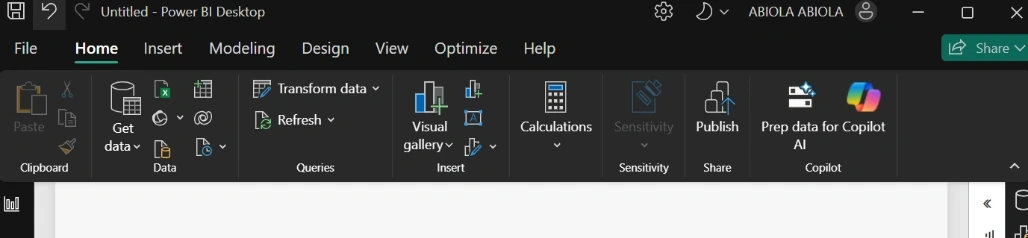
Of course, hiding the Ribbon does not mean losing access to its functionality.
Whenever you need to access a particular command, you can expand the Ribbon again to display the available tools and options.
This makes switching between report development and accessing Power BI features much more convenient.
Context-Aware Ribbon Experience
Another useful aspect of the Ribbon is that its content can dynamically change depending on the current context.
For example, selecting a measure or column can display contextual tabs such as Measure tools or Column tools. These tabs provide relevant options based on the object you are working with.
This helps keep the interface organised by presenting relevant commands when they are needed.
Why This Feature Is Useful
The ability to expand and collapse the Ribbon offers several practical benefits:
- More workspace: Gain additional space for designing and arranging report visuals.
- Cleaner interface: Reduce the amount of visible commands when they are not needed.
- Improved productivity: Switch between a compact and expanded Ribbon depending on your current task.
- Better report development experience: Focus on the report canvas without unnecessary interface elements taking up space.
The expand and collapse functionality might seem like a small interface improvement, but it makes a difference when working with Power BI Desktop regularly.
I particularly like the flexibility of being able to hide the Ribbon when focusing on report design and bring it back whenever I need access to specific commands.
It is another useful improvement that makes the Power BI Desktop development experience more flexible and user-friendly.
Join the conversation! Your thoughts help the community grow.