

Introduction
In my previous article, you learned about "Prototype and Prototype Inheritance in JavaScript". In this article, I will tell you about one more new feature of JavaScript in Visual Studio 2012, Typed Arrays.
A Typed Array can be used to handle binary data from various sources such as Network Protocols, Binary File Formats, and Raw Graphic Buffers. Typed Arrays can also be used to manage in-memory Binary Data with a well-known Byte Layout.
Step 1
Now I will tell you how to use an Array Buffer Object as the response of an XMLHttpRequest through an example. You can manipulate the bytes in the response using the various methods of the Data View Object, or by copying the bytes into the appropriate Typed Array.
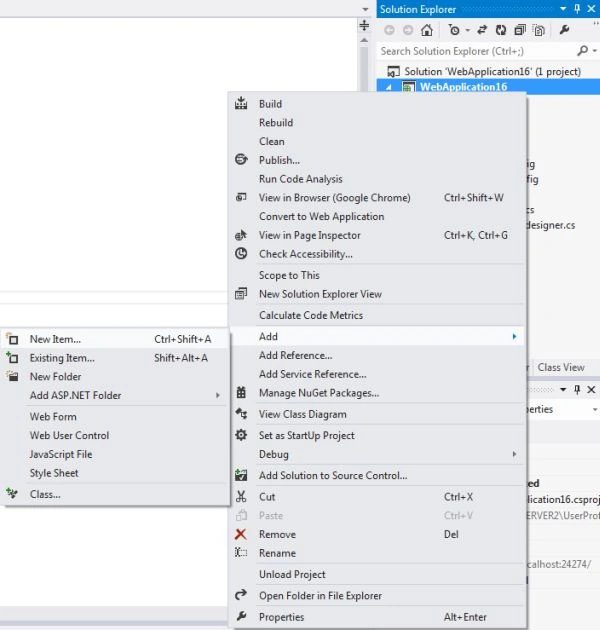
First of all, add a JavaScript page to your Windows or Web Application. This can be done by right-clicking on your application and then "Add" | "New Item...".
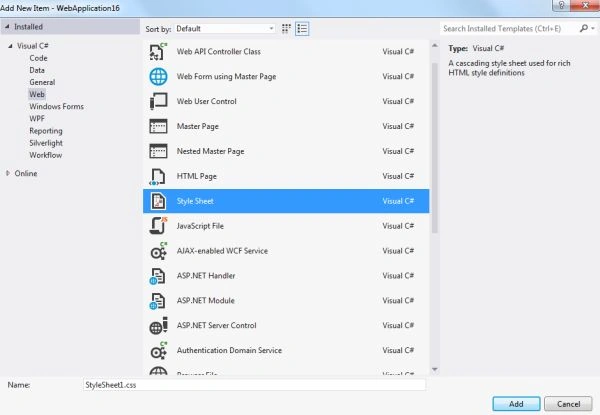
Now in the New Item list select the JavaScript Style Sheet.
Step 2
Now in the Style Sheet write the following code:
- ...
- <div id="xhrDiv"></div>
- ...
- var name = "http://www.microsoft.com";
- var xhrDiv = document.getElementById("xhrDiv");
- var req = new XMLHttpRequest();
- req.open("GET", name, true);
- req.responseType = "arraybuffer";
- req.onreadystatechange = function () {
- if (req.readyState == req.DONE) {
- var arrayResponse = req.response;
- var dataView = new DataView(arrayResponse);
- var ints = new Uint32Array(dataView.byteLength / 4);
- xhrDiv.style.backgroundColor = "#00FF00";
- xhrDiv.innerText = "Array is " + ints.length + "uints long";
- }
- }
- req.send();
Step 3
- Array Buffer: An Array Buffer object represents a buffer of raw data that is used to store data for various Typed Arrays. You can't read from or write to an Array Buffer but you can pass it to a Typed Array or Data View Buffer to interpret the Raw Buffer. You can use an Array Buffer to store any kind of data that can also be mixed data.
- DataView: You can use a DataView object to read and write various kinds of Binary Data to any location in the Array Buffer.
Step 4
Typed Array: The Typed Array types represent views of an Array Buffer Object that can be indexed and manipulated. All Array types are of fixed lengths.
| Name | Size(in Bytes) | Description |
| Int8Array Object | 1 | Eight Bit two's complement signed integer |
| Uint8Array Object | 1 | Eight Bit Unsigned integer |
| Int16Array Object | 2 | Sixteen bit two's complement signed integer |
| Uint16Array Object | 2 | Sixteen Bit Unsigned Integer |
| Int32Array Object | 4 | Thirty-Two Bit two's complement signed integer |
| Uint32Array Object | 4 | Thirty-Two Bit Unsigned Integer |
| Float32Array Object | 4 | Thirty-Two Bit IEEE Floating point |
| Float64Array Object | 8 | Sixty Four Bit IEEE Floating point |
Join the conversation! Your thoughts help the community grow.