

Introduction
In this article, we are going to see the new HTML5 form elements. HTML5 Offers us various types of new form elements. These elements enhanced the functionality of HTML. We can use HTML5 form tags to get more and advanced productivity. In this article, we will see two types of HTML5 form elements that are introduced in HTML5.
Follow These Steps:
Step1:
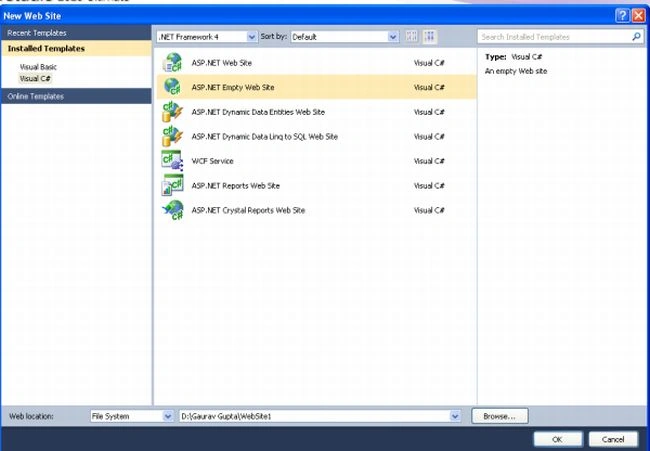
- Open the Visual Studio 2010
- Go File Menu->>New->>Website
- Choose Empty Website
Step2:
- Go to Solution Explorer
- Right-click on the application name
- Select New Item
- Choose HTML Page
Datalist Element
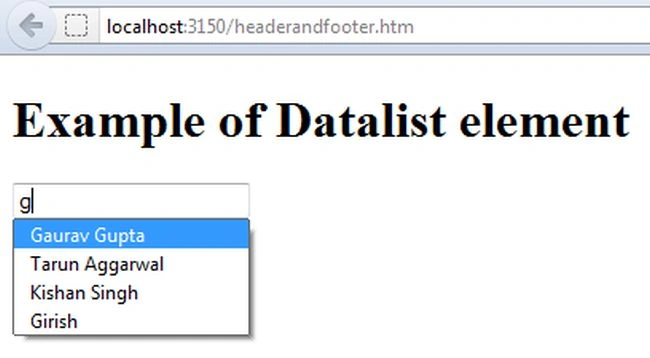
A Datalist is a new form element in HTML5. This element can be used in conjunction with the <option> elements of HTML5. We have to give the value of the datalist using an option element. Datalist elements provide an auto-complete feature on our web page. Users will see a drop-down list of pre-defined options as they input data. When we type the word in the textbox, this will display the suggested words that match the entered word from the option values. To define a Datalist element we can use a <datalist> tag with its option value. The <datalist> tag is currently only supported in Firefox and Opera browsers.
Example: In this example, we define a datalist element and also give the value of datalist elements with a <option> tag of HTML5.
Here is Code:
- <html>
- <body>
- <form>
- <input list="names" name="name" />
- <datalist id="names">
- <option value="Gaurav Gupta">
- <option value="Tarun Aggarwal">
- <option value="Kishan Singh">
- <option value="Kuldeep">
- <option value="Kamal">
- <option value="Girish">
- <option value="Toni">
- </datalist>
- </form>
- </body>
- </html>
Jack OwensPosted Jul 16, 2013, 1:13 PM
FYI - Image for "Step 2" is incorrect