

Angular 2 provides many built-in directives. All these directives provide special behavior to DOM elements. In this article we will learn *ngFor directive.
*ngFor
The ngFor directive repeats a template once per item in collection. It is very similar to ngReate directive in AngualrJS 1.x. Here, each template has their own scope in which given loop variable is set to the current collection item. It has a special set of variables properties , which can be useful while iterating with the collection.
When any changes made in the iterator, ngFor directive made corresponding changes to DOM i.e if any item is added, the new template instance is added in to the DOM. Similarly, If any item is removed, the template instance is removed from the DOM. If items are reordered, the respective templates are reordered in DOM.
Syntax
<<htmlelement> *ngFor="let item of items; let i = index; trackBy: trackByFn">...</< htmlelement> >
OR
<<htmlelement> template="ngFor let item of items; let i = index; trackBy: trackByFn">... </<htmlelement> >
Here, we can use any HTML with *ngFor like tr, li etc.
The asterisk (*) effect
With this directive, we were using asterisk (*) as a prefix. Angular 2 replaces asterisk (*) with verbose <template> form. Thus, we either need used asterisk (*) with this directive or we need to use this directive with the template. The example mentioned below covers both the scenario.
Example
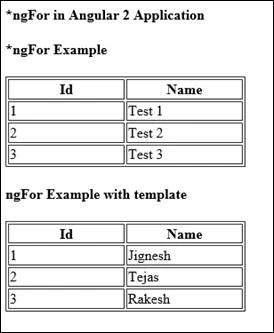
In the example mentioned below, I have two array variables at my component and I have to print the data of the array, using ngFor directive.
app.component.ts
- import { Component } from '@angular/core';
- @Component({
- selector: 'test-app',
- templateUrl: './app/directiveExample.html'
- })
- export class AppComponent {
- testArray:Array<any> =[{id:1, name:'Test 1'},{id:2, name: 'Test 2'},{id:3, name: 'Test 3'}];
- empDataArray:Array<any> =[{id:1, name:'Jignesh'},{id:2, name: 'Tejas'},{id:3, name: 'Rakesh'}];
- }
directiveExample.html
- <h4>*ngFor in Angular 2 Application</h4>
- <div>
- <h4>*ngFor Example</h4>
- <table border="1" width="20%">
- <tr>
- <th width="50%">Id</th>
- <th width="50%">Name</th>
- </tr>
- <tr *ngFor="let item of testArray;">
- <td>{{item.id}}</td>
- <td>{{item.name}}</td>
- </tr>
- </table>
- </div>
- <div>
- <h4>ngFor Example with template</h4>
- <table border="1" width="20%">
- <tr>
- <th width="50%">Id</th>
- <th width="50%">Name</th>
- </tr>
- <tr template="ngFor let item of empDataArray;">
- <td>{{item.id}}</td>
- <td>{{item.name}}</td>
- </tr>
- </table>
- </div>
Output
This directive has special variables/properties, which are shown below.
- Index
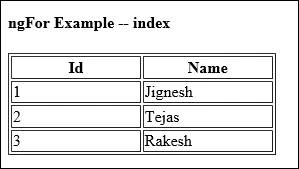
It will set an integer value to the current loop, which indicates each item no. of the template context.
directiveExample.htmlOutput- <div>
- <h4>ngFor Example -- index</h4>
- <table border="1" width="20%">
- <tr>
- <th width="50%">Id</th>
- <th width="50%">Name</th>
- </tr>
- <tr template="ngFor let item of empDataArray;let i=index">
- <td>{{i+1}}</td>
- <td>{{item.name}}</td>
- </tr>
- </table>
- </div>
- First
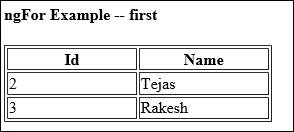
It is a Boolean variable and set to true, if the item is the first in iteration The code snippet mentioned below is used to hide first element of an array.
directiveExample.htmlOutput- <div>
- <h4>ngFor Example -- first</h4>
- <table border="1" width="20%">
- <tr>
- <th width="50%">Id</th>
- <th width="50%">Name</th>
- </tr>
- <tr *ngFor="let item of empDataArray; #first=first" [hidden]="first">
- <td>{{item.id}}</td>
- <td>{{item.name}}</td>
- </tr>
- </table>
- </div>
- last
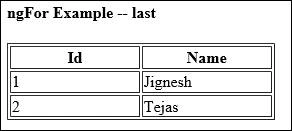
It is a Boolean variable and set to true, if an item is the last one in iteration The code snippet, mentioned below is used to hide last element of an array.
directiveExample.htmlOutput- <div>
- <h4>ngFor Example -- last</h4>
- <table border="1" width="20%">
- <tr>
- <th width="50%">Id</th>
- <th width="50%">Name</th>
- </tr>
- <tr *ngFor="let item of empDataArray; #last=last" [hidden]="last">
- <td>{{item.id}}</td>
- <td>{{item.name}}</td>
- </tr>
- </table>
- </div>
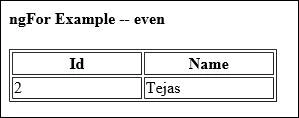
- even
It is a Boolean variable and set to true when an item index is even. The code snippet, mentioned below is used to show only an even index element of an array.
directiveExample.htmlOutput- <div>
- <h4>ngFor Example -- even</h4>
- <table border="1" width="20%">
- <tr>
- <th width="50%">Id</th>
- <th width="50%">Name</th>
- </tr>
- <tr *ngFor="let item of empDataArray; #even=even" [hidden]="even">
- <td>{{item.id}}</td>
- <td>{{item.name}}</td>
- </tr>
- </table>
- </div>
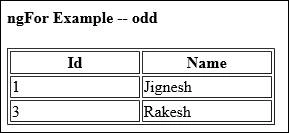
- odd
It is a Boolean variable and set to true when an item index is odd. The code snippet, mentioned below is used to show only odd index element of an array.
directiveExample.htmlOutput- <div>
- <h4>ngFor Example -- odd</h4>
- <table border="1" width="20%">
- <tr>
- <th width="50%">Id</th>
- <th width="50%">Name</th>
- </tr>
- <tr *ngFor="let item of empDataArray; #odd=odd" [hidden]="odd">
- <td>{{item.id}}</td>
- <td>{{item.name}}</td>
- </tr>
- </table>
- </div>
Conclusion
This article will help you to learn ngFor directive in Angular 2. It has a set of special variables/properties, which is useful in iterating the collection.
Note
Here, I have not included the dependency of the example project. To run the project, you need to perform "npm install" command to download the project dependency.
Join the conversation! Your thoughts help the community grow.