

Phase 01 — System Design Foundation | Topic 04
Imagine your Order Management System works perfectly.
Customers can place orders.
Admins can update orders.
Order history works.
But there is one problem.
The API takes 10 seconds to respond.
Would you call the system successful?
Probably not.
This is where Non-Functional Requirements become important.
Functional Requirements tell us:
What should the system do?
Non-Functional Requirements tell us:
How should the system work?
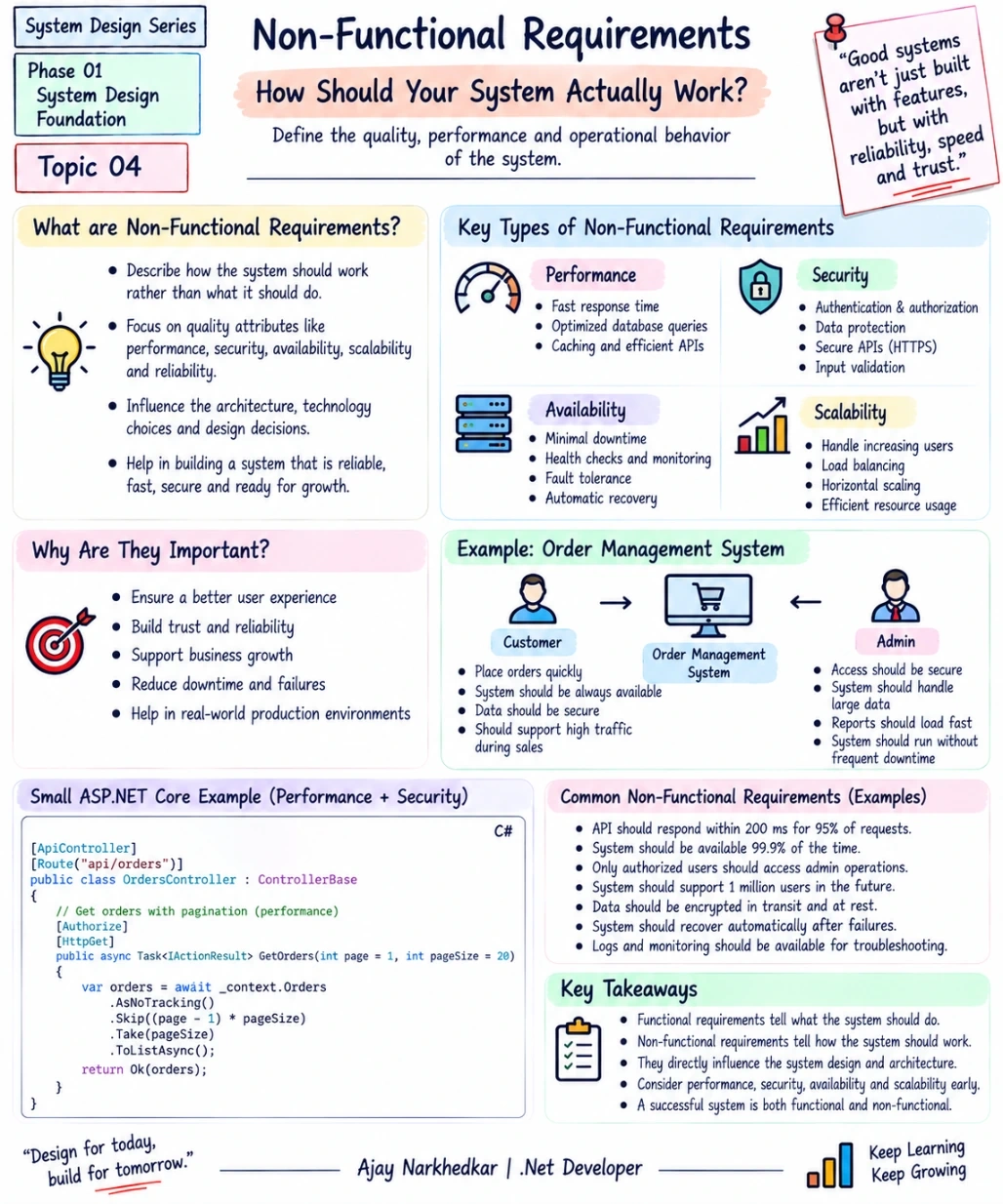
What Are Non-Functional Requirements?
Non-Functional Requirements describe the quality, performance, security, reliability, and operational behavior of a system.
For example:
How fast should the application respond?
How many users should it support?
How available should it be?
How secure should it be?
What should happen when traffic increases?
How should the system behave when something fails?
These requirements may not represent a specific feature, but they strongly influence our architecture and technical decisions.
Let's Take a Real Example
Suppose the requirement says:
“Build an Order Management System for customers and administrators.”
From our previous topic, we identified functional requirements such as:
Customer can place an order
Customer can view order history
Admin can view orders
Admin can update order status
Now let's add Non-Functional Requirements:
⚡ Performance
Order APIs should normally respond within an acceptable response time.
🟢 Availability
The application should remain available even when individual components experience problems.
🔐 Security
Only authorized users should be able to access customer and administrative operations.
📈 Scalability
The system should continue supporting users as traffic grows.
Now our system requirements are much more complete.
⚡ 1. Performance — How Fast Should It Be?
Performance is about how quickly the system responds.
Consider this:
User → API → Database → ResponseIf the database query takes too long, the entire API becomes slow.
For example, this query could become a problem when the Orders table becomes very large:
var orders = await _context.Orders
    .ToListAsync();
Why?
Because you're potentially loading every order into memory.
Instead, pagination may be more appropriate:
var orders = await _context.Orders
    .AsNoTracking()
    .Skip((page - 1) * pageSize)
    .Take(pageSize)
    .ToListAsync();
The goal isn't simply:
“Make the code faster.”
The real question is:
“What performance does the business require?”
That requirement influences database queries, indexes, caching, pagination, API design, and architecture.
🟢 2. Availability — Should the System Always Be Accessible?
Imagine customers are trying to place orders, but your application is unavailable.
Even if all your features are perfectly implemented, the system isn't useful at that moment.
Availability asks:
How often should the system be available?
For example:
“The application should be available 99.9% of the time.”
Availability requirements can influence decisions such as:
Multiple application instances
Load balancing
Health checks
Database availability
Monitoring
Automatic recovery
This is why availability is not just an infrastructure concern.
It starts with a business requirement.
🔐 3. Security — Who Can Do What?
Security requirements define how the system should protect users, data, and operations.
For our Order Management System:
A customer should be able to see their own orders.
An admin may be allowed to see all orders.
A customer should not be able to call an admin-only operation.
ASP.NET Core provides built-in mechanisms for this.
For example:
[Authorize]
[HttpGet("my-orders")]
public IActionResult GetMyOrders()
{
    return Ok();
}

[Authorize(Roles = "Admin")]
[HttpPut("{id}/status")]
public IActionResult UpdateOrderStatus(
    int id,
    UpdateStatusRequest request)
{
    return Ok();
}
Here:
[Authorize]protects authenticated operations.Roles = "Admin"restricts the operation to administrators.
Security requirements can also involve:
Authentication
Authorization
HTTPS
Data protection
Input validation
Secrets management
Audit logging
Again, these are not simply coding decisions.
They come from the requirements of the system.
📈 4. Scalability — What Happens When Users Grow?
Suppose your application currently has:
1,000 users
Everything works perfectly.
Then your business grows.
Now you have:
100,000 users
Will the same architecture continue to work?
That's the scalability question.
A simple ASP.NET Core application might initially run on one server:
Users
   ↓
ASP.NET Core
   ↓
SQL Server
As traffic increases, we may need:
Multiple application instances
Load balancing
Distributed caching
Database optimization
Background processing
Message queues
Auto-scaling
The important point is:
Scalability is about preparing the system to handle growth.
Functional vs Non-Functional Requirements
This distinction is extremely important for System Design.
Functional | Non-Functional |
|---|---|
Place an order | API should respond quickly |
Cancel an order | System should remain available |
View order history | Data should be protected |
Update order status | System should support growing traffic |
Send notification | System should handle failures properly |
A simple way to remember it:
Functional
What should the system do?
Non-Functional
How should the system do it?
One Requirement Can Change Your Architecture
Consider this requirement:
“The system should support a large number of users during peak hours.”
This sounds simple.
But now you may need to think about:
Load Balancer: Distribute traffic across application instances.
Caching: Reduce unnecessary database requests.
Database Optimization: Improve query performance.
Background Processing: Move slow operations away from the request.
Auto Scaling: Add application instances when demand increases.
This is why Non-Functional Requirements are so important in System Design.
They can directly influence the architecture.
A Small ASP.NET Core Example
Let's combine performance and security into a simple API:
[ApiController]
[Route("api/orders")]
public class OrdersController : ControllerBase
{
    [Authorize]
    [HttpGet]
    public async Task<IActionResult> GetOrders(
        int page = 1,
        int pageSize = 20)
    {
        var orders = await _context.Orders
            .AsNoTracking()
            .Skip((page - 1) * pageSize)
            .Take(pageSize)
            .ToListAsync();

        return Ok(orders);
    }
}
This small example already addresses some non-functional concerns:
Security: [Authorize] ensures the endpoint requires authentication.
Performance: AsNoTracking() avoids unnecessary EF Core tracking for read-only data.
Scalability: Pagination prevents the API from loading an unlimited number of records in one request.
But remember:
One code change does not automatically solve a Non-Functional Requirement.
Real systems usually need multiple architectural decisions working together.
How to Identify Non-Functional Requirements?
Whenever you receive a new project requirement, ask:
⚡ Performance
How fast should the system respond?
🟢 Availability
How much downtime is acceptable?
🔐 Security
Who can access what data and operations?
📈 Scalability
How many users or requests should the system support?
🔄 Reliability
What should happen when something fails?
📊 Observability
How will we know when something goes wrong?
These questions help turn a basic application requirement into a real system design requirement.
IMPORTANT Takeaway
A system isn't successful just because its features work.
It also needs to work:
Fast enough.
Securely.
Reliably.
At the required scale.
So when you receive a requirement, don't ask only:
“What features should I build?”
Also ask:
“How should this system behave in the real world?”
That question is the beginning of thinking like a System Designer.
What's Next?
Now that we understand Functional and Non-Functional Requirements, the next step is to put them together.
Phase 01 — System Design Foundation | Topic 05 — Functional vs Non-Functional Requirements
We'll take real-world requirements and learn how to identify which requirements describe what the system does and which describe how the system should behave.
Join the conversation! Your thoughts help the community grow.