

Introduction
In this article, I will introduce you to how to create a simple notepad in the Java programming language. This notepad contains the following functions:
The packages that are included in this application are:
"java call"
Output
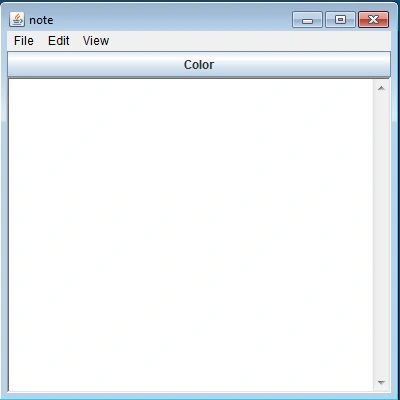
The Notepad looks like this:
- New
- Open
- Save
- Save As
- Undo
- Cut
- Paste
- Copy
- Delete
- Select All
- Status Bar
After extracting the preceding file, just execute the notepad with the name "call". Since the main class is named "call" in my notepad source code.
Packages imported
- java.io.*;
- java.awt.*;
- java.awt.event.*;
- javax.swing.*;
- Action Listener:
This Listener is used when an Action is performed on any of the components, like when a button is clicked etcetera.
- Window Listener:
When a task is performed on the window this listener is used, it includes the following seven functions:- public void windowActivated(WindowEvent e)
- public void windowDeactivated(WindowEvent e)
- public void windowIconified(WindowEvent e)
- public void windowDeiconified(WindowEvent e)
- public void windowClosed(WindowEvent e)
- public void windowClosing(WindowEvent e)
- public void windowClosing(WindowEvent e)
- Mouse Listener:
This listener is used when a mouse action is performed, it includes the following methods in it:- public void mouseEntered(MouseEvent e)
- public void mouseExited(MouseEvent e)
- public void mouseClicked(MouseEvent e)
- public void mousePressed(MouseEvent e)
- public void mouseReleased(MouseEvent e)
- Saving a File: This is a menu item of the File menu. The code of this menu is shown below:
- if (e.getSource() == mi3)
- {
- fd2.setVisible(true);
- try
- {
- String pq;
- pq = ta.getText();
- byte b[] = pq.getBytes();
- fo = new FileOutputStream(fd2.getDirectory() + fd2.getFile());
- fo.write(b);
- fo.close();
- }
- catch (Exception ee) {}
- }
-
Save As: When a user wants to save the file with some other name then the user clicks on the "Save As" option. The code for this function is as follows:
- if (e.getSource() == mi4)
- {
- fd2.setVisible(true);
- try
- {
- String pq;
- pq = ta.getText();
- byte b[] = pq.getBytes();
- fo = new FileOutputStream(fd2.getDirectory() + fd2.getFile());
- fo.write(b);
- fo.close();
- }
- catch (Exception ee) {}
- }
-
Open: To open the existing file, the user clicks on the "Open" menu item. The code for this open function is shown below:
- if (e.getSource() == mi2)
- {
- fd1.setVisible(true);
- try
- {
- fi = new FileInputStream(fd1.getDirectory() + fd1.getFile());
- DataInputStream ds = new DataInputStream(fi);
- String nm;
- while ((nm = ds.readLine()) != null)
- {
- ta.append(nm + String.valueOf((char) 10));
- }
- fi.close();
- }
- catch (Exception ee) {}
- }
-
New: When the user wants to open a new file, this menu item is clicked on. The code for this is:
- if (e.getSource() == mi1)
- {
- ta.setText("");
- }
Join the conversation! Your thoughts help the community grow.