

Creating notepad.exe in Visual C++ (I suspect) would have taken some time, but creating notepad in C# and .NET took less than a week. This notepad, however, is a bit more powerful in that it allows you to open and edit multiple files. It also has the added functionality of viewing recent files, print preview, and a few other niceties lacking in notepad, such as the ability to hit Ctrl-F3 to look for the next occurrence of the selected text. There are many features we could examine in the development of Notepad.NET. In this article we will talk about a class I created for this application called TextBoxPrinter that allows you to print the contents of a multiline textbox.
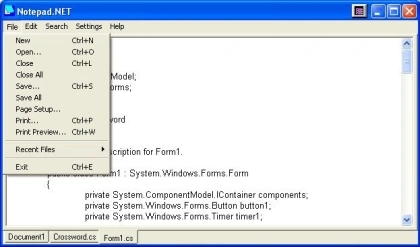
Figure 1 - NotePad.NET
The design for Notepad.NET is illustrated below with the help of the WithClass UML Tool. The MRUMenuItem was borrowed from Jan Wiggers article on code project, but slightly modified to allow persistence to the config file with the help of the ConfigHandler. I've included the ConfigHandler, MRUMenuItem, and TextBoxPrinter classes in the download so you can utilize them in your own projects.
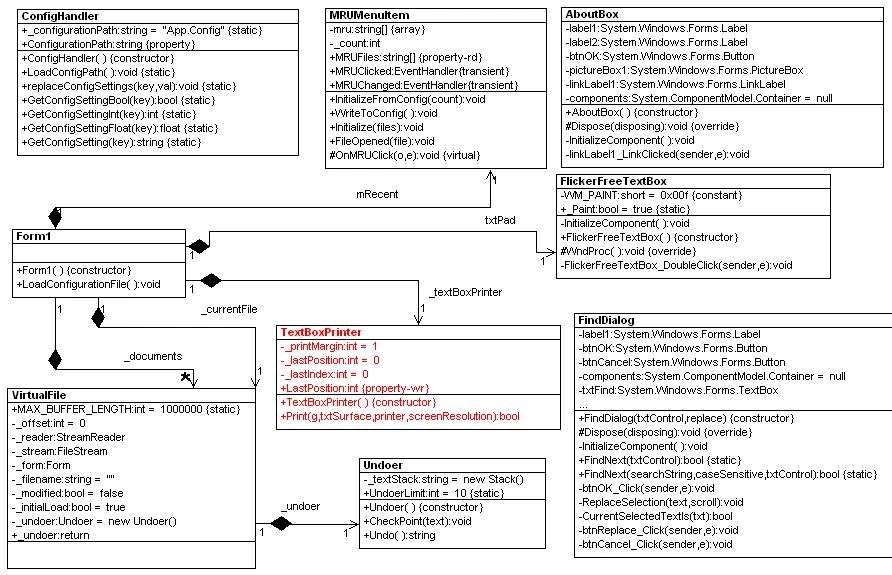
Figure 2 - UML Design of NotePad.NET Reverse Engineered using WithClass UML Tool
The TextBoxPrinter class is a very simple class that possesses all of its functionality in the Print method. The Print method takes the following parameters: a printer Graphics object for drawing on, a TextBox to extract the text, a PrintDocument to get printer settings, and a screenResolution to scale fonts and margins. The Print method steps through each line in the TextBox and draws it to the Graphics Object surface. Before it draws the line, it measures the font string and fits it to a layout rectangle. When the line reaches the end of the page, the Print method sets the HasMorePages flag to prompt the printer to continue printing to the next page.
/// <summary>
/// Go through each line of the text box and print it
/// </summary>
/// <param name="txtSurface"></param>
public bool Print(Graphics g, TextBox txtSurface,
PrintDocument printer, float screenResolution)
{
Font textFont = txtSurface.Font;
// go line by line and draw each string
int startIndex = _lastIndex;
int index = txtSurface.Text.IndexOf("\n", startIndex);
int nextPosition = (int)_lastPosition;
// just use the default string format
StringFormat sf = new StringFormat();
// sf.FormatFlags = StringFormatFlags.NoClip |
// (~StringFormatFlags.NoWrap );
// get the page height
int lastPagePosition = (int)(((printer.DefaultPageSettings.PaperSize.Height/100.0f) - 1.0f) * (float)screenResolution);
// use the screen resolution for measuring the page
int resolution = (int)screenResolution;
// calculate the maximum width in inches from the default paper size and the margin
int maxwidth = (int)((printer.DefaultPageSettings.PaperSize.Width/100.0f - _printMargin*2)*resolution);
// get the margin in inches
int printMarginInPixels = resolution * _printMargin;
Rectangle rtLayout = new Rectangle(0,0,0,0);|
int lineheight = 0;
while (index != -1)
{ // get the next line in the text box
string nextLine = txtSurface.Text.Substring(startIndex, index - startIndex);
// calculate the line height based on the font, string, and maximum line width
lineheight = (int)(g.MeasureString(nextLine, textFont, maxwidth, sf).Height);
// produce a new layout rectangle for the string
rtLayout = new Rectangle(printMarginInPixels, nextPosition, maxwidth, lineheight);
// draw the line to the printer
g.DrawString(nextLine, textFont, Brushes.Black, rtLayout,sf);
// advance to the next line position, leaving 3 pixel padding
nextPosition += (int)(lineheight + 3);
startIndex = index + 1;
// find the position of the end of the next line
index = txtSurface.Text.IndexOf("\n", startIndex);
// if the next line position is greater than the last position on the page, return true to indicate more pages
if (nextPosition > lastPagePosition)
{
_lastPosition = (int)screenResolution;
_lastIndex = index;
return true; // reached end of page
}
} // draw the last line in the document
string lastLine = txtSurface.Text.Substring(startIndex);
lineheight = (int)(g.MeasureString(lastLine, textFont, maxwidth, sf).Height);
rtLayout = new Rectangle(printMarginInPixels, nextPosition, maxwidth, lineheight);
g.DrawString(lastLine, textFont, Brushes.Black, rtLayout, sf);
_lastPosition = (int)screenResolution;
_lastIndex = 0;
return false; // finished printing
}
The TextBoxPrinter's Print method is called from the PrintPage event handler of the PrintDocument. This event will continue to be called for each printed page until all the lines of the text box are exhausted:
private void printDocument1_PrintPage(object sender, System.Drawing.Printing.PrintPageEventArgs e)
{ // Print the contents of the text box. Continue
// printing until all lines in the textbox are exhausted.
e.HasMorePages = _textBoxPrinter.Print(e.Graphics, txtPad, printDocument1, _screenResolutionX);
}
Conclusion
The TextBoxPrinter class illustrates how you can print any text to a printer using .NET. It shows you how to size the text to the printed page, how to allow room for margins, and how to continue printing to multiple pages. Also, I hope you find Notepad.NET useful as a text editing tool. Now you can juggle multiple notes with the power of .NET.
Dileep G GPosted Jun 24, 2010, 5:57 AM
Hai, I used this code to print atext box element. //Declare print as a new PrintDialog PrintDialog print = new PrintDialog(); //Declare prntDoc_PrintPage as a new EventHandler for prntDoc's Print Page prntDoc.PrintPage += new System.Drawing.Printing.PrintPageEventHandler(prntDoc_PrintPage); //Set prntDoc to the PrintDialog's Document print.Document = prntDoc; //Show the PrintDialog if (print.ShowDialog(this) == DialogResult.OK) { //Print the Page prntDoc.Print(); } } private void prntDoc_PrintPage(Object sender, System.Drawing.Printing.PrintPageEventArgs e) { //Declare g as Graphics equal to the PrintPageEventArgs Graphics Graphics g = e.Graphics; //Draw the Text in txtBox to the Document g.DrawString(Rtxt_sel.Text, Rtxt_sel.Font, Brushes.Black,0,0); } bt the problem is I can't control the print alignment.Please help to control the print alignment.
Pratik SawantPosted May 30, 2010, 12:16 PM
just tell me how to change the color of title bar (in c#.net using vs 2005) at runtime. like we have glossy title bar of ms office products.
Ben AffleckPosted Aug 3, 2009, 9:09 AM
Hi all, TextPadDotNet is very useful but i have on problem when add a line to the textBox. If i add this line "some text ...end\r\n" and a second line like "other ...end\r\n" the character position of "...end" start at 31 position for both lines, but TextPadDotNet display it in a different position. Notepad.exe don't have this problem. Why ?
Devidutta PradhanPosted Jun 22, 2007, 9:31 AM
Describe briefly About the Find operation in note pad
sowmya maraboinaPosted Jun 5, 2006, 2:42 AM
how to design a query analyzer window using c#.net
Ali UsmanPosted May 26, 2006, 2:35 AM
Hi Respected Sir: I am a fresh developer of C# and ASP.net and I have not very much sound knowledge of C# and ASP.Net. I have two requests before you. First please guide me to some books and articles which make me very good programmer of C# and ASP.net and the second is the suggestion please write namespaces in the comments when to use the classes which is not used as usual. Like Regex and others. Regards: Ali Usman