

Here we will learn how to add NuGet to our LightSwitch Application using Visual Studio 2012.
In my previous article I created the basic application; see: http://www.c-sharpcorner.com/UploadFile/18ddf7/add-and-edit-data-in-basic-lightswitch-application/.
Procedure for adding NuGet to our application.
Step 1
In the Solution Explorer, click on the Toggle View drop down list and select "File View".
Step 2
Right-click on the HTML_App.HTML Client Project in the Solution Explorer and select Manage NuGet Packages...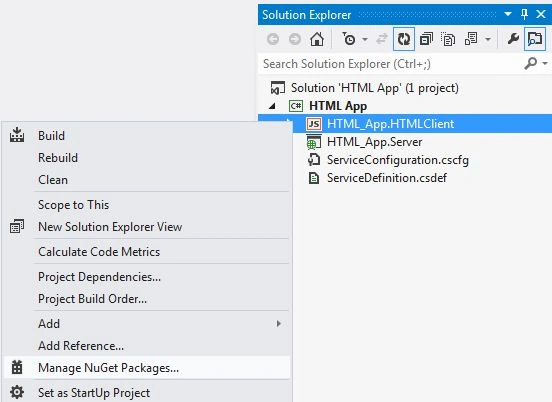
Step 3
The Manage NuGet Packages dialog box appear. Select "Online packages" and in the Search box, search for SignalR. 
Step 4
Install the Microsoft ASP.Net SignalR JavaScript Client.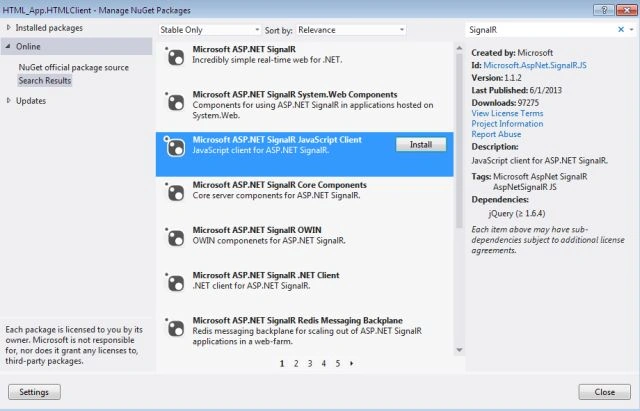
Step 5
The SignalR JavaScript is added to the HTML Client.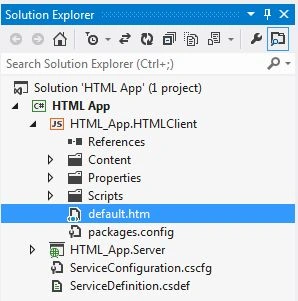
Step 6
Now open the default.htm file and add the following code.
<script type="text/javascript" src="Scripts/jquery.signalR-1.0.1.js"></script> //It is the reference to SignalR Library
<script src="../signalr/hubs"></script> //It is the reference to Java Script Library
Step 7
Right-click on the server project and select "Manage NuGet Package..." as shown below.
Step 8
This time we need to install Microsoft ASP.NET SignalR.
Join the conversation! Your thoughts help the community grow.