

Introduction
In this article, I will discuss how to bind objects such as an ArrayList to a DataGrid control using C# and ADO.NET.
Binding an ArrayList
If you create an ArrayList and bind it to the DataGrid control, DataGrid does not display the contents. For example, the following code creates an ArrayList objects, add items to it, and binds it to the DataGrid:
ArrayList list =
new ArrayList();list.Add(1);
list.Add(2);
list.Add(3);
dataGrid1.DataSource = list;
The problem with this code is DataGrid is not aware of the contents of the ArrayList. DataGrid can only display contents having a format of schema where there should be a column name and column type.
The Solution
The solution of the problem is to create a class that exposes an integer as its property. Then you create an ArrayList and bind it to the DataGrid. For example, the following code creates an ArrayList of MyClass object, which takes one value as constructor parameter. Here MyClasss exposes this value as an int property.
ArrayList list =
new ArrayList();list.Add(new MyClass(1);
list.Add(new MyClass(2);
list.Add(new MyClass(3);
dataGrid1.DataSource = list;
The Complete Code
Here is a class with integer and string properties.
public
class BindingObject{
private int intMember;
private string stringMember;
private string nullMember;
public BindingObject(int i, string str1, string str2)
{
intMember = i;
stringMember = str1;
nullMember = str2;
}
public int IntMember
{
get { return intMember; }
}
public string StringMember
{
get { return stringMember; }
}
public string NullMember
{
get { return nullMember; }
}
}
Now you can create an ArrayList of this class objects and bind it to the DataGrid as following:
ArrayList list =
new ArrayList();list.Add(new BindingObject(1, "One", null));
list.Add(new BindingObject(2, "Two", null));
list.Add(new BindingObject(3, "Three", null));
dataGrid1.DataSource = list; The contents would look like the following:
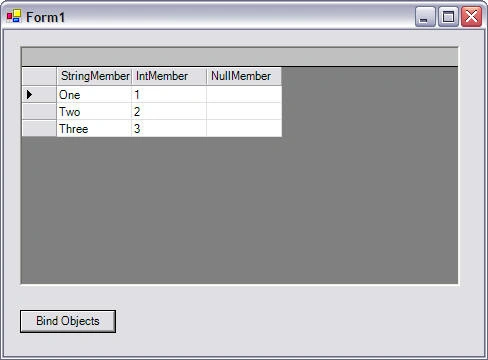
Where StringMember, IntMember, and NullMember are three properties of the object.
See the attached code for more details.
Summary
In this article, you learned how to take advantage of DataGrid binding feature to display the contents of an array of objects.
Francisco GonzalezPosted Jun 1, 2010, 8:48 PM
Hi Mahesh, How do you manage the item when the final user Insert, Update or Delete a Row, I mean, you have each row of the ArrayList as a row in the DataBase, then you should reflect every change in the database. Thanks in advanced.
Ruzive MazhanduPosted Oct 3, 2009, 6:11 PM
thank u very much this article has been very helpful,in displaying arrays in a datagrid.
Luis ArellanoPosted Aug 19, 2009, 10:50 AM
How can I do the inverse method? Fill a list from a datagrid Thks
Henri de FeraudyPosted Feb 8, 2008, 12:20 PM
This article is useful but leaves me ever so frustrated. It does not explain why the order of the columns is different to the order of the fields in the class (or more to the point what to do about it). It leaves the reader hungry just after he has been given the first course. Just as bad, it doesnt give any pointers to further reading.
srinivas rejetiPosted Jan 7, 2008, 7:05 AM
how can i bind 4 text box values into grid with out using any datasource?
indika kannangaraPosted Oct 23, 2007, 6:07 AM
how can i bind a collection to a data grid while the collection is filling. i'm using C# .Net compact frame work. my aim is reduse the time taken to the load item to the data grid. in that case i'm using a separate thread for fill the collection.the problem is datagrid only loads the items that are currently available in the collection not the all. i got more than 7,000 items. how can i handel situation like this thank you indika