
Before reading this article, please go through the following articles:
- Object Relational Mapping (ORM) Using NHibernate - Part 1 of 8
- Object Relational Mapping (ORM) Using NHibernate - Part 2 of 8
- Object Relational Mapping (ORM) Using NHibernate - Part 3 of 8
- Object Relational Mapping (ORM) using NHibernate - Part 4 of 8
- Object Relational Mapping (ORM) Using NHibernate - Part 5-A of 8
- Object Relational Mapping (ORM) Using NHibernate: Part 5-B of 8
- Object Relational Mapping (ORM) Using NHibernate - Part 6 of 8
Completing the E-commerce Example
In articles 1-6, we have finished the various types of associations between entity classes and inheritance between entity classes. The example to illustrate these ideas had been the sample ECommerce scenarios. We have reached a point where shipping must be done for the product. In this seventh article and its client code, we will demonstrate that the classes we have put forth to incorporate the shipping functionality will allow shipment items of an order to be shipped in parts by multiple shipping services. This is a flexibility that provides business advantages. Also possible is the case that multiple orders belonging to the same customer can be combined into one shipment. All this is possible because we have modeled the relationship between entities Shipping and PaymentApprovedOrder as Many-To-Many association with the OrderShipment as an association class. This article and the client code will also demonstrate that the way in which we add ShipmentItem, i.e. the item to shipped for a paid order, will capture the material movement in the ecommerce domain.
Background
Covered in Articles 1 - 6.
NOTE: The two projects included are ECommerce1 and ECommerce 2. ECommerce1 is for samples in articles 1 - 3 and Ecommerce 2 is for the rest of the samples until this article 7. The client project to test the classes and their associations for each article is also provided and each article's testcode is clearly named like "Test Code for Article 1" etc. While starting a subsequent article, the previous article's test code had been commented out in the test client project and the classes in the main project would have evolved and changed to fit the subsequent scenarios of the next article. The commented out previous article's test code has not been updated to reflect changes to the class. So the test code will compile and work correctly for the most recent article for each project i.e. article 3 for ECommerce1 and Article 7 & 6 for Ecommerce 2 which completes our ECommerce samples. Follow the instructions given earlier for using the projects with Microsoft Visual Studio 2012, though we all know how to get it done without any help.
Code Sample For Ecommerce Scenario
Here we will briefly explain and complete the ShipmentItem scenario and demonstrate the points articulated in the Introduction. The scenario is, once a customer gives the paid order to the ecommerce site and has selected his preferred method of shipping, the Ecommerce Site Shipping Department will process the order and ship all the items in the paid order to the customer.
So, when a paid order is created by the customer, the customer selects fast shipping or parcel service according to which service, FastShipping or ParcelService, was specified and stored in the base class reference "Shipping". This Shipping reference stores the paid order id to which it is attached in the PrimaryPaidOrderId property and is persisted to the database. Not a foreignkey but just a property (because Shipping and PaymentApprovedOrder are bound by association to the class OrderShipment). When the Shipping information must be input by personnel of the Shipping Department, they input this primarypaidorderid (PRIMARYPAIDORDERID) to which shipping has to be done to get a particular shipping instance. How do they know this PRIMARYPAIDORDERID? This is the the paid order id (i.e. id of a new order - PAYMENTAPPROVEDORDERID) for which a shipping has not been done which is available for the application to retrieve and show in a listbox from which the shipping department can select one. So using this, the particular shipping instance for that primary paid order id, stored in the repository while an order is created by a customer, is retrieved from the repository and shipping information is added to it and persisted again into the repository. If in case the shipping department decides to do the Shipping in parts i.e in more than one shipment for a particular order, then for subsequent parts they do not need to add the primary paid order id. They can just create new instances of shipping giving all the shipping information. The OrderShipment instance will associate Shipping and PaymentApprovedOrder anyway. This design will provide maximum flexibility to the business scenario.
The code in ECommerceSellerSystem for adding the Shipping information is:
public Shipping AddShippingInformation(
    bool is_primary,
    bool is_fast,
    long prime_id,
    string shipping_name,
    DateTime shipping_start_date,
    string tracking_number,
    bool is_gift_wrapped)
{
    Shipping shipping = null;
    IRepository<Shipping> shipping_repo = new DBRepository<Shipping>();
    NHibernate.ISession session = null;
    NHibernateHelper nh = NHibernateHelper.Create();
    session = nh.Session;

    if (is_primary)
    {
        string query_string = "from Shipping shipping1 where shipping1.PrimaryPaidOrderId = :prime_id";
        shipping = session.CreateQuery(query_string)
            .SetParameter<long>("prime_id", prime_id)
            .UniqueResult<Shipping>();

        if (shipping != null)
        {
            shipping.ShippingName = shipping_name;
            shipping.ShippingStartDate = DateTime.Today;

            if (shipping is FastShipping)
            {
                ((FastShipping)shipping).TrackingNumber = tracking_number;
            }
        }
    }
    else
    {
        if (is_fast)
        {
            shipping = new FastShipping
            {
                ShippingName = shipping_name,
                ShippingStartDate = DateTime.Today,
                PrimaryPaidOrderId = null,
                TrackingNumber = tracking_number
            };
        }
        else
        {
            shipping = new ParcelService
            {
                ShippingName = shipping_name,
                ShippingStartDate = DateTime.Today,
                PrimaryPaidOrderId = null,
                IsGiftWrapped = is_gift_wrapped
            };
        }
    }

    if (shipping != null)
    {
        using (NHibernate.ITransaction trans = session.BeginTransaction())
        {
            session.SaveOrUpdate(shipping);
            trans.Commit();
        }
    }

    return shipping;
}
As mentioned before, the association class for the Many-To-Many association between Shipping and PaymentApprovedOrder is OrderShipment. Each instance of OrderShipment will also contain the list of items that was ordered by the customer and shipped in that shipment i.e. collection of ShipmentItems. But suppose the shipping department of the ECommerce site decides to send a particular order's items in parts i.e. the first few items in one shipping instance and the remainder in other shipping instances. In that case, correspondingly multiple instances of Shipping and OrderShipment will be created and each instance of OrderShipment will contain the collection of shipment items shipped in it.
The Code in ECommerceSellerSystem for adding a ShipmentItem is:
public void AddShipmentItem(OrderShipment order_shipment, string inventory_serial_code)
{
    // The barcode scanner returns a string of inventory serial code.
    // Item instance will have to be retrieved using serial code.
    // Item in Inventory will have to be deleted inside Transaction.
    // In the same transaction, the item has to be added to inventory.

    NHibernateHelper nh = NHibernateHelper.Create();

    using (NHibernate.ISession session = nh.Session)
    {
        string query_string = "from Item item1 where item1.InventorySerialCode = :code";
        Item inventory_item = session.CreateQuery(query_string)
            .SetParameter<string>("code", inventory_serial_code)
            .UniqueResult<Item>();

        if (inventory_item != null)
        {
            IRepository<Item> item_repository = new DBRepository<Item>();
            IRepository<OrderShipment> order_shipment_repository = new DBRepository<OrderShipment>();

            using (NHibernate.ITransaction trans = session.BeginTransaction())
            {
                inventory_item.PaidOrder.PaidOrderItems.Remove(inventory_item);
                session.Delete(inventory_item);

                order_shipment.ShipmentItems.Add(new ShipmentItem { InventorySerialCode = inventory_item.InventorySerialCode });
                session.SaveOrUpdate(order_shipment);

                trans.Commit();
            }
        }
    }
}
The important thing to note about the above piece of code is how it captures the domain's material movement. When an item is ordered and shipped, it no longer exists in the inventory of items. The code written above captures the domain exactly. The item moves from the inventory of items represented by the ITEM table to the SHIPMENTITEMS table. A flag in ITEM table would have been enough but removing the sold and shipped ones from the ITEM table and moving them to the SHIPMENTITEMS table makes it easier for any scrutiny and adds clarity.
The client code to test is given by:
// Add Shipping Information - NOTE THAT THESE METHODS ARE CALLED WITHIN DEPARTMENTS OF E-COMMERCE SITE

// Shipping information for PAYMENTAPPROVEDORDER
ECommerceSellerSystem seller_system3 = new ECommerceSellerSystem();

// SHIPPING DEPARTMENT SELECTS AN APPROPRIATE SHIPPING AGENCY AND CREATES A SHIPPING FOR THE PRODUCT
Shipping shipping1 = seller_system3.AddShippingInformation(true, true, pay_order1.PaymentApprovedOrderId, "Noble House Ships", DateTime.Today, "A101A101", false);

// THE ORDER SHIPMENT BEGINS
OrderShipment order_shipment1 = seller_system3.CreateOrderShipment(pay_order1, shipping1);

// THE SHIPPING MANAGER USES A BARCODE SCANNER TO SCAN AN ITEM TO BE SHIPPED
// THE BARCODE SCANNER JUST GIVES A TEXT IDENTIFYING THE PRODUCT - HERE "00A0110"
seller_system3.AddShipmentItem(order_shipment1, "00A0110");

// THE SHIPPING MANAGER USES A BARCODE SCANNER TO SCAN AN ITEM TO BE SHIPPED
// THE BARCODE SCANNER JUST GIVES A TEXT IDENTIFYING THE PRODUCT - HERE "01A0101"
seller_system3.AddShipmentItem(order_shipment1, "01A0101");

// FOR THE SAME ORDER, A DIFFERENT SHIPPING IS SELECTED - THIS FLEXIBILITY IS GOOD BECAUSE IT ALLOWS
// THE SHIPPING DEPARTMENT TO GIVE ITEMS OF THE SAME ORDER TO DIFFERENT SHIPPERS, EACH SPECIALIZING IN THAT ITEM TYPE
Shipping shipping2 = seller_system3.AddShippingInformation(false, true, pay_order1.PaymentApprovedOrderId, "Fast Service", DateTime.Today, "A10101A", false);

// AS BEFORE, THE SHIPPING MANAGER ADDS ITEMS TO SHIP
OrderShipment order_shipment2 = seller_system3.CreateOrderShipment(pay_order1, shipping2);
seller_system3.AddShipmentItem(order_shipment2, "02A10101");
seller_system3.AddShipmentItem(order_shipment2, "03A01010");
seller_system3.AddShipmentItem(order_shipment2, "04A101010");

// WHEN AN ITEM IS PICKED FROM INVENTORY TO BE SHIPPED BY THE SHIPPING MANAGER USING THE ABOVE METHOD,
// IT CEASES TO LIVE IN INVENTORY's ITEM TABLE AND IS MOVED TO SHIPMENTITEMS TABLE TO CAPTURE
// MATERIAL MOVEMENT IN THE DOMAIN, MAKING IT EASIER FOR SCRUTINY LATER.
Figure 1 below shows the tables created by the client code. The top one is the SHIPMENTITEMS table, the center one is the SHIPPING Table, and the bottom is the ITEM table. Note that the second row of the SHIPPING table (the center table) has nulls. Nulls are there because we have not given the Shipping Information for it in client code and the row was created when the customer created the order as shown in Article 6. Compare it with Row 1 for which we gave all the shipping information in the client code above. Also note that in the SHIPPING Table (center), for the third row with SHIPPINGID = 3, PRIMARYPAIDORDERID is null because this row was not created when the customer created the paid order. This row got created by the Shipping department of the Ecommerce site which decided to send PAYMENTAPPROVEDORDER=1 in two parts and hence added this shipping instance by providing shipping info. As mentioned before, the PRIMARYPAIDODERID is filled up by the application only when the customer gives shipping preferences while creating a paid order. Also note in the top SHIPMENTITEMS table, that all items are of the same paid order but belong to two different shipping instances, each representing a different shipping firm (see the ShippingID column and PAYMENTAPPROVEDORDERID column in the topmost SHIPMENTITEM table). This is the flexibility that we mentioned before. Also note that when these shipmentitems are moved to the SHIPMENTITEMS table, they cease to exist in inventory i.e the ITEM table (the bottom table in Figure 1).
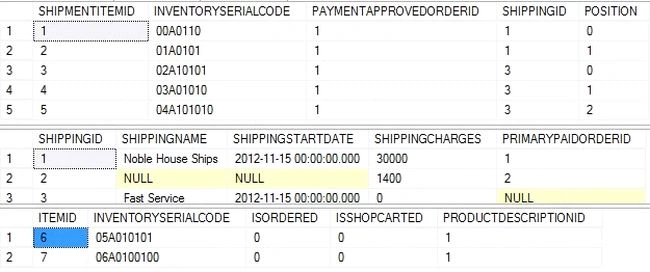
Figure 1: Top - SHIPMENTITEMS Table, Center - SHIPPING Table, Bottom - ITEM Table
Conclusion
The samples are created keeping two core principles in mind: simplistic (KISS) and minimalistic (YAGNI). The entity classes have been factored keeping high cohesion in mind but obviously they cannot have low coupling because the entire article series is for explaining various entity associations and there have been bidirectional associations used for the most part to illustrate the ideas. This article completes the various scenarios of ECommerce samples. The next article of this series will discuss the lazyloading feature in NHibernate. Enjoy NHIBERNATE.
References
To gain a more comprehensive understanding of the subject, please read the next part,
Gowtham RajamanickamPosted Mar 28, 2015, 12:30 PM
good