

WPF ObservableCollection
An ObservableCollection is a dynamic collection of objects of a given type. Objects can be added, removed or be updated with an automatic notification of actions. When an object is added to or removed from an observable collection, the UI is automatically updated. This happens because, when binding to an observable collection, WPF automatically adds a CollectionChanged event handler to the ObservableCollecion's events.
The ObservableCollection class exists in the System.Collections.ObjectModel namespace.
I will demonstrate how this works in a simple example:
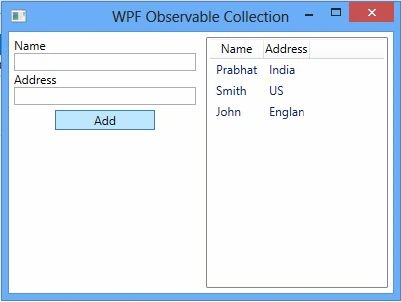
I have a window with a Button, two TextBoxes and a ListView and each time you click the Button the text of the TextBox is added to the collection and the ListView is updated automatically.
UI
Code File
- public partial class MainWindow : Window
- {
- private ObservableCollection<Person> person;
- public MainWindow()
- {
- InitializeComponent();
- person = new ObservableCollection<Person>()
- {
- new Person(){Name="Prabhat",Address="India"},
- new Person(){Name="Smith",Address="US"}
- };
- lstNames.ItemsSource = person;
- }
- private void btnNames_Click(object sender, RoutedEventArgs e)
- {
- person.Add(new Person() { Name = txtName.Text, Address = txtAddress.Text });
- txtName.Text = string.Empty;
- txtAddress.Text = string.Empty;
- }
- }
- public class Person
- {
- public string Name { get; set; }
- public string Address { get; set; }
- }
lstNames.ItemsSource = person;
By doing so, we can dynamically insert, update and remove items from the ListView, as in:
- person.Add(new Person() { Name = txtName.Text, Address = txtAddress.Text });
- <Grid>
- <Grid.ColumnDefinitions>
- <ColumnDefinition/>
- <ColumnDefinition Width="*"/>
- </Grid.ColumnDefinitions>
- <Grid.RowDefinitions>
- <RowDefinition Height="*"></RowDefinition>
- </Grid.RowDefinitions>
- <StackPanel Grid.Row="0" Grid.Column="0" Margin="5,5,5,5">
- <TextBlock x:Name="lblName" Text="Name"></TextBlock>
- <TextBox x:Name="txtName"></TextBox>
- <TextBlock x:Name="lblAddress" Text="Address"></TextBlock>
- <TextBox x:Name="txtAddress"></TextBox>
- <Button Grid.Column="0" Width="100" Height="20" Margin="5,5,5,5" x:Name="btnNames" Click="btnNames_Click" Content="Add"></Button>
- </StackPanel>
- <ListView x:Name="lstNames" Margin="5,5,5,5" Grid.Column="1" Grid.Row="0">
- <ListView.View>
- <GridView x:Name="grdNames">
- <GridViewColumn Header="Name" DisplayMemberBinding="{Binding Name}"/>
- <GridViewColumn Header="Address" DisplayMemberBinding="{Binding Address}"/>
- </GridView>
- </ListView.View>
- </ListView>
- </Grid>
- <GridViewColumn Header="Name" DisplayMemberBinding="{Binding Name}"/>
Nishant DixitPosted Mar 3, 2023, 7:08 AM
Simple and easy to understand. Good work!
Hansueli RickliPosted May 3, 2018, 10:57 AM
Very nice and good expplained but I can not see it works wit update. I change a Name - but the display does not change?
Abdul RasheedPosted Dec 1, 2017, 5:09 PM
Well written and nicely explained
rahul singhPosted Jan 11, 2017, 9:44 AM
Nice Example of ObservableCollection ....... RJ
Former memberPosted Jun 7, 2016, 2:24 AM
Thanks Prabhat, short and nice example, easy to understand.
Asfend YarPosted Feb 27, 2016, 11:53 AM
nice
Prakash ChasiyaPosted Oct 14, 2015, 3:49 AM
Very nice and very easy to understand...many thanks..
vijay kumar sPosted Aug 25, 2015, 9:14 AM
Its very simple and easy example for beginners, Thank You
Ramesh balasubramaniPosted Jul 16, 2015, 8:17 AM
Super
Nambukarthy RaveendranPosted Oct 17, 2014, 1:24 AM
Hi Prabhat, the artical is simple and easy to understand the concept................thanks :)
md ranaPosted Feb 2, 2014, 4:44 AM
Brother my little problem is when i input in grid than not update grid value add me in skype: rakibahamed111
ArturPosted Sep 3, 2013, 5:06 AM
very helpful
Rais PatelPosted May 22, 2013, 12:55 AM
easy to understand... explained well
Hamid KhanPosted Mar 8, 2013, 1:48 PM
Hi Prabhat, it is avery helpfull article.... thanks
SunPosted Jan 9, 2013, 2:46 AM
great, easy to understand.
Deepak MiddhaPosted Jan 8, 2013, 11:03 PM
very nice explanation.