
Introduction
In this post, we will learn about OData by using ASP.Net Web API 2 in MVC application.
What’s OData protocol?
The Open Data Protocol (OData) is a data access protocol for the web. OData provides a uniform way to query and manipulate data sets through CRUD operations (create, read, update, and delete).
Prerequisites
As I said earlier, we are going to use OData protocol in our MVC application. For this, you must have Visual Studio 2015 (.NET Framework 4.5.2) and SQL Server.
SQL Database part
Here, find the script to create database.
Create Database
- USE [master]
- GO
- /****** Object: Database [EmployeeDB] Script Date: 9/27/2016 2:58:52 AM ******/
- CREATE DATABASE [EmployeeDB]
- CONTAINMENT = NONE
- ON PRIMARY
- ( NAME = N'EmployeeDB', FILENAME = N'c:\Program Files (x86)\Microsoft SQL Server\MSSQL11.MSSQLSERVER\MSSQL\DATA\EmployeeDB.mdf' , SIZE = 3072KB , MAXSIZE = UNLIMITED, FILEGROWTH = 1024KB )
- LOG ON
- ( NAME = N'EmployeeDB_log', FILENAME = N'c:\Program Files (x86)\Microsoft SQL Server\MSSQL11.MSSQLSERVER\MSSQL\DATA\EmployeeDB_log.ldf' , SIZE = 1024KB , MAXSIZE = 2048GB , FILEGROWTH = 10%)
- GO
- ALTER DATABASE [EmployeeDB] SET COMPATIBILITY_LEVEL = 110
- GO
- IF (1 = FULLTEXTSERVICEPROPERTY('IsFullTextInstalled'))
- begin
- EXEC [EmployeeDB].[dbo].[sp_fulltext_database] @action = 'enable'
- end
- GO
- ALTER DATABASE [EmployeeDB] SET ANSI_NULL_DEFAULT OFF
- GO
- ALTER DATABASE [EmployeeDB] SET ANSI_NULLS OFF
- GO
- ALTER DATABASE [EmployeeDB] SET ANSI_PADDING OFF
- GO
- ALTER DATABASE [EmployeeDB] SET ANSI_WARNINGS OFF
- GO
- ALTER DATABASE [EmployeeDB] SET ARITHABORT OFF
- GO
- ALTER DATABASE [EmployeeDB] SET AUTO_CLOSE OFF
- GO
- ALTER DATABASE [EmployeeDB] SET AUTO_CREATE_STATISTICS ON
- GO
- ALTER DATABASE [EmployeeDB] SET AUTO_SHRINK OFF
- GO
- ALTER DATABASE [EmployeeDB] SET AUTO_UPDATE_STATISTICS ON
- GO
- ALTER DATABASE [EmployeeDB] SET CURSOR_CLOSE_ON_COMMIT OFF
- GO
- ALTER DATABASE [EmployeeDB] SET CURSOR_DEFAULT GLOBAL
- GO
- ALTER DATABASE [EmployeeDB] SET CONCAT_NULL_YIELDS_NULL OFF
- GO
- ALTER DATABASE [EmployeeDB] SET NUMERIC_ROUNDABORT OFF
- GO
- ALTER DATABASE [EmployeeDB] SET QUOTED_IDENTIFIER OFF
- GO
- ALTER DATABASE [EmployeeDB] SET RECURSIVE_TRIGGERS OFF
- GO
- ALTER DATABASE [EmployeeDB] SET DISABLE_BROKER
- GO
- ALTER DATABASE [EmployeeDB] SET AUTO_UPDATE_STATISTICS_ASYNC OFF
- GO
- ALTER DATABASE [EmployeeDB] SET DATE_CORRELATION_OPTIMIZATION OFF
- GO
- ALTER DATABASE [EmployeeDB] SET TRUSTWORTHY OFF
- GO
- ALTER DATABASE [EmployeeDB] SET ALLOW_SNAPSHOT_ISOLATION OFF
- GO
- ALTER DATABASE [EmployeeDB] SET PARAMETERIZATION SIMPLE
- GO
- ALTER DATABASE [EmployeeDB] SET READ_COMMITTED_SNAPSHOT OFF
- GO
- ALTER DATABASE [EmployeeDB] SET HONOR_BROKER_PRIORITY OFF
- GO
- ALTER DATABASE [EmployeeDB] SET RECOVERY SIMPLE
- GO
- ALTER DATABASE [EmployeeDB] SET MULTI_USER
- GO
- ALTER DATABASE [EmployeeDB] SET PAGE_VERIFY CHECKSUM
- GO
- ALTER DATABASE [EmployeeDB] SET DB_CHAINING OFF
- GO
- ALTER DATABASE [EmployeeDB] SET FILESTREAM( NON_TRANSACTED_ACCESS = OFF )
- GO
- ALTER DATABASE [EmployeeDB] SET TARGET_RECOVERY_TIME = 0 SECONDS
- GO
- ALTER DATABASE [EmployeeDB] SET READ_WRITE
- GO
Create your MVC application
Open Visual Studio and select File >> New Project.
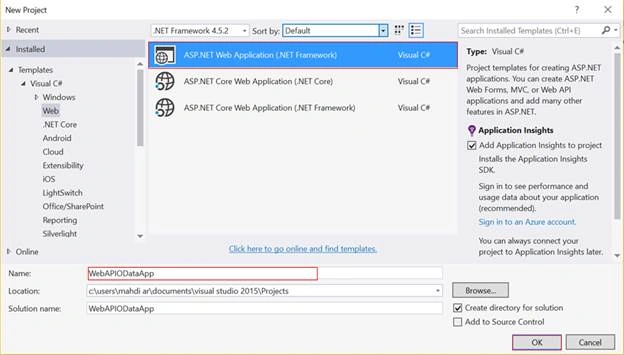
The "New Project" window will pop up. Select ASP.NET Web Application (.NET Framework), name your project, and click OK.
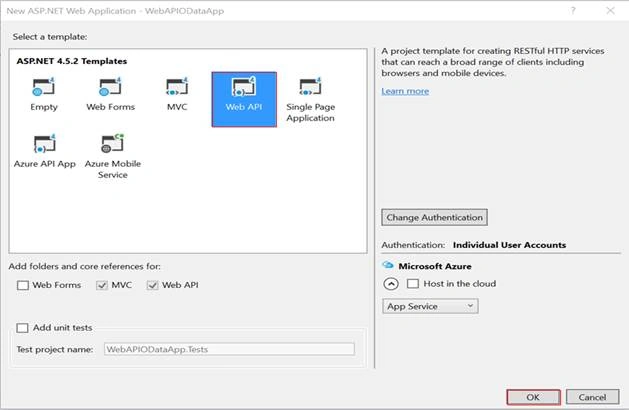
Now, new dialog will pop up for selecting the template. We are going to choose Web API template and click OK.
Add a Model class
In Solution Explorer, right click on Models folder > Add > Class > Name your class.
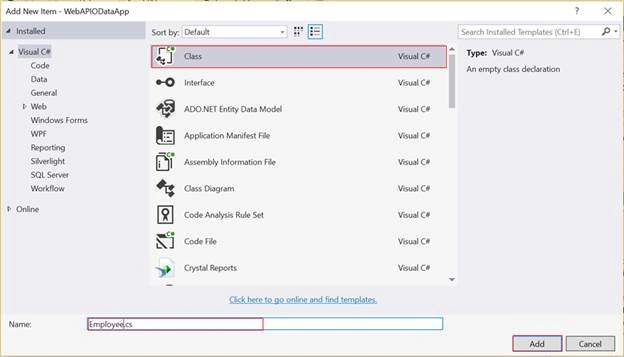
Employee.cs
- using System;
- using System.Collections.Generic;
- using System.ComponentModel.DataAnnotations.Schema;
- using System.Linq;
- using System.Web;
- namespace WebAPIODataApp.Models
- {
- [Table("Employee")]
- public class Employee
- {
- public int EmployeeID { get; set; }
- public string FirstName { get; set; }
- public string LastName { get; set; }
- public string Gender { get; set; }
- public string Designation { get; set; }
- public int Salary { get; set; }
- public string City { get; set; }
- public string Country { get; set; }
- }
- }
Now, we are going to create a Controller. Right click on the Controllers folder > Add > Controller> selecting Web API 2 OData v3 Controller with actions, using Entity Framework > click Add.
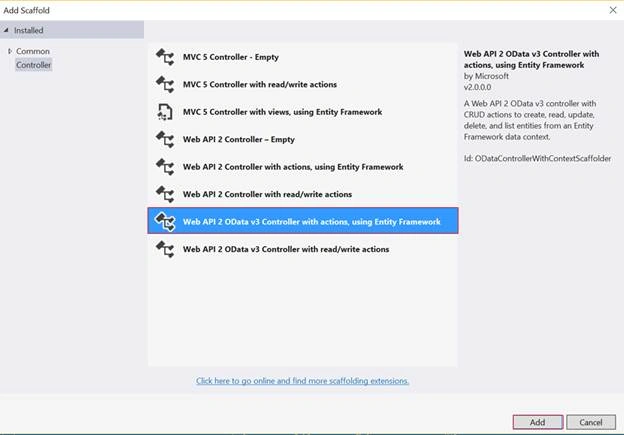
After clicking on Add button, window will pop up, as shown below.
We need to specify our Model class (in this case Employee.cs) and name for our Controller.
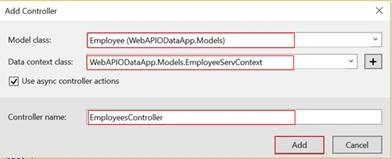
Finally, in order to add data context class, click on new data context > given a name for our new data context > Click Add.
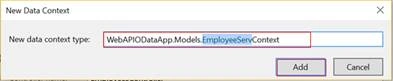
The scaffolding adds two code files to the project.
- EmployeesController.cs - defines the Controller which implements the OData endpoint.
- EmployeeServContext.cs - ensures that our application is connected to the database.
EmployeesController.cs
- using System;
- using System.Collections.Generic;
- using System.Data;
- using System.Data.Entity;
- using System.Data.Entity.Infrastructure;
- using System.Linq;
- using System.Net;
- using System.Net.Http;
- using System.Threading.Tasks;
- using System.Web.Http;
- using System.Web.Http.ModelBinding;
- using System.Web.Http.OData;
- using System.Web.Http.OData.Routing;
- using WebAPIODataApp.Models;
- namespace WebAPIODataApp.Controllers
- {
- public class EmployeesController : ODataController
- {
- private EmployeeServContext db = new EmployeeServContext();
- // GET: odata/Employees
- [EnableQuery]
- public IQueryable<Employee> GetEmployees()
- {
- return db.Employees;
- }
- }
- }
EmployeeServContext.cs
- using System;
- using System.Collections.Generic;
- using System.Data.Entity;
- using System.Linq;
- using System.Web;
- namespace WebAPIODataApp.Models
- {
- public class EmployeeServContext : DbContext
- {
- // You can add custom code to this file. Changes will not be overwritten.
- //
- // If you want Entity Framework to drop and regenerate your database
- // automatically whenever you change your model schema, please use data migrations.
- // For more information refer to the documentation:
- // http://msdn.microsoft.com/en-us/data/jj591621.aspx
- public EmployeeServContext() : base("name=EmployeeServContext")
- {
- }
- public System.Data.Entity.DbSet<WebAPIODataApp.Models.Employee> Employees { get; set; }
- }
- }
First of all, we need to add connection string.
In Solution Explorer, open web.config file and add inside configuration element in the following section.
- <connectionStrings>
- <add name="EmployeeServContext" connectionString="Data Source=.;Initial Catalog=EmployeeDB;Integrated Security=True" providerName="System.Data.SqlClient" />
- </connectionStrings>
Next step is - In Solution Explorer, select App_Start > double click on WebApiConfig.cs, then we should add the following code to the register method:
- public static void Register(HttpConfiguration config)
- {
- ODataConventionModelBuilder builder = new ODataConventionModelBuilder();
- builder.EntitySet<Employee>("Employees");
- config.Routes.MapODataRoute("odata", "odata", builder.GetEdmModel());
- }
- Creates an EDM (Entity Data Model).
- Adds a route for OData service.
The EDM is used to create the service metadata document. At this level, we have two possibilities by using,
- The ODataConventionModelBuilder class which creates an EDM by using default naming conventions.
- The ODataModelBuilder class to create the EDM by adding properties, keys, and navigation properties.
In the last, we need to call the MapOdataRoute extension method for routing. We can conclude that our URI for Employees EntitySet is http://localhost:56262/odata/Employees.
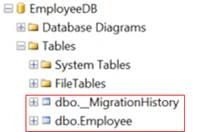
Note - When you run our URI first time, the database table will be created as follow. Don’t forget add some records into Employee table for demo.
Consuming OData Service
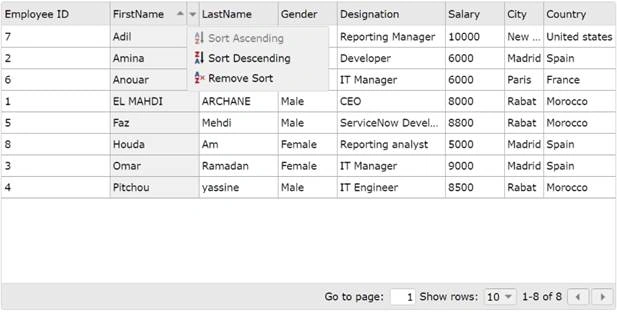
In order to consume OData service, we will work to display data by using jqxGrid plugin.
Let’s GO.
Create controller
Now, we are going to create a controller. Right click on the controllers folder > Add > Controller> selecting MVC 5 Controller – Empty > click Add.
HomeController.cs
- using System;
- using System.Collections.Generic;
- using System.Linq;
- using System.Web;
- using System.Web.Mvc;
- namespace WebAPIODataApp.Controllers
- {
- public class HomeController : Controller
- {
- public ActionResult Index()
- {
- return View();
- }
- }
- }
In HomeController, just right click on Index() action, select Add View and window will pop up. Write a name for your View. Finally, click Add.
Index cshtml
- @{
- ViewBag.Title = "Data Employees";
- }
- <h2> Data Employees </h2>
- <div id="gridEmployee" style="margin:20px auto;"></div>
- @section scripts {
- <script type="text/javascript" src="http://jqwidgets.com/jquery-widgets-demo/scripts/jquery-1.11.1.min.js"></script>
- <script type="text/javascript" src="http://jqwidgets.com/jquery-widgets-demo/jqwidgets/jqx-all.js"></script>
- <link rel="stylesheet" type="text/css" href="http://jqwidgets.com/jquery-widgets-demo/jqwidgets/styles/jqx.base.css" />
- <script type="text/javascript">
- $(document).ready(function () {
- // In this part, you need to prepare your data
- var source =
- {
- datatype: "json",
- // Here you will declare all fields that must be used in the grid
- datafields: [
- { name: 'EmployeeID', type: 'number' },
- { name: 'FirstName', type: 'string' },
- { name: 'LastName', type: 'string' },
- { name: 'Gender', type: 'string' },
- { name: 'Designation', type: 'string' },
- { name: 'Salary', type: 'number' },
- { name: 'City', type: 'string' },
- { name: 'Country', type: 'string' }
- ],
- // call the action which retrieve data employees in json format
- url: '/odata/Employees'
- };
- var dataAdapter = new $.jqx.dataAdapter(source);
- // displaying data in the grid with jqxGrid
- $("#gridEmployee").jqxGrid(
- {
- width: 800,
- source: dataAdapter,
- pageable: true,
- sortable: true,
- columns: [
- { text: "Employee ID", datafield: "EmployeeID" },
- { text: "FirstName", datafield: "FirstName" },
- { text: "LastName", datafield: "LastName" },
- { text: "Gender", datafield: "Gender" },
- { text: "Designation", datafield: "Designation" },
- { text: "Salary", datafield: "Salary" },
- { text: "City", datafield: "City" },
- { text: "Country", datafield: "Country" }
- ]
- });
- });
- </script>
- }
kawtar najiPosted Jan 14, 2019, 8:48 PM
Can this approach be used instead of RDA(Remote Data Access)?
Hamid KhanPosted Nov 12, 2018, 6:05 AM
Good article
AniruddhaPosted Jan 17, 2018, 11:48 PM
Fantastico! Gracias!!!
Akshay PPosted Oct 31, 2017, 8:18 AM
Any suggestions please let me know
Akshay PPosted Oct 31, 2017, 8:17 AM
Table is not creating dynamically
Cavit OzPosted Oct 5, 2016, 5:43 AM
Thanks For Shared you. Perfect
El Mahdi ArchanePosted Sep 30, 2016, 4:58 PM
Thank you sir
Mahesh ChandPosted Sep 30, 2016, 8:32 AM
I like your writing style, EL. Thank you for following guidelines. This is a perfect way to explain your code including heading styles etc. Thanks!