

Before getting into the details of this article, make sure you have already followed my earlier steps on Office 365 Outlook Add-in Development using NAPA:
- Office 365 Outlook Add-in Development Using NAPA (Basics) - Part One
- Office 365 Outlook Add-in Development Using NAPA (Basics) - Part Two
Outlook Add-In and REST API
After charting, now we would like to have the data coming from third party REST APIs in our Outlook add-in. To do this, we will be referring to Google APIs for books. These are public and can be accessed anonymously. Refer to the below URL for this API.
API URL
JSON Output
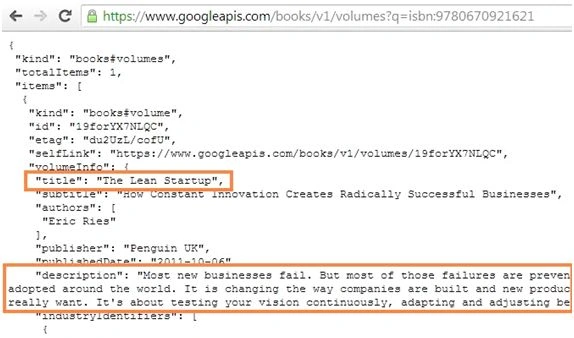
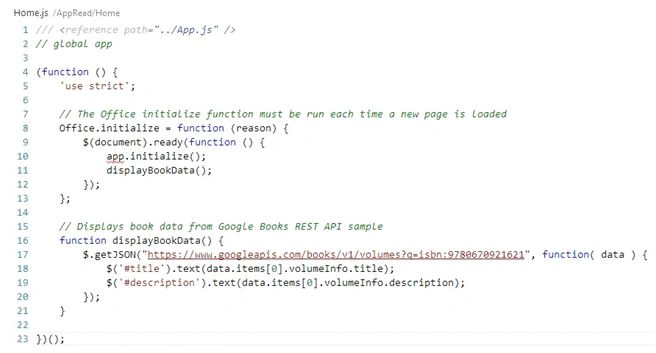
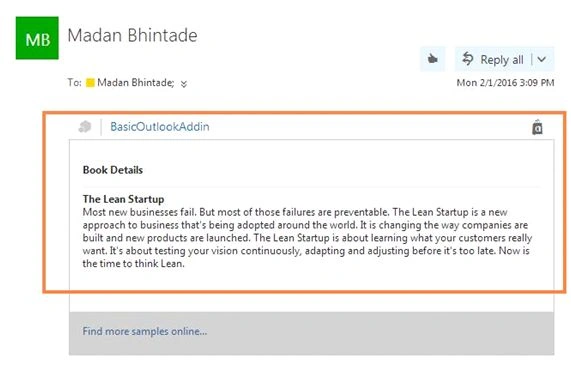
From the above JSON output, we will be displaying title and description attributes in our Outlook AddIn.
Now refer to the the following steps to achieve this,
Step 1: Open our earlier Outlook Add-in solution BasicOutlookAddIn in Napa explorer,
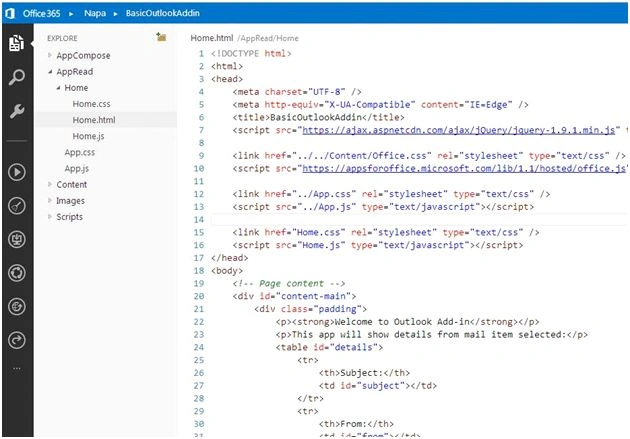
Step 2: Now to render our book details within home.html, locate tag <div class="padding"> and remove existing tags within it. Now use the following code lines and copy paste inside tag <div class="padding"> home.html.
- <p><strong>Book Details</strong></p>
- <hr></hr>
- <strong><div id="title"></div></strong>
- <div id="description"></div>

Madan BhintadePosted Feb 14, 2016, 2:08 PM
Thanks a lot! Guys.
Shubham KumarPosted Feb 10, 2016, 4:45 AM
Intresting
Pramod ThakurPosted Feb 9, 2016, 12:12 PM
Good one..
Santhakumar MunuswamyPosted Feb 9, 2016, 11:40 AM
Thanks for nice article
Abhay ShankerPosted Feb 9, 2016, 9:12 AM
Nice Share
Sibeesh VenuPosted Feb 9, 2016, 7:15 AM
Nice Share