
In this article we can learn how to configure SharePoint 2013 with Office Web Apps Server.
Office Web Apps Server overview
Office Web Apps is the online companion to Office Word, Excel, PowerPoint, and OneNote applications. It enables users, regardless of location, to view and edit documents. Office Web Apps gives users a browser-based viewing and editing experience by providing a representation of an Office document in the browser. When a user selects an Office document that is stored in a SharePoint document library or on SkyDrive, the document opens directly in the browser. The document appears in the browser similar to how it appears in the Office client application and provides many of the same editing features. When an Office Web App user selects the Edit in Word, Edit in Excel, Edit in PowerPoint, or Edit in OneNote button on the toolbar, the document opens in the associated Office client application if it is installed on the client computer.
Office Web Apps Server is an Office server product that provides browser-based file viewing and editing services for Office files. Office Web Apps Server works with products and services that support WOPI, the Web app Open Platform Interface protocol. These products, known as hosts, include SharePoint 2013, Lync Server 2013, and Exchange Server 2013. An Office Web Apps Server farm can provide Office services to multiple on-premises hosts, and you can scale out the farm from one server to multiple servers as your organization's needs grow. Although Office Web Apps Server requires dedicated servers that run no other server applications, you can install Office Web Apps Server on virtual machine instances instead.
It is easier to deploy and manage Office Web Apps within your organization now that it is a stand-alone product. If you deploy SharePoint 2013, for example, you no longer must optimize the SharePoint infrastructure to support Office Web Apps, which in earlier versions was tightly integrated with SharePoint Server 2010. You can also apply updates to the Office Web Apps Server farm separately and at a different frequency than you update SharePoint, Exchange, or Lync Server. Having a stand-alone Office Web Apps Server farm also means that users can view or edit Office files that are stored outside SharePoint Server, such as those in shared folders or other websites. This functionality is provided by a feature known as Online Viewers.
The following illustration shows the new stand-alone deployment model for Office Web Apps.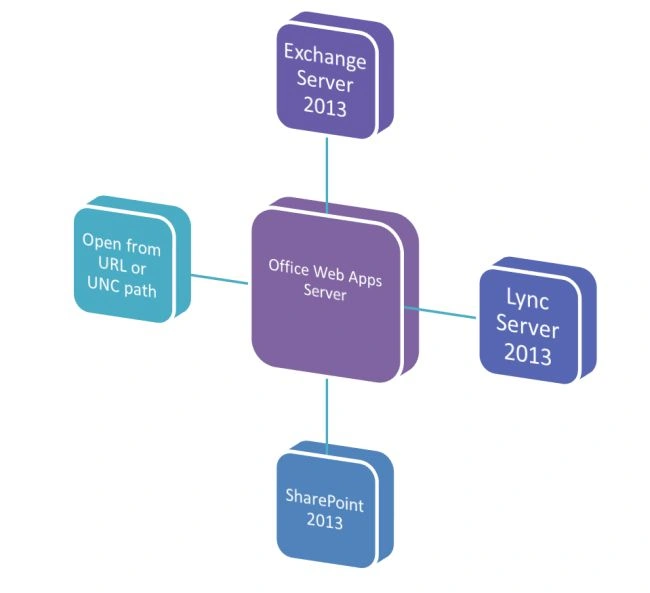
SharePoint 2013 uses Office Web Apps Server for viewing and editing Office documents
When used with SharePoint Server 2013, Office Web Apps Server provides updated versions of Word Web App, Excel Web App, PowerPoint Web App, and OneNote Web App. Users can view and, in some cases, edit Office documents in SharePoint libraries by using a supported web browser on computers and on many mobile devices, such as Windows Phones, iPhones, iPads, and Windows 8 tablets. Among the many new features in Office Web Apps, improved touch support and editing capabilities enable users of iPads and Windows 8 tablets to enjoy editing and viewing Office documents directly from their devices. The following illustration summarizes the viewing and editing capabilities of Office Web Apps on SharePoint 2013.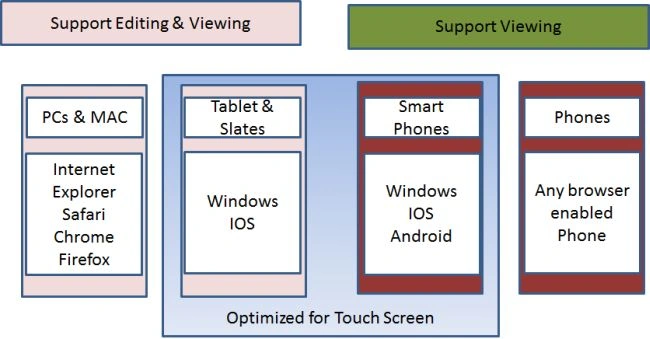
What is new in Office Web Apps?

Office Web Apps and SharePoint 2013
Join the conversation! Your thoughts help the community grow.
Sign in to leave a comment
It is the same account you read, post and publish with — and you will come straight back to this page.
Gowtham RajamanickamPosted Apr 10, 2016, 1:36 AM
good article