

This is an On Line Address Book project. Learn with this small project that How to make a project. Those who are new to ASP.NET or going for first project can learn a lot from this. This is a project to keep the address and other information. In our daily life we meet many people and we have to keep the information and addresses of these people. This project is very useful to keep the record.
To use this project just change the connection string. I stored the database in ZipFile.
Welcome.aspx
<%@ Page Language="C#" AutoEventWireup="true" CodeFile="Welcome.aspx.cs" Inherits="Welcome" %>
<!DOCTYPE html PUBLIC "-//W3C//DTD XHTML 1.0 Transitional//EN" "http://www.w3.org/TR/xhtml1/DTD/xhtml1-transitional.dtd">
<html xmlns="http://www.w3.org/1999/xhtml" >
<head runat="server">
<title>Welcome</title>
</head>
<body>
  <form id="form1" runat="server">
    <div>
      <table  width="100%" background="BackGround.jpg">
        <tr><td align="center">
              <asp:Label ID="lblWelcome" runat="server"
                   Text="Welcome In On Line Address Book" Font-Bold="true"
                     Font-Size="22pt" ForeColor="#6600ff"></asp:Label>
            </td></tr>
            <tr><td> </td></tr>
            <tr><td align="center">
                  <asp:Label ID="lblDoAddress" runat="server" Text="Do Your Address On Line" Font-Bold="true"
                         ForeColor="#33cccc"  Font-Size="14pt"></asp:Label>
                 </td></tr>
            <tr><td height="50px"> </td></tr>
            <tr><td align="center">
                  <asp:ImageButton ID="Imgm" ImageUrl="~/case2-a.gif" runat="server" OnClick="StartAddress" />
                </td></tr>
            <tr><td> </td></tr>
            <tr><td align="center">
                  <asp:Label ID="lblAddress" runat="server" Text="(Address Book)" Font-Bold="true" ForeColor="#000099"
                            Font-Size="16pt"></asp:Label>
                </td></tr>
            <tr><td height="190px"></td></tr>
            <tr><td>      <asp:Button ID="btnAddressBook" runat="server"
                            Text="Go Inside The Address Book" BackColor="#ff9900" Height="45px" OnClick="btnInside_Click" />
            </td></tr>
      </table>
      <table background="BackGround.jpg" cellpadding="0" cellspacing="0" width="100%">
        <tr><td align="right">
              <asp:Label ID="lblName" runat="server" Text="Rahul Saxena" Font-Bold="true" Font-Size="16pt"
                 ForeColor="#6600ff"></asp:Label><br /><br />
              <asp:Label ID="lblEmail" runat="server" Text="Email: [email protected]"
                Font-Bold="true"  Font-Size="14pt" ForeColor="#6600ff"></asp:Label>
            </td><td width="5%"></td></tr>
        <tr><td Height="43px"></td></tr>
      </table>
    </div>
  </form>
</body>
</html>
The window will be:
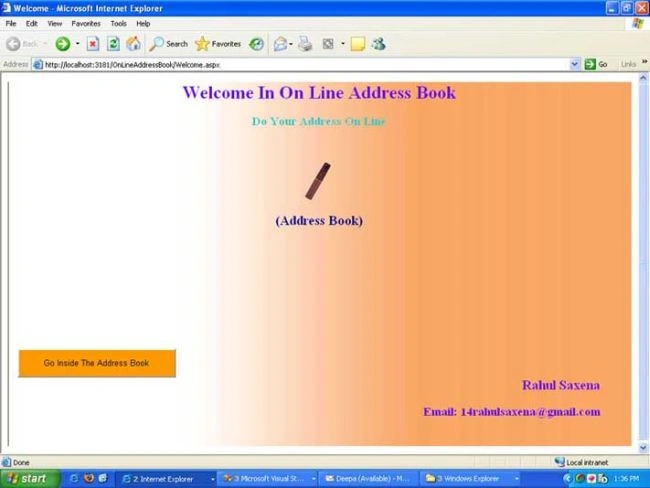
Figure 1: Welcome window.
Welcome.aspx.cs is:
using System;
using System.Data;
using System.Configuration;
using System.Collections;
using System.Web;
using System.Web.Security;
using System.Web.UI;
using System.Web.UI.WebControls;
using System.Web.UI.WebControls.WebParts;
using System.Web.UI.HtmlControls;
public partial class Welcome : System.Web.UI.Page
{
    protected void Page_Load(object sender, EventArgs e)
    {
    }
    protected void btnInside_Click(object sender, EventArgs e)
    {
        Response.Redirect("AllRecord.aspx");
    }
    protected void StartAddress(object sender, ImageClickEventArgs e)
    {
        Response.Redirect("AllRecord.aspx");
    }
}
AllRecord.aspx
<%@ Page Language="C#" AutoEventWireup="true" CodeFile="AllRecord.aspx.cs"  Inherits="AllRecord" %>
<!DOCTYPE html PUBLIC "-//W3C//DTD XHTML 1.0 Transitional//EN"  "http://www.w3.org/TR/xhtml1/DTD/xhtml1-transitional.dtd">
<html xmlns="http://www.w3.org/1999/xhtml" >
<head runat="server">
    <title>All Record</title>
</head>
<body>
  <form id="form1" runat="server">
    <div>
      <table cellpadding="0" cellspacing="0" width="90%" border="0" height="100%">
        <tr><td width="10px"></td><td><asp:Image ID="imageContact" runat="server"  ImageUrl="~/clip1-c.gif"/> </td></tr>
        <tr><td width="10px"></td><td width="90%"  background="BackGround.jpg" align="left">
              <asp:Button ID="btnSubmit" runat="server" Text="Add New Address" OnClick="btnSubmit_Click" />

              <asp:Button ID="btnSearch"  runat="server" Text="Search A Address"  OnClick="SearchRecord" />

              <asp:Image ID="ImgMove" runat="server" ImageUrl="~/ball1-a.gif" />
              <asp:Label ID="lblSearch" Text="All Address" runat="server" Font-Bold="true"  ForeColor="#ff6600"
                          Font-Size="16pt"> </asp:Label>

             <asp:Image ID="ImgDate" runat="server" ImageUrl="~/hourglass-b.gif" />
             <asp:Label ID="lblShowTime" runat="server" Text="Date" Font-Bold="true"> </asp:Label>

             <asp:Label ID="lbltime" runat="server"></asp:Label>
           </td></tr>
        <tr><td height="5px"></td></tr>
        <tr><td width="10px"></td>
             <td><table background="BackGround.jpg"  cellpadding="0" cellspacing="0" height="100%" border="0"  width="100%">
                   <tr><td height="25px"></td></tr>
                   <tr><td width="10px"></td><td align="center" >
                         <asp:DataGrid ID="GridAllRecord" runat="server"  AutoGenerateColumns="false" Width="90%"
                              DataKeyField="ID"
                                PagerStyle-HorizontalAlign="Center"  BorderStyle="ridge" GridLines="Both"
                                BorderWidth="2px" BorderColor ="white" BackColor="white" CellPadding="3" CellSpacing="1"
                                OnEditCommand="EditAddress"  OnDeleteCommand="AddressDelete"
                                OnItemCommand="Grid_ItemCommand" AllowSorting="true" PageSize=5
                                OnPageIndexChanged="GridAllRecord_PageIndexChanged" AllowPaging="true">
                         <FooterStyle ForeColor="Black" BackColor="#C6C3C6"></FooterStyle>
                         <HeaderStyle Font-Bold="True" ForeColor="#FFFFFF" BackColor="#A53A6A"></HeaderStyle>
                         <FooterStyle BackColor="beige" />
                         <PagerStyle Font-Bold="true" Mode=NumericPages Font-Underline="true"/>
                         <Columns>
                           <asp:BoundColumn DataField=ID HeaderText="ID" Visible="false">
                             <ItemStyle BackColor="graytext" />
                             <HeaderStyle BackColor="graytext" />
                           </asp:BoundColumn>
                           <asp:TemplateColumn HeaderText="First Name">
                             <ItemTemplate>
                               <asp:LinkButton ID="lnkName" runat="server"  Text='<%#DataBinder.Eval
                                   (Container.DataItem,"FirstName") %>' CommandName="RecordShow"> </asp:LinkButton>
                             </ItemTemplate>
                           </asp:TemplateColumn>
                           <asp:BoundColumn DataField=LastName HeaderText="Last Name">
                             <ItemStyle BackColor=GhostWhite />
                           </asp:BoundColumn>
                           <asp:BoundColumn DataField=PersonelEmail HeaderText="Personnel(EMail)">
                             <ItemStyle BackColor=GhostWhite />
                           </asp:BoundColumn>
                           <asp:BoundColumn DataField=Mobile HeaderText="Mobile">
                             <ItemStyle BackColor=GhostWhite />
                           </asp:BoundColumn>
                           <asp:EditCommandColumn EditText="Edit Address" HeaderText="Edit Address">
                 </asp:EditCommandColumn>
                           <asp:ButtonColumn  CommandName="DeleteAddress" HeaderText="Delete Address"
                                  Text="Delete"></asp:ButtonColumn>
                         </Columns>
                      </asp:DataGrid>
                    </td>
                  </tr>
                <tr><td height="25px"></td></tr>
              </table></td></tr>
           <tr><td height="15px"></td></tr>
         <%-- <tr><td width="10px"></td><td><asp:Label ID="lblTotalRegisterartion" runat="server"
                   Text="Total Registered Address :"></asp:Label><asp:Label ID="lblRegistered"
                                                 runat="server"></asp:Label></td></tr>--%>
       </table>
     </div>
    </form>
  </body>
</html>
AllRecord.aspx.cs
using System;
using System.Data;
using System.Configuration;
using System.Collections;
using System.Web;
using System.Web.Security;
using System.Web.UI;
using System.Web.UI.WebControls;
using System.Web.UI.WebControls.WebParts;
using System.Web.UI.HtmlControls;
using System.Data.SqlClient;
public partial class AllRecord : System.Web.UI.Page
{
    string connect = @"Data Source=MCN0100;Initial Catalog=AddressBook; Uid=sa; Pwd=";
    SqlConnection con;
    SqlCommand cmd = new SqlCommand();
    SqlDataAdapter da;
    DataSet ds = new DataSet();
    protected void Page_Load(object sender, EventArgs e)
    {
        if (!IsPostBack)
        {
            rebind();
            string Time = DateTime.Now.Date.ToShortDateString();
            lbltime.Text = Time;
            //TotalUsers();
        }
    }
    public void rebind()
    {
        con = new SqlConnection(connect);
        cmd.CommandText = "select ID,FirstName,LastName, Mobile, PersonelEmail from record";
        da = new SqlDataAdapter(cmd);
        cmd.Connection = con;
        da.Fill(ds);
        con.Open();
        cmd.ExecuteNonQuery();
        GridAllRecord.DataSource = ds;
        GridAllRecord.DataBind();
    }
    protected void btnSubmit_Click(object sender, EventArgs e)
    {
        Response.Redirect("Register.aspx");
    }
    protected void Grid_ItemCommand(object sender, DataGridCommandEventArgs e)
    {
        if (e.CommandName == "RecordShow")
        {
            int Rep_Id = int.Parse(e.Item.Cells[0].Text);
            Session["ID"] = Rep_Id;
            Response.Redirect("ShowSelectedRecord.aspx");
        }
        if (e.CommandName == "DeleteAddress")
        {
            con = new SqlConnection(connect);
            int UpadteAddress = int.Parse(e.Item.Cells[0].Text);
            cmd.CommandText = "delete from Record where ID=" + UpadteAddress;
            cmd.Connection = con;
            con.Open();
            cmd.ExecuteNonQuery();
            con.Close();
            GridAllRecord.EditItemIndex=-1;
            rebind();
        }
    }
    protected void SearchRecord(object sender, EventArgs e)
    {
        Response.Redirect("Search.aspx");
    }
    public void GridAllRecord_PageIndexChanged(object source, DataGridPageChangedEventArgs e)
    {
        GridAllRecord.CurrentPageIndex = e.NewPageIndex;
        rebind();
    }
    public void EditAddress(object ssender, DataGridCommandEventArgs e)
    {
        int UpadteAddress = int.Parse(e.Item.Cells[0].Text);
        Session["UpadteAddressID"] = UpadteAddress;
        Response.Redirect("LoginCheck.aspx");
    }
    public void AddressDelete(object sender, DataGridCommandEventArgs e)
    {
        con = new SqlConnection(connect);
        int UpadteAddress = int.Parse(e.Item.Cells[0].Text);
        cmd.CommandText = "delete from Record where ID=" + UpadteAddress;
        cmd.Connection = con;
        con.Open();
        cmd.ExecuteNonQuery();
        con.Close();
        GridAllRecord.EditItemIndex=-1;
        rebind();
    }
}
The output when User run the application:
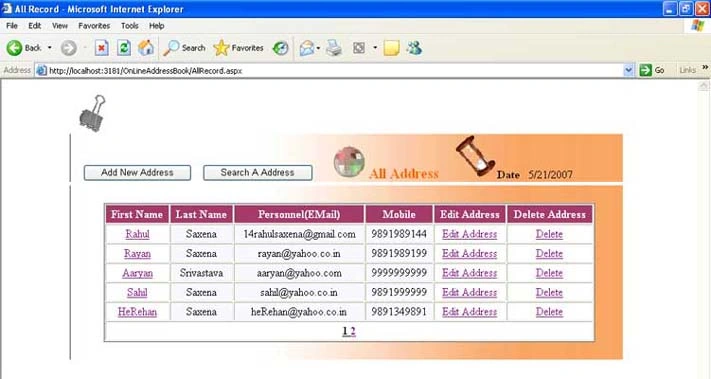
Figure 2: All Record.
Register.aspx
<%@ Page Language="C#" AutoEventWireup="true" CodeFile="Register.aspx.cs" Inherits="_Default" %>
<!DOCTYPE html PUBLIC "-//W3C//DTD XHTML 1.0 Transitional//EN" "http://www.w3.org/TR/xhtml1/DTD/xhtml1-transitional.dtd">
<html xmlns="http://www.w3.org/1999/xhtml" >
<head runat="server">
<title>Address Book</title>
</head>
<body>
<form id="form1" runat="server">
<div>
<table cellpadding="0" cellspacing="0" width="90%" border="0" align=center>
<tr><td>
<table cellpadding="0" cellspacing="0" width="80%" align="center" border="4" background=BackGround.jpg>
<tr><td align="center"><asp:Label ID="lblWelcome" Text="Welcome On Line Address Book" runat="server"
Font-Bold="true" Font-Size="14pt" ForeColor="black"> </asp:Label>
</td></tr>
<tr><td><marquee bgcolor="#ff9900" behavior="alternate">
<asp:Label ID="lblInformationfill" runat="server" Text="Please Fill The Information" ForeColor="#0000ff"
Font-Bold="true"> </asp:Label> </marquee>
</td></tr>
<tr><td><asp:Label ID="lblRecordAdded" runat="server" Visible="false" ForeColor="Red"> </asp:Label>
</td> </tr>
<tr><td>  
<asp:Label ID="lbltitle" runat="server" Text="Select Title" Width="100" Font-Bold="true"> </asp:Label>
<asp:DropDownList ID="listTitle" runat="server">
<asp:ListItem Value="Select">--Select--</asp:ListItem>
<asp:ListItem Value="Mr">Mr</asp:ListItem>
<asp:ListItem Value="Ms">Ms</asp:ListItem>
</asp:DropDownList>
</td></tr>
<tr><td align="center" style="height: 233px">
<table cellpadding="0" cellspacing="0" width="80%" border="0">
<tr><td align="center">
<table>
<tr><td><marquee> <asp:Label ID="lblPersonnelInformation" runat="server"
Text="Personnel Information"
Font-Bold="True" ForeColor=ActiveCaption> </asp:Label> </marquee>
</td></tr>
<tr><td align="left"><asp:Label ID="lblFirstNmae" Text="First Name" runat="server" Width="100px" ForeColor=ActiveCaption> </asp:Label>
<asp:TextBox ID="txtFirstName" runat="server"> </asp:TextBox>
</td></tr>
<tr><td align="left"><asp:Label ID="lblMiddleName" Text="Middle Name" runat="server" Width="100px" ForeColor=ActiveCaption> </asp:Label>
<asp:TextBox ID="txtMiddleName" runat="server"></asp:TextBox>
</td></tr>
<tr><td align="left"> <asp:Label ID="lblLastName" Text="Last Name" runat="server" Width="100px" ForeColor=ActiveCaption> </asp:Label>
<asp:TextBox ID="txtLastName" runat="server"></asp:TextBox>
</td></tr>
<tr><td align="left"> <asp:Label ID="lblHomePhone" Text="Home Phone" runat="server" Width="100px" ForeColor=ActiveCaption> </asp:Label>
<asp:TextBox ID="txtHomePhone" runat="server"></asp:TextBox>
</td></tr>
<tr><td align="left"><asp:Label ID="lblMobile" Text="Mobile" runat="server" Width="100px" ForeColor=ActiveCaption> </asp:Label>
<asp:TextBox ID="txtMobile" runat="server"></asp:TextBox>
</td></tr>
<tr><td align="left"><asp:Label ID="lblPersonelEmail" Text="Email" runat="server" Width="100px" ForeColor=ActiveCaption> </asp:Label>
<asp:TextBox ID="txtPersonnelEmail" runat="server"></asp:TextBox>
</td></tr>
</table></td>
<td>
<table>
<tr><td><marquee><asp:Label ID="lblOfficeInformation" runat="server" Text="Official Information" Font-Bold="True" ForeColor="Chocolate"> </asp:Label> </marquee> </td> </tr>
<tr><td align="left"><asp:Label ID="lblCompany" Text="Company" runat="server" Width="100px" ForeColor="Chocolate"> </asp:Label>
<asp:TextBox ID="txtCompany" runat="server"></asp:TextBox>
</td></tr>
<tr><td align="left"><asp:Label ID="lblJobTitle" Text="Job Title" runat="server" Width="100px" ForeColor="Chocolate"> </asp:Label>
<asp:TextBox ID="txtJobTitle" runat="server"></asp:TextBox>
</td></tr>
<tr><td align="left"><asp:Label ID="lblWebSite" Text="Web Site" runat="server" Width="100px" ForeColor="Chocolate"></asp:Label>
<asp:TextBox ID="txtWebSite" runat="server"></asp:TextBox>
</td></tr>
<tr><td align="left"><asp:Label ID="lblOfficePhone" Text="OfficePhone" runat="server" Width="100px" ForeColor="Chocolate"></asp:Label>
<asp:TextBox ID="txtOfficePhone" runat="server"></asp:TextBox>
</td></tr>
<tr><td align="left"><asp:Label ID="lblFax" Text="Fax" runat="server" Width="100px" ForeColor="Chocolate"> </asp:Label>
<asp:TextBox ID="txtFax" runat="server"></asp:TextBox>
</td></tr>
<tr><td align="left"><asp:Label ID="lblOfficeEmail" Text="Office Email" runat="server" Width="100px" ForeColor="Chocolate"></asp:Label>
<asp:TextBox ID="txtOfficeEmail" runat="server"></asp:TextBox>
</td></tr>
</table></td>
</tr>
</table></td></tr>
<tr><td>
<asp:Label ID="lblAddress" runat="server" Text="Address" ForeColor=ActiveCaption> </asp:Label>
<asp:TextBox ID="txtAddress" runat="server" TextMode="MultiLine"> </asp:TextBox>
</td></tr>
<tr><td align="center" style="height: 52px">
<asp:Button ID="btnSubmitRecord" runat="server" Text="Submit" Height="40px"
OnClick="btnSubmit_Click" Width="200px"/>
<asp:ImageButton ID="ImageMain" runat="server" ImageUrl="~/5ar04a.gif" OnClick="Main_Click" ToolTip="Click Here To Go On All Record"/>
</td></tr>
</table>
</td></tr>
</table>
</div>
</form>
</body>
</html>
Register.aspx.cs
using System;
using System.Data;
using System.Configuration;
using System.Web;
using System.Web.Security;
using System.Web.UI;
using System.Web.UI.WebControls;
using System.Web.UI.WebControls.WebParts;
using System.Web.UI.HtmlControls;
using System.Data.SqlClient;
public partial class _Default : System.Web.UI.Page
{
    protected void Page_Load(object sender, EventArgs e)
    {
    }
    SqlConnection con;
    SqlCommand cmd = new SqlCommand();
    string connection = @"Data Source=MCN0100;Initial Catalog=AddressBook; Uid=sa; Pwd=";
    protected void btnSubmit_Click(object sender, EventArgs e)
    {
        if (txtFirstName.Text !="" && txtLastName.Text !="")
        {
            InserRecord();
            txtFirstName.Text = "";
            txtLastName.Text = "";
            txtMiddleName.Text = "";
            txtJobTitle.Text = "";
            txtCompany.Text = "";
            txtWebSite.Text = "";
            txtOfficePhone.Text = "";
            txtHomePhone.Text = "";
            txtMobile.Text = "";
            txtFax.Text = "";
            txtOfficeEmail.Text = "";
            txtPersonnelEmail.Text = "";
            txtAddress.Text="";
        }
        else
        {
            lblRecordAdded.Visible = true;
            lblRecordAdded.Text = "Please Fill First Name and Last Name ";
        }
    }
    public void InserRecord()
    {
        con = new SqlConnection(connection);
        cmd.CommandText = "insert into Record(Title,FirstName,LastName,MiddleName, JobType,Company,WebSite,OfficePhone, HomePhone,Mobile, Fax,OfficialEmail,PersonelEmail,Address) values('" + listTitle.Text + "','" + txtFirstName.Text + "','" + txtLastName.Text + "','" + txtMiddleName.Text + "','" + txtJobTitle.Text + "','" + txtCompany.Text + "','" + txtWebSite.Text + "','" + txtOfficePhone.Text + "','" + txtHomePhone.Text + "','" + txtMobile.Text + "','" + txtFax.Text + "','" + txtOfficeEmail.Text + "','" + txtPersonnelEmail.Text + "','"+ txtAddress.Text + "')";
        cmd.Connection = con;
        con.Open();
        cmd.ExecuteNonQuery();
        con.Close();
        lblRecordAdded.Visible = true;
        lblRecordAdded.Text = "Your Address has benn sucessfuly Submitted, Thanx for add a Record ";
    }
    protected void Main_Click(object sender, ImageClickEventArgs e)
    {
        Response.Redirect("Allrecord.aspx");
    }
}
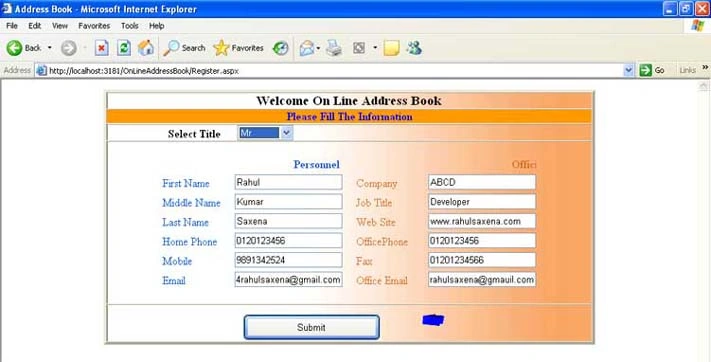
Adding a new Record
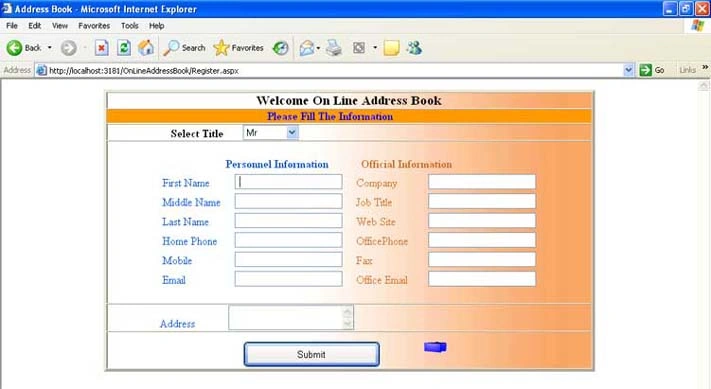
Figure 3: Add a new address.
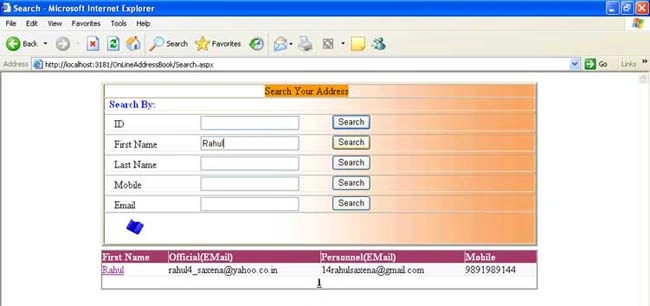
Search.aspx
Raja jPosted Oct 15, 2019, 2:24 AM
Documentation give me plsss
Dilip GoliyaPosted Apr 11, 2016, 11:26 AM
I am not able to connect to the database please give me database structure. Thanks
Rahul Kumar SaxenaPosted Mar 2, 2015, 2:05 PM
Thanks Habi Hab
Rahul Kumar SaxenaPosted Mar 2, 2015, 2:05 PM
To connect DB check ur Connection String and Data base...
Rahul Kumar SaxenaPosted Mar 2, 2015, 2:05 PM
Get DB File inside APP_DATA Folder...
aras kurdPosted May 21, 2014, 4:30 AM
i am unable to connect database mdf file
bhagavan bharosePosted Feb 2, 2013, 7:53 AM
Tnax dude...
mohammad nabhanPosted Jan 4, 2012, 6:34 PM
not work because there is a problem with connect it to database help me
habi habPosted Sep 20, 2011, 11:59 PM
thanks its a really useful source code
anu mettuPosted Feb 17, 2011, 2:53 AM
i am unable to connect database mdf file
anu mettuPosted Feb 17, 2011, 2:53 AM
i am unable to connect database mdf file
SatyaPosted Jan 17, 2011, 2:03 AM
Good Project
ashok kumarPosted Jan 4, 2011, 3:12 AM
Nice Project.Its really useful for me.
sabitha N HPosted Feb 19, 2010, 12:01 PM
Hi, Can you explain me how to load data base and what all things I will have to change in the program? <!--Session data-->