

Many reporting tables need more setup than they should: a transformation script, a scheduled job, maybe a separate pipeline, and documentation kept in a wiki that's soon out of date. For a straightforward daily summary, Databricks SQL can handle all of it in one statement.
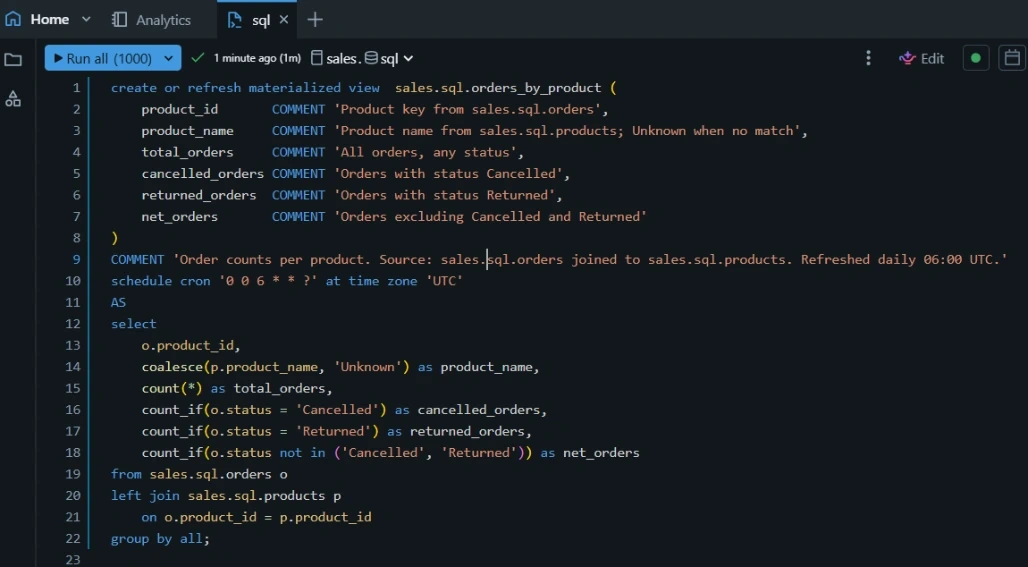
Here's an example: order counts per product, refreshed every morning, with documentation stored on the table.
The statement
1. The schedule is part of the definition
The SCHEDULE CRON clause refreshes the view every day at 06:00 UTC. Databricks runs the refresh on managed infrastructure in the background, so there's no separate pipeline or job to build or maintain. The logic and its timing are defined in the same place.
2. Documentation is stored with the data
The view and every column have comments. Anyone who opens the table in Catalog Explorer can see what each column means and where it comes from. The descriptions sit next to the data, so they don't drift out of date in a separate document.
3. One pass for several metrics
count_if computes total, cancelled, returned and net orders in a single aggregation, with no self-joins or repeated subqueries.
4. Missing products still count
The left join keeps orders whose product isn't in the catalog. coalesce labels them "Unknown" instead of dropping them, so the totals still reflect every order.
5. Less repetition
GROUP BY ALL groups by every non-aggregated column in the select list. That's one less thing to keep in sync when the columns change.
Caveats
- Freshness: the data is current as of the last scheduled refresh, not real time. For tighter freshness, change the schedule or trigger refreshes when the source changes.
- NULL statuses:
NOT INdoesn't count rows wherestatusis NULL. The comparison is also case-sensitive. If your source data isn't clean, the three status counts may not add up to the total. - Access: the view isn't shared automatically. Set an appropriate owner, such as a service principal, and grant
SELECTto the groups that need it.
Takeaway
A materialized view with a schedule and column comments gives you transformation, refresh and documentation in one statement. Not every workload fits this pattern, but for daily summary tables it removes a lot of setup.
#Databricks #SQL #DataEngineering #Lakehouse #Analytics
Join the conversation! Your thoughts help the community grow.