

Introduction
- It provides better maintainability as all the codes depend on layers or the center.
- It provides better testability as the unit test can be created for separate layers without an effect of other modules of the application.
- It develops a loosely coupled application as the outer layer of the application always communicates with the inner layer via interfaces.
- Any concrete implantation would be provided to the application at run time
- Domain entities are core and center part. It can have access to both the database and UI layers.
- The internal layers never depend on the external layer. The code that may have changed should be part of an external layer.
Why Onion Architecture
There are several traditional architectures, like 3-tier architecture and n-tier architecture, all having their own pros and cons. All these traditional architectures have some fundamental issues, such as - tight coupling and separation of concerns. The Model-View-Controller is the most commonly used web application architecture, these days. It solves the problem of separation of concern as there is a separation between UI, business logic, and data access logic. The View is used to design the user interface. The Model is used to pass the data between View and Controller on which the business logic performs any operations. The Controller is used to handle the web request by action methods and returns View accordingly. Hence, it solves the problem of separation of concern while the Controller is still used to database access logic. In essence, MVC solves the separation of concern issue but the tight coupling issue still remains.
On the other hand, Onion Architecture addresses both the separation of concern and tight coupling issues. The overall philosophy of the Onion Architecture is to keep the business logic, data access logic, and model in the middle of the application and push the dependencies as far outward as possible means all coupling towards to center.
Onion Architecture Layers
This architecture relies heavily on the Dependency Inversion Principle. The UI communicates to business logic through interfaces. It has four layers, as shown in figure 1.
- Domain Entities Layer
- Repository Layer
- Service Layer
- UI (Web/Unit Test) Layer

Figure 1: Onion Architecture Layers
- Domain Entities Layer
It is the center part of the architecture. It holds all application domain objects. If an application is developed with the ORM entity framework then this layer holds POCO classes (Code First) or Edmx (Database First) with entities. These domain entities don't have any dependencies.
- Repository Layer
The layer is intended to create an abstraction layer between the Domain entities layer and the Business Logic layer of an application. It is a data access pattern that prompts a more loosely coupled approach to data access. We create a generic repository, which queries the data source for the data, maps the data from the data source to a business entity, and persists changes in the business entity to the data source.
- Service Layer
The layer holds interfaces which are used to communicate between the UI layer and repository layer. It holds business logic for an entity so it’s called the business logic layer as well.
- UI Layer
It’s the most external layer. It could be the web application, Web API, or Unit Test project. This layer has an implementation of the Dependency Inversion Principle so that the application builds a loosely coupled application. It communicates to the internal layer via interfaces.
Onion Architecture Project Structure
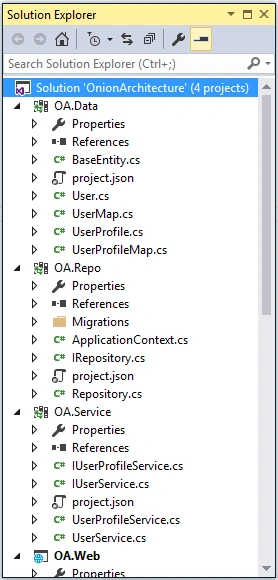
Figure 2: Application projects structure
- OA.Data
It is a class library project. It holds POCO classes along with configuration classes. It represents the Domain Entities layer of the onion architecture. These classes are used to create database tables. It’s a core and central part of the application.
- OA.Repo
It is a second class library project. It holds a generic repository class with its interface implementation. It also holds a DbContext class. The Entity Framework Code First data access approach needs to create a data access context class that inherits from the DbContext class. This project represents the Repository layer of the onion architecture.
- OA.Service
It is a third class library project. It holds business logic and interfaces. These interfaces communicate between UI and data access logic. As it communicates via interfaces, it builds applications that are loosely coupled. This project represents the Service layer of the onion architecture.
- OA.Web
It is an ASP.NET Core Web application in this sample but it could be a Unit Test or Web API project. It is the most external part of an application by which the end-user can interact with the application. It builds loosely coupled applications with in-built dependency injection in ASP.NET Core. It represents the UI layer of the onion architecture.
Implement Onion Architecture
- {
- "dependencies": {
- "Microsoft.EntityFrameworkCore.SqlServer": "1.0.0",
- "Microsoft.EntityFrameworkCore.Tools": "1.0.0-preview2-final"
- },
- "frameworks": {
- "netcoreapp1.0": {
- "imports": [ "dotnet5.6", "portable-net45+win8" ]
- }
- },
- "tools": {
- "Microsoft.EntityFrameworkCore.Tools": "1.0.0-preview2-final"
- },
- "version": "1.0.0-*"
- }
- using System;
- using System.Collections.Generic;
- using System.Linq;
- using System.Threading.Tasks;
- namespace OA.Data
- {
- public class BaseEntity
- {
- public Int64 Id { get; set; }
- public DateTime AddedDate { get; set; }
- public DateTime ModifiedDate { get; set; }
- public string IPAddress { get; set; }
- }
- }
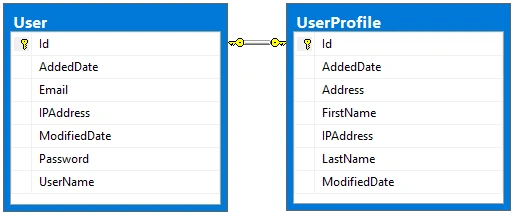
Figure 3: One to One User-UserProfile relationship
- namespace OA.Data
- {
- public class User:BaseEntity
- {
- public string UserName { get; set; }
- public string Email { get; set; }
- public string Password { get; set; }
- public virtual UserProfile UserProfile { get; set; }
- }
- }
- using Microsoft.EntityFrameworkCore.Metadata.Builders;
- namespace OA.Data
- {
- public class UserMap
- {
- public UserMap(EntityTypeBuilder<User> entityBuilder)
- {
- entityBuilder.HasKey(t => t.Id);
- entityBuilder.Property(t => t.Email).IsRequired();
- entityBuilder.Property(t => t.Password).IsRequired();
- entityBuilder.Property(t => t.Email).IsRequired();
- entityBuilder.HasOne(t => t.UserProfile).WithOne(u => u.User).HasForeignKey<UserProfile>(x => x.Id);
- }
- }
- }
- namespace OA.Data
- {
- public class UserProfile:BaseEntity
- {
- public string FirstName { get; set; }
- public string LastName { get; set; }
- public string Address { get; set; }
- public virtual User User { get; set; }
- }
- }
- using Microsoft.EntityFrameworkCore.Metadata.Builders;
- namespace OA.Data
- {
- public class UserProfileMap
- {
- public UserProfileMap(EntityTypeBuilder<UserProfile> entityBuilder)
- {
- entityBuilder.HasKey(t => t.Id);
- entityBuilder.Property(t => t.FirstName).IsRequired();
- entityBuilder.Property(t => t.LastName).IsRequired();
- entityBuilder.Property(t => t.Address);
- }
- }
- }
- using Microsoft.EntityFrameworkCore;
- using OA.Data;
- namespace OA.Repo
- {
- public class ApplicationContext : DbContext
- {
- public ApplicationContext(DbContextOptions<ApplicationContext> options) : base(options)
- {
- }
- protected override void OnModelCreating(ModelBuilder modelBuilder)
- {
- base.OnModelCreating(modelBuilder);
- new UserMap(modelBuilder.Entity<User>());
- new UserProfileMap(modelBuilder.Entity<UserProfile>());
- }
- }
- }
- using OA.Data;
- using System.Collections.Generic;
- namespace OA.Repo
- {
- public interface IRepository<T> where T : BaseEntity
- {
- IEnumerable<T> GetAll();
- T Get(long id);
- void Insert(T entity);
- void Update(T entity);
- void Delete(T entity);
- void Remove(T entity);
- void SaveChanges();
- }
- }
- using Microsoft.EntityFrameworkCore;
- using OA.Data;
- using System;
- using System.Collections.Generic;
- using System.Linq;
- namespace OA.Repo
- {
- public class Repository<T> : IRepository<T> where T : BaseEntity
- {
- private readonly ApplicationContext context;
- private DbSet<T> entities;
- string errorMessage = string.Empty;
- public Repository(ApplicationContext context)
- {
- this.context = context;
- entities = context.Set<T>();
- }
- public IEnumerable<T> GetAll()
- {
- return entities.AsEnumerable();
- }
- public T Get(long id)
- {
- return entities.SingleOrDefault(s => s.Id == id);
- }
- public void Insert(T entity)
- {
- if (entity == null)
- {
- throw new ArgumentNullException("entity");
- }
- entities.Add(entity);
- context.SaveChanges();
- }
- public void Update(T entity)
- {
- if (entity == null)
- {
- throw new ArgumentNullException("entity");
- }
- context.SaveChanges();
- }
- public void Delete(T entity)
- {
- if (entity == null)
- {
- throw new ArgumentNullException("entity");
- }
- entities.Remove(entity);
- context.SaveChanges();
- }
- public void Remove(T entity)
- {
- if (entity == null)
- {
- throw new ArgumentNullException("entity");
- }
- entities.Remove(entity);
- }
- public void SaveChanges()
- {
- context.SaveChanges();
- }
- }
- }
- using OA.Data;
- using System.Collections.Generic;
- namespace OA.Service
- {
- public interface IUserService
- {
- IEnumerable<User> GetUsers();
- User GetUser(long id);
- void InsertUser(User user);
- void UpdateUser(User user);
- void DeleteUser(long id);
- }
- }
- using OA.Data;
- using OA.Repo;
- using System.Collections.Generic;
- namespace OA.Service
- {
- public class UserService:IUserService
- {
- private IRepository<User> userRepository;
- private IRepository<UserProfile> userProfileRepository;
- public UserService(IRepository<User> userRepository, IRepository<UserProfile> userProfileRepository)
- {
- this.userRepository = userRepository;
- this.userProfileRepository = userProfileRepository;
- }
- public IEnumerable<User> GetUsers()
- {
- return userRepository.GetAll();
- }
- public User GetUser(long id)
- {
- return userRepository.Get(id);
- }
- public void InsertUser(User user)
- {
- userRepository.Insert(user);
- }
- public void UpdateUser(User user)
- {
- userRepository.Update(user);
- }
- public void DeleteUser(long id)
- {
- UserProfile userProfile = userProfileRepository.Get(id);
- userProfileRepository.Remove(userProfile);
- User user = GetUser(id);
- userRepository.Remove(user);
- userRepository.SaveChanges();
- }
- }
- }
- using OA.Data;
- namespace OA.Service
- {
- public interface IUserProfileService
- {
- UserProfile GetUserProfile(long id);
- }
- }
- using OA.Data;
- using OA.Repo;
- namespace OA.Service
- {
- public class UserProfileService: IUserProfileService
- {
- private IRepository<UserProfile> userProfileRepository;
- public UserProfileService(IRepository<UserProfile> userProfileRepository)
- {
- this.userProfileRepository = userProfileRepository;
- }
- public UserProfile GetUserProfile(long id)
- {
- return userProfileRepository.Get(id);
- }
- }
- }
As the concept of dependency injection is central to the ASP.NET Core application, we register context, repository, and service to the dependency injection during the application start up. Thus, we register these as a Service in the ConfigureServices method in the StartUp class as per the following code snippet.
- public void ConfigureServices(IServiceCollection services)
- {
- services.AddMvc();
- services.AddDbContext<ApplicationContext>(options => options.UseSqlServer(Configuration.GetConnectionString("DefaultConnection")));
- services.AddScoped(typeof(IRepository<>), typeof(Repository<>));
- services.AddTransient<IUserService, UserService>();
- services.AddTransient<IUserProfileService, UserProfileService>();
- }
- {
- "ConnectionStrings": {
- "DefaultConnection": "Data Source=DESKTOP-RG33QHE;Initial Catalog=OADb;User ID=sa; Password=***"
- },
- "Logging": {
- "IncludeScopes": false,
- "LogLevel": {
- "Default": "Debug",
- "System": "Information",
- "Microsoft": "Information"
- }
- }
- }
- Tools -> NuGet Package Manager -> Package Manager Console
- Run PM> Add-Migration MyFirstMigration to scaffold a migration to create the initial set of tables for our model. If we receive an error stating the term `add-migration' is not recognized as the name of a cmdlet, then close and reopen Visual Studio.
- Run PM> Update-Database to apply the new migration to the database. Because our database doesn't exist yet, it will be created for us before the migration is applied.
Create Application User Interface
- using System;
- using System.Collections.Generic;
- using System.Linq;
- using Microsoft.AspNetCore.Mvc;
- using OA.Service;
- using OA.Web.Models;
- using OA.Data;
- using Microsoft.AspNetCore.Http;
- namespace OA.Web.Controllers
- {
- public class UserController : Controller
- {
- private readonly IUserService userService;
- private readonly IUserProfileService userProfileService;
- public UserController(IUserService userService, IUserProfileService userProfileService)
- {
- this.userService = userService;
- this.userProfileService = userProfileService;
- }
- }
- }
- using Microsoft.AspNetCore.Mvc;
- using System;
- using System.ComponentModel.DataAnnotations;
- namespace OA.Web.Models
- {
- public class UserViewModel
- {
- [HiddenInput]
- public Int64 Id { get; set; }
- [Display(Name = "First Name")]
- public string FirstName { get; set; }
- [Display(Name = "Last Name")]
- public string LastName { get; set; }
- public string Name { get; set; }
- public string Address { get; set; }
- [Display(Name = "User Name")]
- public string UserName { get; set; }
- public string Email { get; set; }
- public string Password { get; set; }
- [Display(Name = "Added Date")]
- public DateTime AddedDate { get; set; }
- }
- }
- [HttpGet]
- public IActionResult Index()
- {
- List<UserViewModel> model = new List<UserViewModel>();
- userService.GetUsers().ToList().ForEach(u =>
- {
- UserProfile userProfile = userProfileService.GetUserProfile(u.Id);
- UserViewModel user = new UserViewModel
- {
- Id = u.Id,
- Name = $"{userProfile.FirstName} {userProfile.LastName}",
- Email = u.Email,
- Address = userProfile.Address
- };
- model.Add(user);
- });
- return View(model);
- }
- @model IEnumerable<UserViewModel>
- @using OA.Web.Models
- @using OA.Web.Code
- <div class="top-buffer"></div>
- <div class="panel panel-primary">
- <div class="panel-heading panel-head">Users</div>
- <div class="panel-body">
- <div class="btn-group">
- <a id="createEditUserModal" data-toggle="modal" asp-action="AddUser" data-target="#modal-action-user" class="btn btn-primary">
- <i class="glyphicon glyphicon-plus"></i> Add User
- </a>
- </div>
- <div class="top-buffer"></div>
- <table class="table table-bordered table-striped table-condensed">
- <thead>
- <tr>
- <th>Name</th>
- <th>Email</th>
- <th>Address</th>
- <th>Action</th>
- </tr>
- </thead>
- <tbody>
- @foreach (var item in Model)
- {
- <tr>
- <td>@Html.DisplayFor(modelItem => item.Name)</td>
- <td>@Html.DisplayFor(modelItem => item.Email)</td>
- <td>@Html.DisplayFor(modelItem => item.Address)</td>
- <td>
- <a id="editUserModal" data-toggle="modal" asp-action="EditUser" asp-route-id="@item.Id" data-target="#modal-action-user"
- class="btn btn-info">
- <i class="glyphicon glyphicon-pencil"></i> Edit
- </a>
- <a id="deleteUserModal" data-toggle="modal" asp-action="DeleteUser" asp-route-id="@item.Id" data-target="#modal-action-user" class="btn btn-danger">
- <i class="glyphicon glyphicon-trash"></i> Delete
- </a>
- </td>
- </tr>
- }
- </tbody>
- </table>
- </div>
- </div>
- @Html.Partial("_Modal", new BootstrapModel { ID = "modal-action-user", AreaLabeledId = "modal-action-user-label", Size = ModalSize.Large })
- @section scripts
- {
- <script src="~/js/user-index.js" asp-append-version="true"></script>
- }
- (function ($) {
- function User() {
- var $this = this;
- function initilizeModel() {
- $("#modal-action-user").on('loaded.bs.modal', function (e) {
- }).on('hidden.bs.modal', function (e) {
- $(this).removeData('bs.modal');
- });
- }
- $this.init = function () {
- initilizeModel();
- }
- }
- $(function () {
- var self = new User();
- self.init();
- })
- }(jQuery))
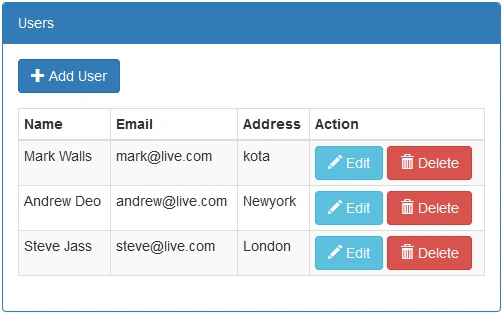
Figure 4: User listing
- [HttpGet]
- public ActionResult AddUser()
- {
- UserViewModel model = new UserViewModel();
- return PartialView("_AddUser", model);
- }
- [HttpPost]
- public ActionResult AddUser(UserViewModel model)
- {
- User userEntity = new User
- {
- UserName = model.UserName,
- Email = model.Email,
- Password = model.Password,
- AddedDate = DateTime.UtcNow,
- ModifiedDate = DateTime.UtcNow,
- IPAddress = Request.HttpContext.Connection.RemoteIpAddress.ToString(),
- UserProfile = new UserProfile
- {
- FirstName = model.FirstName,
- LastName = model.LastName,
- Address = model.Address,
- AddedDate = DateTime.UtcNow,
- ModifiedDate = DateTime.UtcNow,
- IPAddress = Request.HttpContext.Connection.RemoteIpAddress.ToString()
- }
- };
- userService.InsertUser(userEntity);
- if (userEntity.Id > 0)
- {
- return RedirectToAction("index");
- }
- return View(model);
- }
- @model UserViewModel
- @using OA.Web.Models
- <form asp-action="AddUser" role="form">
- @await Html.PartialAsync("_ModalHeader", new ModalHeader { Heading = "Add User" })
- <div class="modal-body form-horizontal">
- <div class="row">
- <div class="col-lg-6">
- <div class="form-group">
- <label asp-for="FirstName" class="col-lg-3 col-sm-3 control-label"></label>
- <div class="col-lg-6">
- <input asp-for="FirstName" class="form-control" />
- </div>
- </div>
- <div class="form-group">
- <label asp-for="LastName" class="col-lg-3 col-sm-3 control-label"></label>
- <div class="col-lg-6">
- <input asp-for="LastName" class="form-control" />
- </div>
- </div>
- <div class="form-group">
- <label asp-for="Email" class="col-lg-3 col-sm-3 control-label"></label>
- <div class="col-lg-6">
- <input asp-for="Email" class="form-control" />
- </div>
- </div>
- </div>
- <div class="col-lg-6">
- <div class="form-group">
- <label asp-for="UserName" class="col-lg-3 col-sm-3 control-label"></label>
- <div class="col-lg-6">
- <input asp-for="UserName" class="form-control" />
- </div>
- </div>
- <div class="form-group">
- <label asp-for="Password" class="col-lg-3 col-sm-3 control-label"></label>
- <div class="col-lg-6">
- <input type="password" asp-for="Password" class="form-control" />
- </div>
- </div>
- <div class="form-group">
- <label asp-for="Address" class="col-lg-3 col-sm-3 control-label"></label>
- <div class="col-lg-6">
- <input asp-for="Address" class="form-control" />
- </div>
- </div>
- </div>
- </div>
- </div>
- @await Html.PartialAsync("_ModalFooter", new ModalFooter { })
- </form>
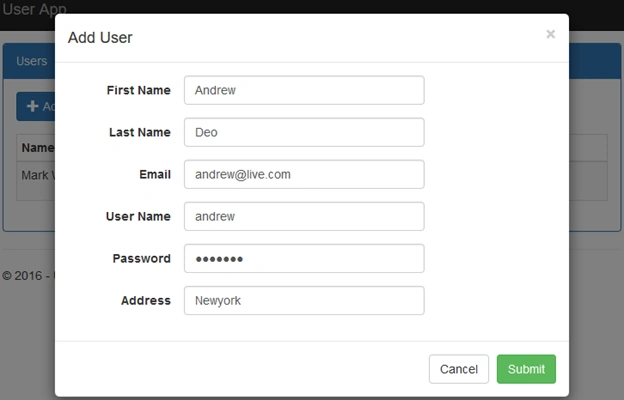
Figure 5: Add User screen
- public ActionResult EditUser(int? id)
- {
- UserViewModel model = new UserViewModel();
- if (id.HasValue && id != 0)
- {
- User userEntity = userService.GetUser(id.Value);
- UserProfile userProfileEntity = userProfileService.GetUserProfile(id.Value);
- model.FirstName = userProfileEntity.FirstName;
- model.LastName = userProfileEntity.LastName;
- model.Address = userProfileEntity.Address;
- model.Email = userEntity.Email;
- }
- return PartialView("_EditUser", model);
- }
- [HttpPost]
- public ActionResult EditUser(UserViewModel model)
- {
- User userEntity = userService.GetUser(model.Id);
- userEntity.Email = model.Email;
- userEntity.ModifiedDate = DateTime.UtcNow;
- userEntity.IPAddress = Request.HttpContext.Connection.RemoteIpAddress.ToString();
- UserProfile userProfileEntity = userProfileService.GetUserProfile(model.Id);
- userProfileEntity.FirstName = model.FirstName;
- userProfileEntity.LastName = model.LastName;
- userProfileEntity.Address = model.Address;
- userProfileEntity.ModifiedDate = DateTime.UtcNow;
- userProfileEntity.IPAddress = Request.HttpContext.Connection.RemoteIpAddress.ToString();
- userEntity.UserProfile = userProfileEntity;
- userService.UpdateUser(userEntity);
- if (userEntity.Id > 0)
- {
- return RedirectToAction("index");
- }
- return View(model);
- }
- @model UserViewModel
- @using OA.Web.Models
- <form asp-action="EditUser" role="form">
- @await Html.PartialAsync("_ModalHeader", new ModalHeader { Heading = "Edit User" })
- <div class="modal-body form-horizontal">
- <div class="row">
- <input asp-for="Id" />
- <div class="form-group">
- <label asp-for="FirstName" class="col-lg-3 col-sm-3 control-label"></label>
- <div class="col-lg-6">
- <input asp-for="FirstName" class="form-control" />
- </div>
- </div>
- <div class="form-group">
- <label asp-for="LastName" class="col-lg-3 col-sm-3 control-label"></label>
- <div class="col-lg-6">
- <input asp-for="LastName" class="form-control" />
- </div>
- </div>
- <div class="form-group">
- <label asp-for="Email" class="col-lg-3 col-sm-3 control-label"></label>
- <div class="col-lg-6">
- <input asp-for="Email" class="form-control" />
- </div>
- </div>
- <div class="form-group">
- <label asp-for="Address" class="col-lg-3 col-sm-3 control-label"></label>
- <div class="col-lg-6">
- <input asp-for="Address" class="form-control" />
- </div>
- </div>
- </div>
- </div>
- @await Html.PartialAsync("_ModalFooter", new ModalFooter { })
- </form>
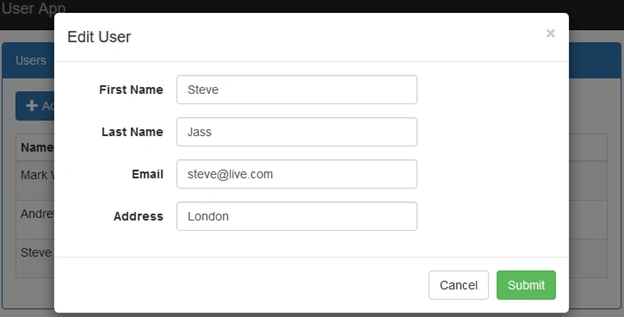
Figure 6: Edit User
- [HttpGet]
- public PartialViewResult DeleteUser(int id)
- {
- UserProfile userProfile = userProfileService.GetUserProfile(id);
- string name = $"{userProfile.FirstName} {userProfile.LastName}";
- return PartialView("_DeleteUser", name);
- }
- [HttpPost]
- public ActionResult DeleteUser(long id, FormCollection form)
- {
- userService.DeleteUser(id);
- return RedirectToAction("Index");
- }
- @using OA.Web.Models
- <form asp-action="DeleteUser" role="form">
- @Html.Partial("_ModalHeader", new ModalHeader { Heading = "Delete User" })
- <div class="modal-body form-horizontal">
- Are you want to delete @Model?
- </div>
- @Html.Partial("_ModalFooter", new ModalFooter { SubmitButtonText = "Delete" })
- </form>
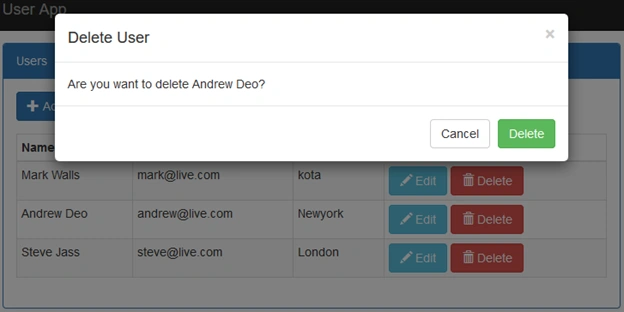
Figure 7: Delete User
- Rating Star Application ASP.NET Core
- CRUD Operations in ASP.NET Core and Entity Framework Core
- Repository Pattern in ASP.NET Core
- Generic Repository Pattern in ASP.NET Core
- Onion Architecture In ASP.NET Core MVC
See Also
- Overview of ASP.NET Core
- ASP.NET Core With Visual Studio 2017 RC
- CRUD Operations In ASP.NET Core Using Entity Framework Core Code First
- Repository Pattern In ASP.NET Core
- Generic Repository Pattern In ASP.NET Core
- Onion Architecture In ASP.NET Core MVC
kamil kamilPosted Jan 15, 2024, 12:03 PM
Thanks for sharing but here are some missing controls like as @Html.Partial("_Modal", new BootstrapModel { ID = "modal-action-user", AreaLabeledId = "modal-action-user-label", Size = ModalSize.Large }) . So where is BootstrapModel class and _modal partial page code.can you share it ?
sajmonPosted Jun 28, 2022, 3:28 PM
Where to download source code of this sample project?
Arran SimmonsPosted Sep 17, 2021, 11:15 AM
This makes no sense to me, arent the repositories supposed to be in the infrastructure which sits out on the ui layer? then in the service layer which sits where your repository layer is you would have the Interfaces for the repository. Currently there is no inversion of control in this application?
Ahmad AlweshahiPosted Jul 18, 2021, 11:49 AM
Very good article
Waseem SangrasiPosted Mar 17, 2021, 12:54 PM
How i will download this core ?? Onion Architecture In ASP.NET Core MVCPlease support ?
Hamid KhanPosted Mar 12, 2021, 9:29 PM
Very good explanation Sandeep Singh Shekhawat
Brent HetlandPosted Dec 16, 2020, 11:22 AM
I guess I don't like how your OA.Web project, "knows about" your entites in the OA.Data project.
Sunil HurkatPosted Nov 25, 2020, 3:17 AM
Excellent post sir, thank you so much your support
Fabian LeonPosted Jun 23, 2020, 9:31 PM
Excellent post, but I have a doubt. How can I implement Identity without breaking the onion architecture? I mean if I put IdentityUser in the Domain Layer it will be dependant on Identity package. I would really appreciate if you could answer me.
Padam AgrawalPosted May 21, 2020, 3:25 PM
Are clean and onion architecture both same ? Or have some differences?
Padam AgrawalPosted May 21, 2020, 3:22 PM
Thank you so much for such as informative article ?? could you please also share article for microservice in the same way?
Mustafayev TuralPosted Mar 20, 2020, 6:00 AM
You do nothing with update method in repository??
kuldeep chopraPosted Oct 5, 2019, 5:13 AM
This article is really helpful and awesome , can you pls also share this project with Dapper
khaled maherPosted Nov 6, 2018, 4:23 AM
Please need explain Why make Domain Entities Layer as separate layer
Supun NimanthaPosted Oct 17, 2018, 8:51 PM
If we want to introduce unit of work here what will be the best approach ? Where should we put it ? Inside repo ? or service ?
Marco Dalla LiberaPosted Mar 19, 2018, 10:18 AM
Awesome job! What about log policy in asp.net core with Onion Architecture? What is the best approach? thank you so much!
Boncho ValkovPosted Feb 21, 2018, 4:57 AM
Nice article. Look at this example for more complex architecture: https://code.msdn.microsoft.com/NET-Core-extented-bf2b88bc
istekhar ahmadPosted Dec 1, 2017, 4:42 AM
Very good but without Entity Framework
Guest UserPosted Nov 18, 2017, 5:14 PM
Excellent post and design/architecture that I think is clean
Ganapati PanapanaPosted Sep 23, 2017, 10:31 AM
Very Good One !! Thanks !!!
Ankita NalawadePosted Sep 12, 2017, 5:31 AM
Can you please give the example of Onion architecture database first approch.
Ankita NalawadePosted Sep 12, 2017, 5:30 AM
Very nice article.
Jakub JanuszkiewiczPosted Feb 17, 2017, 5:24 AM
You lost me with "Domain Entities [...] classes are used to create database tables". This has noting to do with domain design, I fully agree with Sebastian Stehle here.
Josh YatesPosted Feb 16, 2017, 8:42 AM
I like this design, but have not implemented it yet. The article primarily focuses on ASP.NET Core, but what do you think about Onion Architecture with ASP.NET Identity by imran_ku07 on GitHub?
Sebastian StehlePosted Feb 12, 2017, 5:04 PM
The article is full of mistakes and misunderstandings:* You don't have domain objects. This are just stupid entities, that reflect your database. No abstraction here. * You have an anemic domain model. * The repository pattern should reduce the complexity, not add another useless layer. There is a good summary: http://www.infoworld.com/article/3117713/application-development/design-patterns-that-i-often-avoid-repository-pattern.html => Please stop to create those stupid structural classes and think about your business operations and how to model them in a DDD way.
Former memberPosted Jan 24, 2017, 4:40 AM
Onion architecture is same as domain driven design pattern or is it totally different ? please let me know. thanks
Suman Chandra RoyPosted Jan 1, 2017, 10:31 PM
Please give a source code link