

Introduction
Did you ever think that technology is changing so quickly, that everything you write will only contain half-truths in 10 years? This certainly seems to be the path that .NET is taking. The .NET library keeps changing and improving at such an accelerated rate, I sometimes wonder if I am wasting time learning one aspect of the technology, when I should be concentrating on the latest and greatest feature in the library. Let's take ADO.NET for example. Remember when this library seemed the way to go when accessing databases? Then along came datasources, which wraps a lot of the complicated functionality. And now LINQ is coming down the pike... Do I really need ADO.NET anymore? Hmmm........
This is a rewrite of the Dynamic Web Quiz Project in ASP.NET 2.0. In this project we chose to replace all of our OleDb objects inside of ADO.NET with AccessDataSources in order to access our Quiz.mdb database on the web. Once you start using these data sources, you'll probably want to say good-bye to OleDb classes. First of all the data source classes work well with Access. Second of all they are less cumbersome and require much less code. Third of all you can declare them inside your web page. Fourth of all, you don't have to worry about all these small details such as the MissingSchemaAction or how parameters are passed: It just works.
Declaring an Access Data Source
The AccessDataSource object is declared like any other server side object, it's just added as an xml node inside of the web form. Listing 1 shows the declaration of the AccessDataSource. This declaration names and instantiates the AccessDataSource1 object. Note that all we need to do to connect to the MSAccess database is to declare the relative location of the database in the DataFile property. We also have a choice of what mode we can run our AccessDataSource. There are two modes for an AccessDataSource: DataSet and DataReader. When you have the DataSourceMode set to DataSet, you can access the data from memory through a collection of DataRowViews. If you are in DataReader mode, you can access each row through the IDataReader interface a row at a time.
Listing 1 - Declaring the Access Data Source
|
<body> |
With this declaration, there is no need for connection strings, connection string objects, adapters, or any of that other drivel. You can just change the query string and call the Select method on the AccessDataSource and wallah, you have a list of desired rows!
Using the AccessDataSource
For our project, we've created 2 methods to help us use the AccessDataSource SelectRows and GetColumnValue. SelectRows takes a SELECT query statement and returns a list of enumerable DataRowViews. GetColumnValue takes a SELECT query and a column name and returns the data of the column in the first row determined by the query. The Select method of the AccessDataSource takes an arguement of type DataSourceSelectArguements (seems like a pretty relevant name for the arguement of a DataSource Select statement :-) ). This arguement allows us to limit the number of rows returned. It also allows us to sort the rows returned from the select statement.
Listing 2 - Methods to Help us Perform Queries on the Database
|
private IEnumerable SelectRows(string queryString) object GetColumnValue(string queryString, string columnName) |
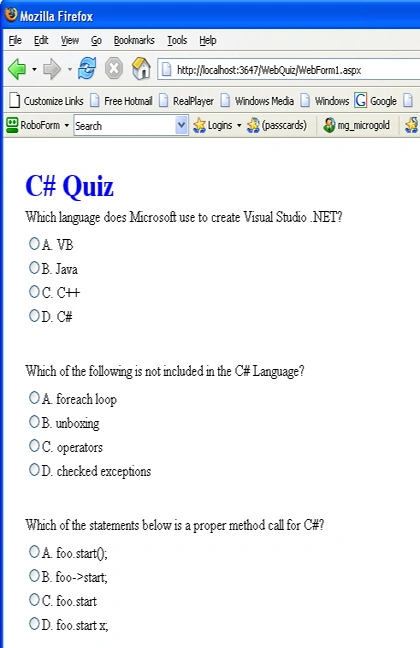
Now let's take a look at how we use this data source functionality with the web quiz. Rather than rehash the previous article, we'll just pick one example to illustrate how the AccessDataSource helps us dynamically build our quiz into a ASP.NET table. In listing 3, we call upon the SelectRows method (from listing 2) to use the AccessDataSource to get us all of the questions. Then we loop through the collection of DataRowViews returned from the query and plop the questions into our Table. In order to put the question inside the table, we need to create a TableRow and then create a Cell to place inside the TableRow. The Cell is assigned the question Text so it will appear on our web page. After we place the question on the page, we want to get all the corresponding choices for that question. The Rows in the Choice table in our Access Database contain a QuestionID. The QuestionID in the Choices table allows us to match the proper choices against the question id in the Questions table. Using our AccessDataSource again, we can assign it a query to choose the choices for our particular QuestionID. Once we have selected the proper choices from the database table, we loop through each of the choices and create a radio button containing the choice information. The radio button is placed inside a Cell in the Table object. We can use the question number and the letter of the choice as a makeshift key for our radio button and assigned to the radio button's id. When we later go to score the test, we will pull the key out of the selected radio and compare it against the answer to the question in the database.
subhash dobhalPosted Apr 18, 2012, 4:26 PM
I want to create a online Quiz which will be using MS access DB to store the questions and answers and also the student results. My Requirment:- 1) User should get login screen when the online exam page is open 2) User to select the exam month. 3)time should be runing and displayed on the same page. 4)once exam is complete user will get the scores with pass or fail status. 5)user should have an option to send the scores by clicking on email scores and also to take a print in pdf format. Admin side requirment:- 1)As exam will be on monthly basis Admin should have access to add questions and answers every month. 2)should be able to see the scores for all with the %age or rank. I need this online quiz on clasic ASP and with MS access DB.Please help me with this as I am taking this project as initiative of go green and no use of paper. waiting for a response! thanks in advance. Regards, Subhash Dobhal
zee devPosted Oct 21, 2011, 7:24 AM
this is a very simple and universal tutorial
hamad elmalikPosted Oct 14, 2011, 7:46 PM
nice example but i try it by nested gridview how can do it how can i do it thx
Jasmin GandhiPosted Nov 30, 2010, 6:59 AM
plz help me, to create excel sheet in asp.net with c#
Gene Da RochaPosted Jun 29, 2010, 7:41 AM
Hi, I downloaded your app which was great. I am much better with vb.net though and wanted to know if you had a VB version? Thanks Gene
mahesh konadePosted Aug 13, 2009, 3:34 AM
it seems to be good
anil maniPosted Dec 27, 2007, 2:32 AM
when user start examination question and answer with radio button option retrived from database and show the correct and wrong answer after click sbmit button. and plz send me photographer site with code
Eyal RozenPosted Nov 26, 2007, 1:47 PM
HI, first it's really a good article, it's helped me alot. I did the questions randomally. But I still have one more problem - I want this quiz to be one time, meaning if he click the submit button and had mistake it's wont help him to click on the back button of the explorer and change the answer until he do it right. I want him to start an new quiz. How can i disable him from doing the "back" think and changing the answers?
EdPosted Jun 14, 2007, 9:01 AM
Great aarticle. I fully understand that this is a programming article and not an article on database design. But I believe the correct answer should be stored in the answer table to make it more flexible. It would open up the option of multiple correct answers for a question, random order of choices, etc.