

Introduction
The command prompt is very useful for us developers to run quick applications and commands.
Windows 8 has two modes - the new Metro mode and the old
traditional Windows mode.
To launch the command prompt in the new Metro mode
Hit the WIN+Q key to launch the Apps search bar and type cmd. You
will see Command Prompt in the results. Click it to launch a Windows command
prompt.

In traditional mode
Hit WIN+X and select Run from the command prompt.
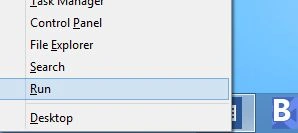
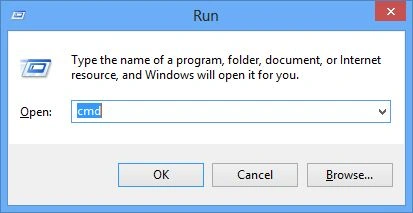
In the Run dialog search text box, type cmd and click OK.
Command-Line Commands
Here is a complete list of command-line commands:
Summary
In this article, we learned about How to open command prompt in Windows 8.
Mahesh ChandPosted Sep 2, 2012, 3:54 PM
I like that idea. I am going to do the same.
Sam HobbsPosted Sep 2, 2012, 2:52 PM
I pinned the command prompt to my start menu.