

Introduction
In this article, I am going to show you how to read the entire Excel workbook with multiple worksheets and display the data into the Label.
Prerequisites
Kindly find the basic installation information of OpenXML in the link, given below:
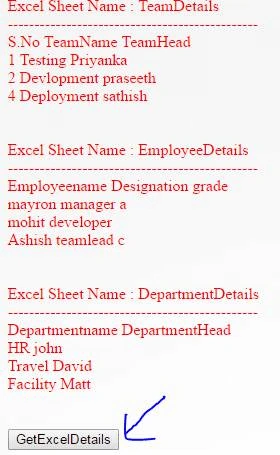
Snagit of how the output will look:
Excel workbook name is Official_Details.xlsx
C# code
Click button event:
- protected void insertBoqElements_Click(object sender, EventArgs e) {
- try {
- OpenXml();
- } catch (Exception Ex) {
- lbldisplayerrors.Text = Ex.Message;
- }
- }
- public void OpenXml() {
- try {
- //specify the file name where its actually exist
- string filepath = @ "D:\TPMS\Uploaded_Boq\Official_Details.xlsx";
- //open the excel using openxml sdk
- using(SpreadsheetDocument doc = SpreadsheetDocument.Open(filepath, false)) {
- //create the object for workbook part
- WorkbookPart wbPart = doc.WorkbookPart;
- Sheets thesheetcollection = wbPart.Workbook.GetFirstChild < Sheets > ();
- //Sheet thesheet = (Sheet)thesheetcollection.FirstChild;
- //using for each loop to get the sheet from the sheetcollection
- foreach(Sheet thesheet in thesheetcollection) {
- lbldisplayerrors.Text += "Excel Sheet Name : " + thesheet.Name + "</br> ";
- lbldisplayerrors.Text += "----------------------------------------------- " + "</br> ";
- //statement to get the worksheet object by using the sheet id
- Worksheet theWorksheet = ((WorksheetPart) wbPart.GetPartById(thesheet.Id)).Worksheet;
- SheetData thesheetdata = (SheetData) theWorksheet.GetFirstChild < SheetData > ();
- foreach(Row thecurrentrow in thesheetdata) {
- foreach(Cell thecurrentcell in thecurrentrow) {
- //statement to take the integer value
- string currentcellvalue = string.Empty;
- if (thecurrentcell.DataType != null) {
- if (thecurrentcell.DataType == CellValues.SharedString) {
- int id;
- if (Int32.TryParse(thecurrentcell.InnerText, out id)) {
- SharedStringItem item = GetSharedStringItemById(wbPart, id);
- if (item.Text != null) {
- //code to take the string value
- lbldisplayerrors.Text += item.Text.Text + " ";
- } else if (item.InnerText != null) {
- currentcellvalue = item.InnerText;
- } else if (item.InnerXml != null) {
- currentcellvalue = item.InnerXml;
- }
- } //end of if (Int32.TryParse ( thecurrentcell.InnerText, out id )
- } //end of if(thecurrentcell.DataType == CellValues.SharedString)
- } // end of if(thecurrentcell.DataType != null)
- else {
- lbldisplayerrors.Text += Convert.ToInt16(thecurrentcell.InnerText) + " ";
- }
- } // end of foreach(Cell thecurrentcell in thecurrentrow)
- lbldisplayerrors.Text += "</br>";
- } //end of foreach(Row thecurrentrow in thesheetdata)
- lbldisplayerrors.Text += "</br>";
- lbldisplayerrors.Text += "</br>";
- } //end of foreach(Sheet thesheet in thesheetcollection)
- } //end of using
- } //end of try
- catch (Exception Ex) {
- lbldisplayerrors.Text = Ex.Message;
- }
- }
In the code, mentioned above, most of the code was explained in the code itself and it will also give you the idea of what are the collections involved to access the data from MS Excel .
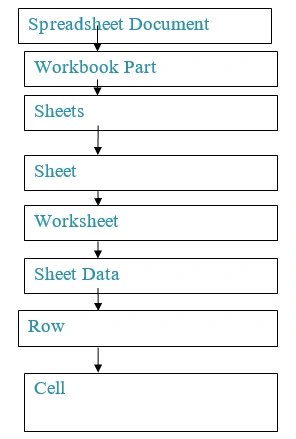
Diagrammatic representation for Collections Hierarchy in openXML to access the data is given below:
Conclusion
Kindly find the entire source code in the attachment section. I hope this will be useful for those, who are going to work in the OpenXML for the first time. Kindly share your feedback or thoughts.
Om MauryaPosted Sep 2, 2022, 1:48 PM
Can you please share GetSharedStringItemById method
Karthik ElumalaiPosted Aug 11, 2016, 11:39 AM
Thank a lot for you nice feedback Vignesh Mani
Vignesh ManiPosted Aug 11, 2016, 11:36 AM
Nice