

Introduction
This article shows how to use the brand new feature of OWIN security components used in the ASP.NET, OpenID Connect. The ASP.NET team revealed this last week along with many improvements to WS-Federation support. You can also check out the first preview of Claims-Based Identity Programming released a month ago.
The team is making improvements based on the feedback they received from the previous preview of this version. The following are some of it:
- Ensuring that the new components are compatible with the Azure Active Directory OAuth bearer middleware
- Establishing consistency with well-established conventions of the framework
- Support for the SignInAsAuthentication Type
The team did the imminent bug fixes and rearranged the validation pipeline to ensure that every stage receives the information it needs in the notifications. The sign-out and error-handling support are also improved.
Working with OpenID Connect in ASP.NET
You can easily get it from the NuGet Package Manager Gallery by entering Microsoft.Owin.OpenID. The Azure Active Directory has supported OpenID Connect for quite some time; every time you log into the Microsoft Azure Portal.
The support is easily accessible in the ASP.NET MVC Application. So, now develop the MVC application with the following procedure.
Step 1. Create the ASP.NET Web Application with MVC Project Template in the Visual Studio 2013.
Step 2. Search for the OpenID Connect in the NuGet Package Manager.
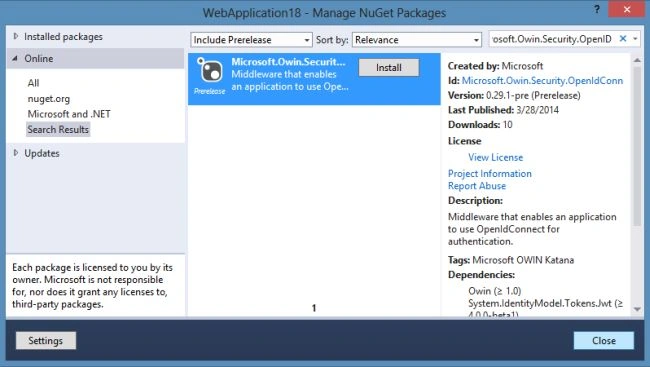
Step 3. It's very easy to switch from WS-Federation to OpenID. Open the Startup. Auth. cs page and implement the following code.
using Microsoft.Owin.Security;

public partial class Startup {
    public void ConfigureAuth(IAppBuilder app) {
        app.SetDefaultSignInAsAuthenticationType(
            CookieAuthenticationDefaults.AuthenticationType);
        app.UseCookieAuthentication(new CookieAuthenticationOptions {});
        app.UseOpenIdConnectAuthentication(
            new Microsoft.Owin.Security.OpenIdConnect.OpenIdConnectAuthenticationOptions {
                Client_Id = "",
                Authority = ""
            });
    }
}
In the code above are the following two main options available regarding OpenIdConnectAuthentication.
- Client_Id: It is the uniquely identified identifier produced during the creation of the Azure Active Directory. We've been using this value for all OAuth2 flows where the app acted as a client; in OpenID Connect we use it roughly the same way in which we used the realm in WS-Federation
- Authority: This represents the Azure Active Directory tenant. The AAD exposes the metadata describing the signing key and issuer values to validate. It gets or sets the authority to use when making the OpenID Connect calls.
That's it for adding the OpenID Connect association to an application.
Summary
There are more things we could do as sign in and at the same time obtain an access token for the app to access the other APIs. The team is working on how to add this support to the web programming stack. Thanks for reading.
Join the conversation! Your thoughts help the community grow.